
Stay Connected

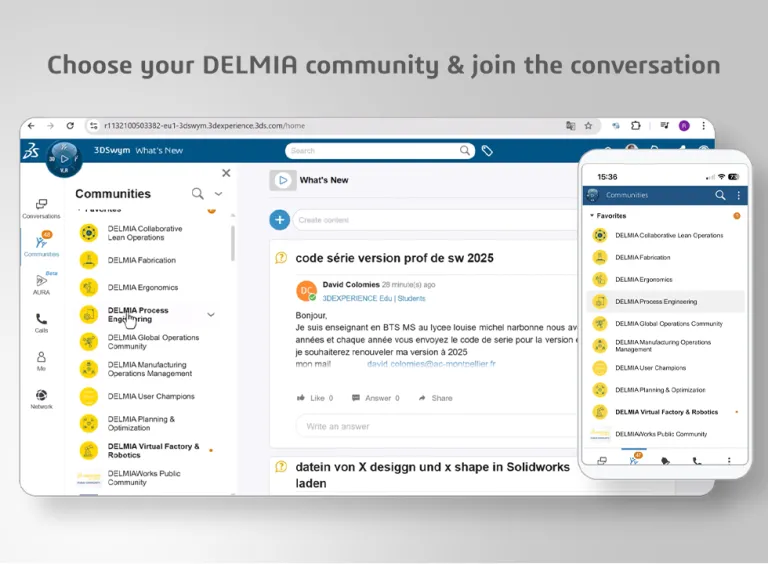
Join the DELMIA User Communities to discuss your challenges and share tips and tricks with your peers. DELMIA provides a 3DEXPERIENCE of global production systems for all stakeholders in the extended supply chain. Members have access to valuable content including webinar replays, new release updates, helpful videos, expert advice and more.

Topics in the community range from product announcement and release updates to technical discussions and best practice sharing.

User Community

Global Operations

This is your starting point where you can easily navigate to the additional communities that DELMIA provides to our customers. Start or join conversations and discover insights from DELMIA experts.

User Community

Collaborative Lean Operations

This is where members share ideas and experiences on the topic of Lean manufacturing and are using, or are interested in, DELMIA 3DLean. Share in these discussions and access content that covers how to empower teams to find new ways to innovate

User Community

Virtual Factory & Robotics

Robot programmers and simulation engineers will find a number of ways to share and learn with others. The community is dedicated to professionals involved with industrial robotics and automation in various segments including technologists, academia, end users, OEMs, and system integrators.

User Community

Fabrication

This is a place for users of DELMIA Machining and Additive Manufacturing on the 3DEXPERIENCE platform to connect. This community is active with rich content and engagement across users and experts.

User Community

Ergonomics

Owners of the Ergonomic Workplace Design role can connect with fellow users and experts. Engage with your questions, ideas, requests or share your experiences. This community helps manufacturing engineers make key decisions to design safe and efficient workplaces.

User Community

Process Engineering

Connecting professionals from all aspects of the collaborative design and manufacturing planning process, this community is a unique and common source of information on manufacturing planning and process engineering.  

User Community

Planning & Optimization

This is the perfect community for users of DELMIA Ortems and DELMIA Quintiq to gather. Engage in discussion supply chain planning and optimization, scheduling and optimization for complex business processes within manufacturing, logistics, transit and workforce operations.

User Community

Operations Management & Augmented Reality

Through the community, DELMIA Apriso and DELMIA Augmented Experience customers connect, engage with peers, share knowledge, ask questions, and access DELMIA experts. Discussions include the best practices related to using DELMIA's solutions for operations management and augmented reality (AR).

DELMIA Champions Community

The DELMIA User Champion program is an exclusive customer network of expert DELMIA users and top ambassadors. The ideal User Champion is highly skilled in one or more DELMIA solution, or manages a team of users and understands the benefits, strategies and use of 3DEXPERIENCE DELMIA, DELMIA Apriso, DELMIA Ortems, DELMIA Quintiq, DELMIA Augmented Experiences, and DELMIA 3DLean. 

Join the Conversation!

WEBINAR | Complex Milling with DELMIA | October 8

Dear Community,We are happy to announce our new webinar focusing on Complex Milling. This session will be on October 8 and led by @Robert MOLLS. Join us and learn how DELMIA helps manufacturers transform complex milling challenges into efficient, reliable and repeatable machining processes.REGISTER HERE

DELMIA GLOBAL OPERATIONS COMMUNITY

FFS Behavior

I have built simulation model and its was running well till last week. This week, I used EKL to upload some NC machine activities to speed up model build but after importing the EKL, my model got freeze and it's not running now. Now if I run the model, it's not working. Is there any way we can recover last week file with history details. Unfortunately, I have not created any revision of it before

DELMIA VIRTUAL FACTORY & ROBOTICS

Hits & tips : how access more easily command in a list ....

Perhaps you always know the tip.... but I just discover it last week In the last version we change the icons display when you have a list of command (small symbol in the bottom right) and it is difficult to select it with the ‘left key” of the mousse (like I always did it !) But there is a more simple way to do => click on the icons with the right key (open the list) and click with the left

DELMIA FABRICATION

Learn What DELMIA Can Do for You

Speak with a DELMIA expert to learn how our solutions enable seamless collaboration and sustainable innovation at organizations of every size.

Get Started

Courses and classes are available for students, academia, professionals and companies. Find the right DELMIA training for you. 

Get Help

Find information on software & hardware certification, software downloads, user documentation, support contact and services offering