
WASP-NET’s Design Help Tools
Explore WASP-NET’s user-friendly design tools to quickly create demanding designs and achieve accurate results with ease.
Design Wizards and Optimized EM Templates of the Designer Data Base
WASP-NET streamlines the design of complex microwave, antenna, and array components through two powerful capabilities: Intuitive Design Wizards and a comprehensive Designer Data Base. The design wizards automate the creation of commonly used electromagnetic (EM) components with guided, step-by-step workflows, helping users move quickly from specifications to fabrication-ready designs. Complementing this, the designer data base provides access to more than 500 professionally optimized templates that can be scaled, modified and re optimized for new applications. Together, these tools accelerate the EM design process, reduce manual effort, and support accurate first-pass development using WASP-NET’s rigorous full-wave EM methods.
WASP-NET’s Design Wizards
WASP-NET’s user-friendly design wizards conveniently automate the accurate and fast EM CAD design process of frequently required components, such as filters, transformers, corrugated horns, shaped body-of revolution single and dual reflectors, shaped offset single and dual reflectors and slot-arrays. The wizards’ help buttons provide detailed assistance. WASP-NET’s wizards are completely kept intuitively so that, no matter what level of experience you may have as a user, you can achieve professional designs right away. Simply select desired wizard (main menu bar), start wizard, select a desired template, modify the template according to desired needs, enter desired specifications, click on the “next” button and just follow the design steps on screen. The wizard completes automatically the design for you. Since the design is based on WASP-NET’s rigorous full-wave EM methods, the design result is accurate and appropriate for first pass success. Using WASP-NET’s convenient export capability in standard 3D CAD formats, e.g. STEP, ACIS, IGES, BREP, the designed structure is directly exportable to the machine shop for fabrication.
- Antenna Wizards
- Filter Wizards
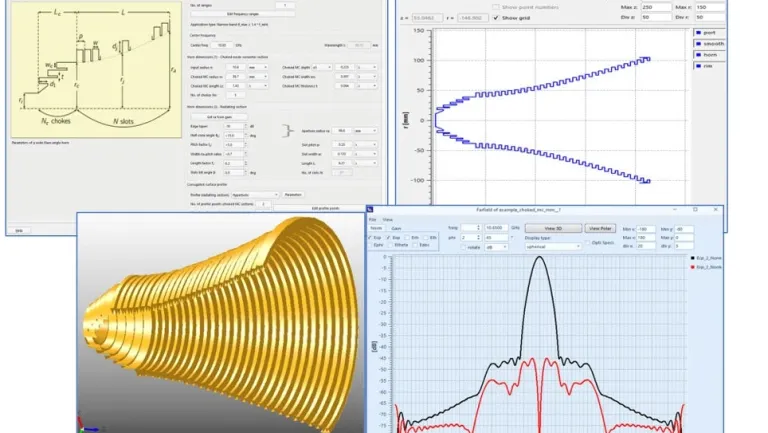
Horn Wizard
WASP-NET simplifies horn antenna design through user friendly horn wizard.
Key Benefits
- Automated creation of horn antennas by intuitive step-by step workflows
- Flexible horn modeling with arbitrary profile shapes
- Efficient optimization for challenging requirements
- Flexible corrugation modeling
- Supports slant and ring-loaded corrugations for broadband applications
- Supports choked horns, smooth walled horns and their combinations
- Supports inclusion of lenses and dielectric covers
- Structure export as standard 3D data files
- Convenient export of designed horns as feed to reflector antenna wizard
- From specifications to fabrication-ready designs within a couple of minutes
Typical Applications
- Corrugated horns
- Combined corrugated choked horns
- Profiled horns
- Profiled corrugated horns
- Broadband ring-loaded corrugated horns
- Dual-band horns
- Profiled horns with slant corrugations
BOR Shaped Reflector Wizard
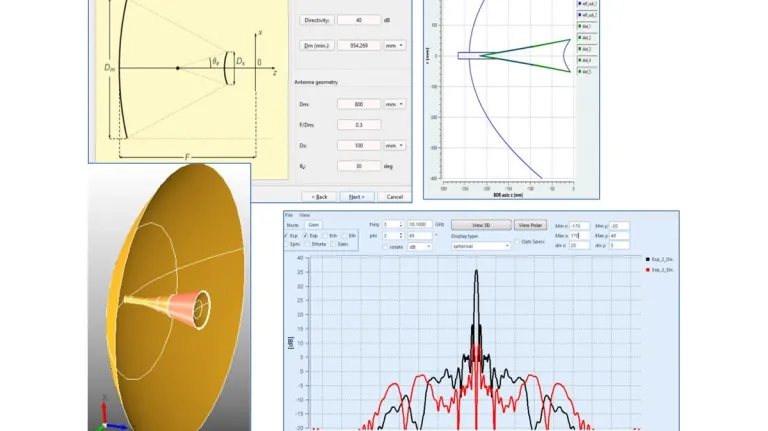
WASP-NET simplifies body-of-revolution (BOR) reflector antenna design through user-friendly BOR reflector wizard.
Key Benefits
- Automated creation of BOR reflector antennas by intuitive step-by step workflows
- Automated creation of arbitrarily shaped single and dual-reflector antennas
- Inclusion of shaped dielectric support of sub-reflectors
- Fast BOR MoM and BOR FEM solver
- Efficient optimization for challenging requirements
- Automated direct inclusion of horn structures Direct import of corrugated horns created by horn wizard
- Supports inclusion of lenses and dielectric covers
- Supports inclusion of radomes
- Structure export as standard 3D data files
- From specifications to fabrication-ready designs within a couple of minutes
Typical Applications
- Single and dual shaped Cassegrain reflectors
- Single and dual shaped Gregorian reflectors
- Asymmetrically displaced elliptic (ADE) shaped dual reflectors
- Shaped dual reflectors with radomes
- Dual-band shaped dual reflectors
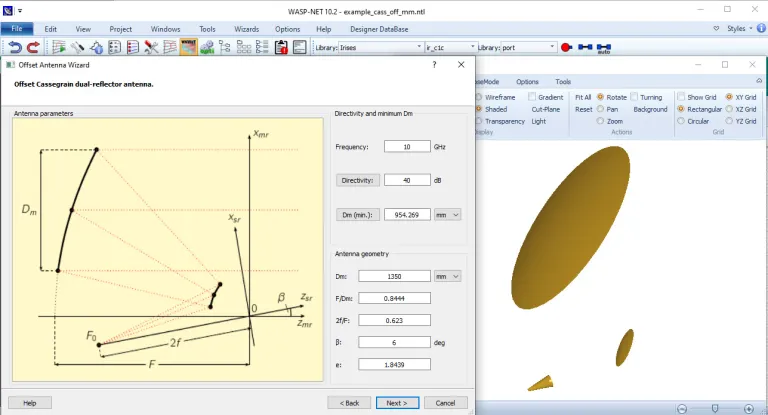
Offset Reflector Wizard
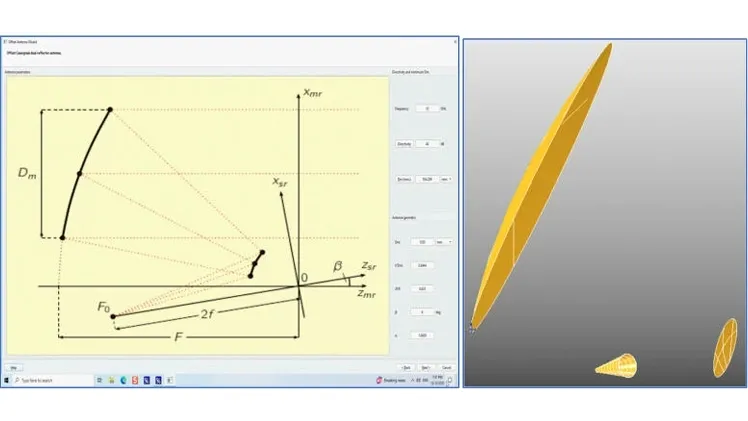
WASP-NET simplifies offset reflector antenna design through user-friendly offset reflector wizard.
Key Benefits
- Automated creation of offset reflector antennas by intuitive step-by-step workflows
- Automated creation of arbitrarily shaped single and dual-reflector antennas
- Efficient optimization for challenging requirements
- Automated direct inclusion of horn structures
- Fast hybrid iterative physical optics (IPO) MoM solver
- Direct import of corrugated horns created by horn wizard
- Structure export as standard 3D data files
- From specifications to fabrication-ready designs within a couple of minutes
Typical Applications
- Single and dual shaped Cassegrain reflectors
- Single and dual shaped Gregorian reflectors
- Single and dual shaped Dragonian reflectors
- Dual-band shaped dual reflectors
Slot-Array Wizard
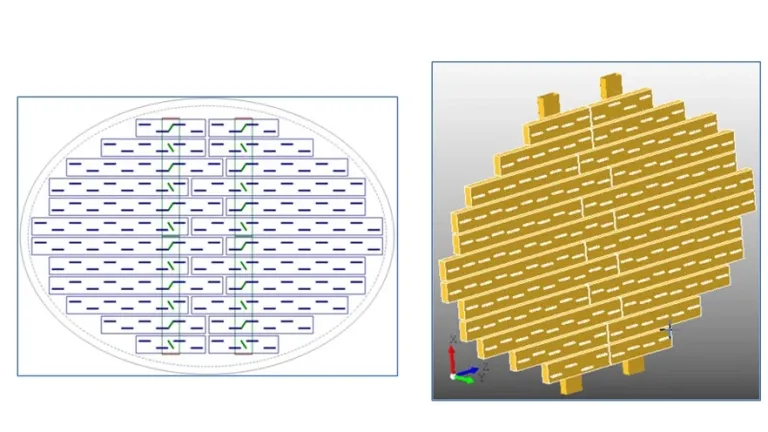
WASP-NET simplifies slot-array antenna design through user friendly slot-array wizard.
Key Benefits
- Automated creation of slot-array antennas by intuitive step by-step workflows
- Automated creation of resonant and travelling wave slot-arrays
- Efficient optimization for challenging requirements
- Automated creation of elliptical contours
- Fast accurate hybrid MM MoM solver
- Mutual inner and outer coupling effects, finite array sizes rigorously included
- Direct inclusion of feed networks
- Simplified breakdown in feeding sub-structures
- Structure export as standard 3D data files
- From specifications to fabrication ready designs within a couple of minutes
Typical Applications
- Resonant slot arrays, end fed or center fed
- Traveling wave slot-arrays
- Resonant and traveling wave slot-arrays with feed-networks
- Slot-arrays with elliptical contours
Simplified Filter Wizard
WASP-NET simplifies standard filter design through user friendly filter wizard.
Key Benefits
- Automated creation of filters by intuitive step-by-step workflows
- Flexible filter modeling
- Efficient optimization for challenging requirements
- Automated accuracy cross-check by WASP-NET’s FEM solver
- Structure export as standard 3D data files
- From specifications to fabrication-ready designs within a couple of minutes
Typical Applications
- Standard common iris and post coupled waveguide filters
- mm-wave metal-insert filters
- Low-loss filters with E-plane radiused cavities
Typical Workflow
(1) Choose filter type, load example
(2) enter specifications
(3) enter desired waveguide housing dimensions
(4) get filter order, prototype parameters, and midband insertion loss, start filter synthesis
(5) after a few seconds, the synthesis is completed, load created netlist
(6) display structure by WASP-NET’s graphic tool WNVisT, run analysis.
Dual-Mode Filter Wizard
WASP-NET simplifies dual-mode filter design through user-friendly filter wizard.
Key Benefits
- Automated creation of filters by intuitive step-by-step workflows
- Flexible filter modeling
- Efficient optimization for challenging requirements
- Automated accuracy cross-check by WASP NET’s FEM solver
- Structure export as standard 3D data files
- From specifications to fabrication-ready designs within a couple of minutes Typical Applications
- Dual-mode filters with stop-band poles
Typical Workflow
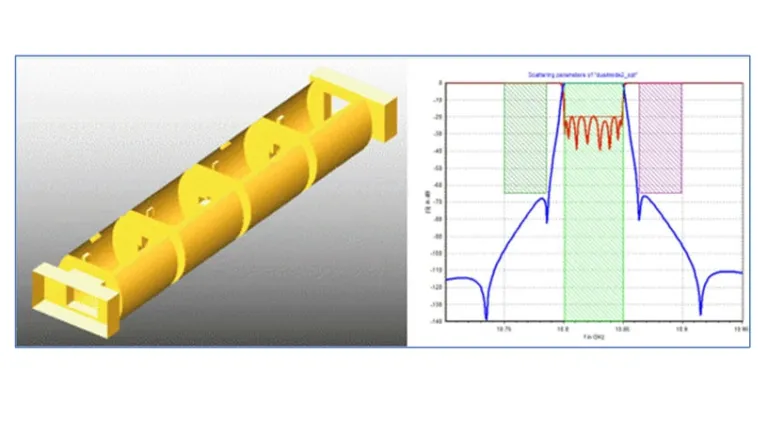
The convenient automated design steps are similar to those of the simplified filter wizard. The wizard design result shows a typical dual mode four cavity (8 resonator) filter example with 45-degree coupling screws and cross irises.
SIW Filter Wizard
WASP-NET simplifies SIW filter design through user-friendly filter wizard.
Key Benefits
- Automated creation of filters by intuitive step-by-step workflows
- Flexible filter modeling
- Efficient optimization for challenging requirements
- Structure export as standard 3D data files
- From specifications to fabrication-ready designs within a couple of minutes Typical Applications
- Substrate integrated waveguide (SIW) filters
Typical Workflow
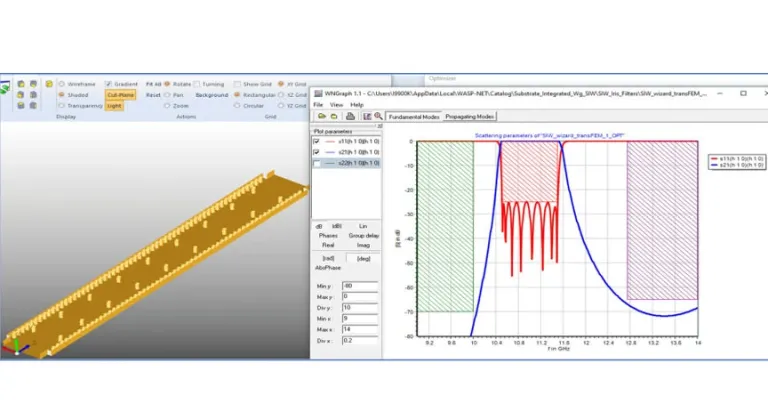
The convenient automated design steps are similar to those of the simplified filter wizard. The substrate integrated waveguide (SIW) filter wizard design result shows a typical SIW eight resonator filter with double-post coupling elements.
WASP-NET’s Designer Data Base
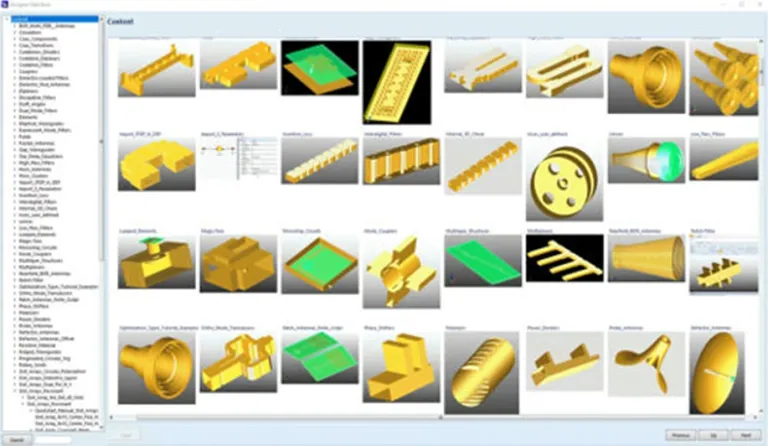
WASP-NET includes a comprehensive Designer Data Base with more than 500 professional pre-optimized design examples of practically all types of microwave, antenna and array components.
The templates for creating custom designs, range from circulators to diplexers, from horn antennas to magic tees, from microstrip circuits and antennas to ridged waveguides, from shaped reflector antennas to SIW structures, from rotary joints to slot arrays, from waveguide filters to tuning screws, from draft angles to wire antennas.
The design examples serve as convenient and user-friendly templates for own fast designs. Just scale selected template to desired frequency range, modify template, when necessary, and re-optimize template to desired specifications with WASP-NET’s powerful optimizers and utilizing WASP-NET’s high optimization speed.
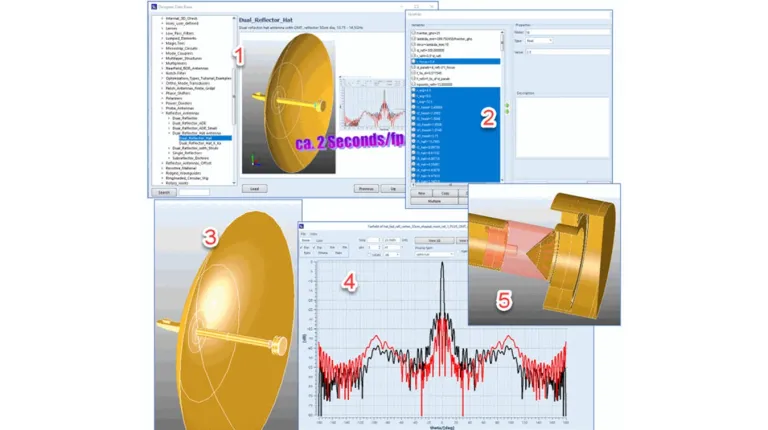
Dual-Reflector Hat Antenna Design using Designer Data Base Template
The typical workflow of design steps, using the appropriate template from the Designer database for convenient CAD, are straightforward, as shown by the example of the design of a compact dual-band dual-reflector hat antenna for mobile satellite communication applications with OMT for dual polarization.
(1) Start Designer Data Base • Search for reflector antennas, dual reflector hat antenna • Load example.
(2) Scale all corresponding variables (by highlighting them in the variable list) by the desired frequency factor • Rename the netlist accordingly.
(3) Run scaled example • Re-optimize to desired new specifications.
(4) Display new far-field and S-parameter results
(5) Display detail of the sub-reflector (hat).
The structure can then be exported to the machine shop by making use of the export feature of WASP-NET’s graphic tool WNVisT.
Coupler Design using Designer Data Base Template
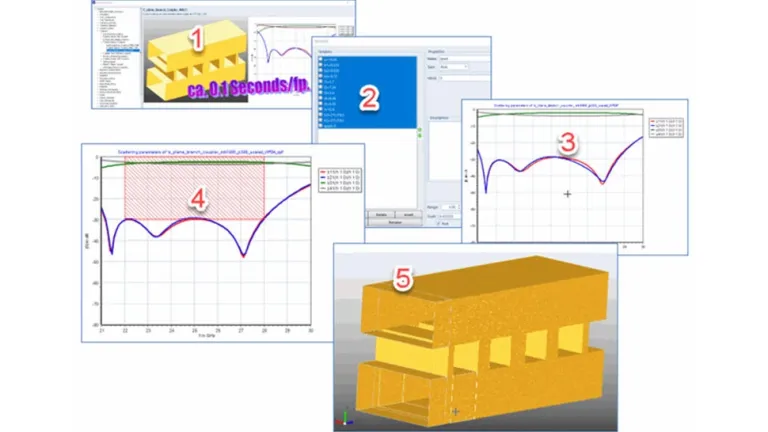
The typical workflow of design steps using the corresponding template from the Designer Data Base is briefly further illustrated by the example of the design of a -3dB WR34 branch guide coupler with a desired bandwidth of 22–28 GHz, 30 dB isolation and 30dB return loss.
(1) Start Designer Data Base • Search for couplers, branch guide couplers • Select E-plane branch-guide coupler WR75 • Load example.
(2) Scale all variables (by highlighting them in the variable list) by the factor of the quotient of the corresponding waveguide widths a_WR34 / a_WR75 = 0.45333 • Rename the netlist accordingly.
(3) Run scaled example • Enter desired new specifications in the optimization window.
(4) Optimize.
(5) After a few minutes, the new WR34 coupler design is ready and can be exported to the machine shop (by making use of the export feature of WASP-NET’s graphic tool WNVisT).
Also Discover
Hybrid Multi-Solver Domain Decomposition Electromagnetic CAD Technology
Simulation and Analysis of Electromagnetic Fields
Learn What SIMULIA Can Do for You
Speak with a SIMULIA expert to learn how our solutions enable seamless collaboration and sustainable innovation at organizations of every size.
Get Started
Courses and classes are available for students, academia, professionals and companies. Find the right SIMULIA training for you.
Get Help
Find information on software & hardware certification, software downloads, user documentation, support contact and services offering