
SysML v2 Book sample - read only
Can the sample model ("SysML v2 book sample") be opened in CATIA MAGIC Community edition in read-write mode? (is read-only by default) so that I can access the text version of the models...
CATIA MBSE CYBER SYSTEMS
An Open Standard for an Architecture Applicable in many Scenarios and Situations
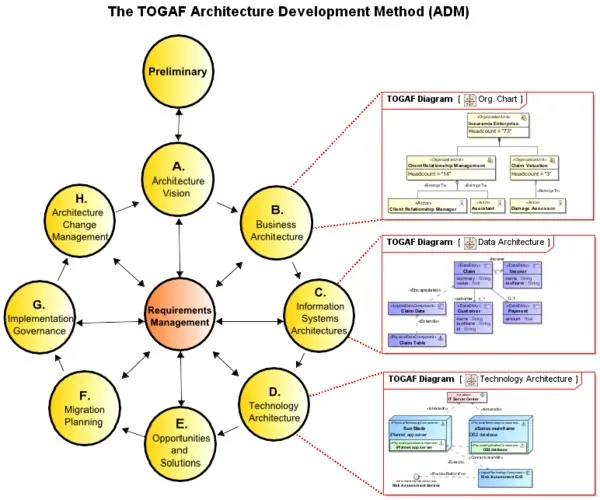
This powerful tool allows you to prepare the enterprise documentation, unify and integrate business processes across the enterprise as well as data both inside and outside the boundaries of the enterprise, lower the complexity barrier, reduce both solution delivery time, development costs by maximizing reuse of enterprise models, and drive continuous business and IT alignment.
Vast experience in Enterprise modeling, especially DoDAF and UPDM, provides us with the skills and know-how to drive your business via The Open Group Architecture Framework (TOGAF) solution. The role of TOGAF is to provide an open standard for an architecture that is applicable in many scenarios and situations. Together with proven and tested No Magic solution.

Furthermore, the TOGAF plugin is even more powerful in various domains when used with other No Magic products:
A set of model analysis and modification tools is provided to use with the TOGAF plugin:
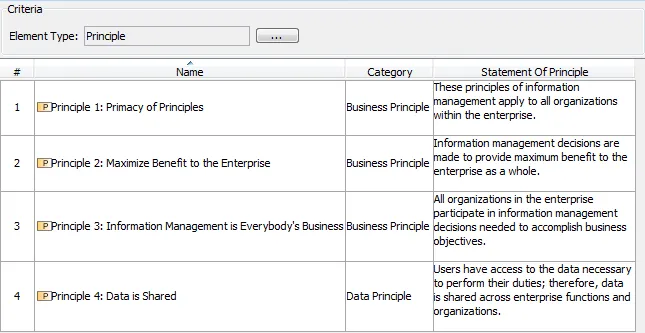
Generic Table is a powerful tool for analyzing and specifying/modifying data. The following example shows the use of the Generic Table to modify the data of Principles within your Enterprise model.
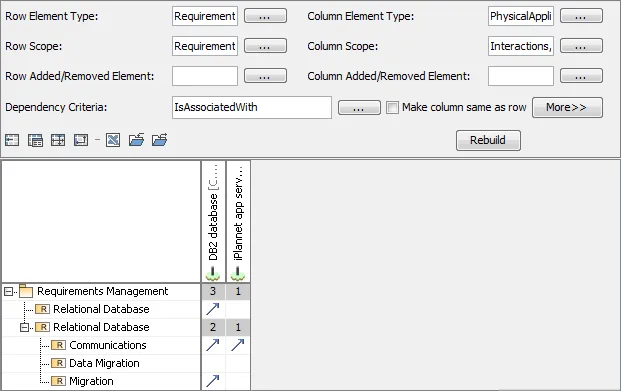
Dependency Matrix is a tool for convenient representation of model relationships. Let us say, we have requirements in the model and we need to show what application components satisfy these requirements. A dependency matrix can be used to display and create the Is Associated With relations between requirements and physical application components.
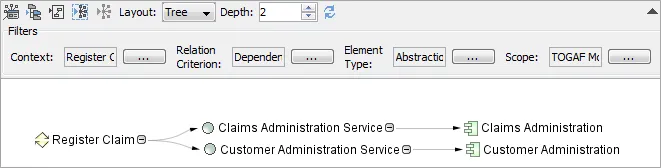
Relation Map is used to display relations between elements from the different layers of abstraction. For example, if we want to find out what information system services and information system architecture components assist in realization of a business process Register claim.
You can use UML elements to extend your TOGAF model.
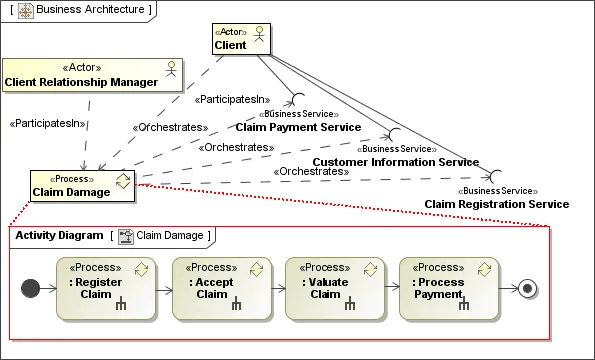
Let us say, we need to detail the Claim damage business process. An activity diagram can be used to display the sequence of actions inside the Claim damage process.
Can the sample model ("SysML v2 book sample") be opened in CATIA MAGIC Community edition in read-write mode? (is read-only by default) so that I can access the text version of the models...
CATIA MBSE CYBER SYSTEMS
I'm looking to add a table of contents based on the ordering of the views; by paragraph # as laid out in the Inner Elements ordering. It would be awesome if there were page numbers on the ToC when published and exported to pdfThe "Collaborator WebApp" can insert a ToC to the very first page of my document, but that gets listed before my customers official markings and cover pages. I would prefer
CATIA MBSE CYBER SYSTEMS
Hi, is there a way to get a trial version of Cameo Systems Modeler or MagicDraw for my postgraduate MBSE course? Also, I am writing a research paper for Zero Trust and would like to use the software to publish my model. Or can it be included in a Student Package, Although I only need the MBSE capability and no other software? I don't think University of New South Wales in Australia offer an academ
CATIA MBSE CYBER SYSTEMS
Tired of digging through menus because your most-used SysML v2 elements aren't in the creation dialog? I just dropped a new video showing how to easily patch your CATIA Magic UI to add elements like Views and Viewpoint Definitions right into your palette. We're keeping it strictly focused on native, out-of-the-box configurations rather than writing complex code.Grab the downloadable source file
CATIA MBSE CYBER SYSTEMS
NOTE: Existing users of No Magic products can access to the user portal at https://magicdraw.com/main.php, as well as Cameo Collaborator for Teamwork Cloud samples at https://ccexamples.nomagic.com.
Speak with a CATIA expert to learn how our solutions enable seamless collaboration and sustainable innovation at organizations of every size.
Courses and classes are available for students, academia, professionals and companies. Find the right CATIA training for you.
Find information on software & hardware certification, software downloads, user documentation, support contact and services offering