
Accelerate Team Collaboration

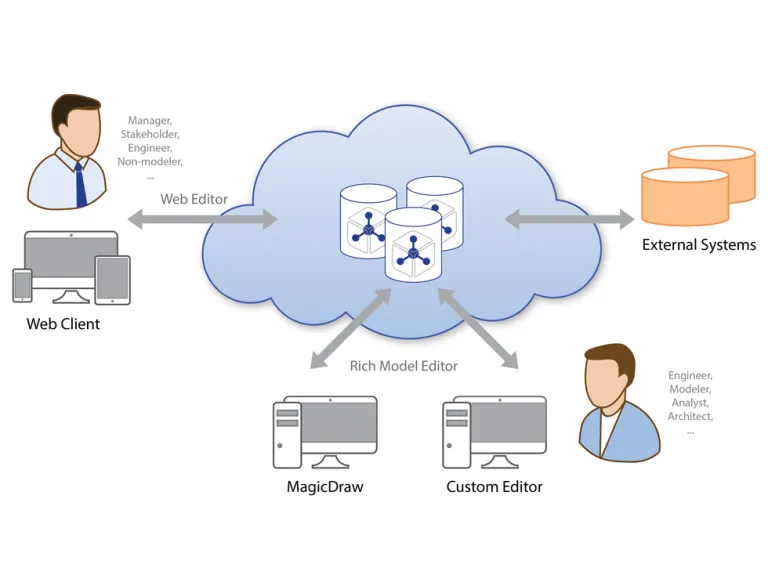
Teamwork Cloud is a central repository for storing Cameo and MagicDraw models. It is designed as a modeling platform for working with large models and includes a number of features for accelerating team collaboration.

Using Teamwork Cloud, team members can access and modify the same model or even the same diagram in parallel. The product supports data & change management, seamless project collaboration, and scalable performance.

Server and projects configurations can be managed and reviewed through the Web Admin, which allows administrating projects with minimal technical knowledge and effort.

A Robust Model Repository

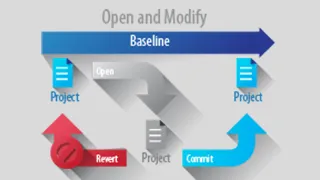
Teamwork Cloud supports model versioning, configuration management, analysis, and access control. It's open and integrates with third-party tools, and can be used on local hardware or cloud services like AWS and Azure. Teamwork Cloud is where you store Cameo and MagicDraw models for collaborative work. Multiple team members can work on the same model simultaneously, with changes tracked at an element level.

Detailed model version comparisons are available. Configuration management is vital for complex systems, and Teamwork Cloud includes features like model branching, merging, versioning, and comparison. It simplifies concurrent development and controlled review. The platform offers a web-based, mobile-friendly admin interface for managing user accounts, projects, settings, and more. It aids in model decomposition tracking and dependency analysis. Efficiency is a priority, especially for large models. It uses an efficient delta-based protocol to save time and support poor network connections.

Even under high loads, it maintains a good user experience. Teamwork Cloud provides a REST API for querying and manipulating data. It can act as an OSLC provider, enhancing integration with OSLC-compatible tools through Linked Data resources.

A Central Repository for Your Project Data

Teamwork Cloud offers seamless collaboration, version control, and project management.

  • Central Repository: All project data is stored centrally, making it easy to share and collaborate with colleagues.
  • Data & Change Management: It provides version control at the element level, allowing teams to review and resolve changes and conflicts.
  • Managed Projects & Collaboration: Supports collaborative modeling with features like simultaneous updates and element locking to avoid conflicts.
  • Track & Review Changes: Easily track and review changes for project elements, with advanced reporting and visual history analysis.
  • Project Decomposition: Tools for breaking down projects into smaller parts, tracking usages, and analyzing impacts.
  • Available Offline: Projects can be modified offline, with changes synced to the server when online.
  • Disconnected Team Collaboration: Ideal for working with contractors or third parties who can't access your network.
  • Scalability and High Availability: Can handle large projects and slow networks efficiently. It can also be transformed into a cluster for increased availability.
  • Model Patch Mechanism: Efficiently extract and apply just changes to specific elements without needing a full model merge or transfer.

Keep Your Data Protected

Teamwork Cloud ensures robust security for your data:

  • User Authentication: It offers various authentication options, including built-in, LDAP, PKI/CAC, and SAML-based authentication.
  • Secured Connection: Utilizes SSL connections for secure data transmission between clients and the server.
  • Access Control: Implements Role-Based Access Control (RBAC) and granular permissions at the branch or package level to protect data access.
  • Password Protection: Projects can be further safeguarded with password protection, requiring both a password and proper access rights for entry.
  • Access Reports: Generate access audit reports to track user access and permissions granted for server projects.
  • Remote Administration: Easily manage security configurations, users, and projects through a user-friendly web admin site, even with minimal technical expertise. This includes setting up server communication security, user authentication, and project management.
  • Data Markings: enable classification of resources, categories, users, and groups with custom access levels, adding even more flexibility to the security framework.

Integrations, Extensions and Automations Made Easy

Teamwork Cloud supports multiple interfaces for accessing its data, extending its capabilities by creating plugins, performing integrations with external systems, or accessing data for analysis purposes.

  • Client API: Teamwork Cloud has a Java-based Client API for accessing its data for native applications.
  • RESTful API: Teamwork Cloud also provides REST API for writing web plugins, which extends Teamwork Cloud functionality by installing your applications into the Teamwork Cloud environment.
  • Command Line Interface: For various automation purposes, Teamwork Cloud supports Command Line Interface (CLI). This allows automating regular security, audit, or other procedures.
  • Open Services for Lifecycle Collaboration (OSLC): Teamwork Cloud continues to introduce more ways for integrations with other tools using OSLC.
  • Web Collaboration: Teamwork Cloud functionality can be extended by installing Cameo Collaborator, a web-based product designed to present models in a simplified form for stakeholders, sponsors, customers, and engineering teams. The product makes it easy for users to comment and review or even edit models in a transparent, collaborative environment, keeping the entire project team up to date with any changes made to the model.
  • Cross-Cluster Resource Synchronization: Seamlessly move resources between Teamwork Cloud servers with automatic, file-free periodic updates from one server to another.

Teamwork Cloud Editions

 STANDARDBUSINESSBUSINESS PROENTERPRISE
Concurrent Connections1025+UnlimitedUnlimited
ConfigurationSingle-node serverSingle-node serverSingle-node server can be expanded to Cassandra ClusterUnlimited
Data Replication--AutomaticAutomatic
High Availability---+


Join the conversation in the CATIA MBSE Cyber System User Community!

UCODS - SE Commission - From Needs to Tests

The SE commision of UCODS is pleased is pleased to announce its next webinar : "From Needs to Tests" which will take place on October 14, 2026 at 05:00 pm (French Time)Register at the following link:https://www.ucods.eu/event/from-needs-to-tests-56/registerWebinar Description : This webinar showcases a unified, collaborative approach from requirements management (TRM) to test management (VRP)

CATIA MBSE CYBER SYSTEMS

Web Based UI for Non-Modeler for Business Data Capture and Automatic UAF Model Generation

This is amazing new integration sample of flexible web based UI. Based on highly configurable ALM web based solution - Tuleap. Solution is for non-modeler to capture business data and automatically transition it to world wide recognized standard of the model in OMG UAF. Solution is covering UAF strategy, operational, resources model generation including elements, relations and diagrams. OverviewT

CATIA MBSE CYBER SYSTEMS

SysML v2 Geometry Viewer - Spatial Requirements From System Model to CAD

SysML v2 gives shapes, coordinate frames and units a meaning that tools can reason over. Lets overview SysML v2 geometry capabilities from a ten-line car envelope to requirements that are rechecked in CATIA / 3DEXPERIENCE.Full demo:https://youtu.be/4SHATeLi2o8 Note: All figures are renders and screenshots from running models.An orbital station of about 150 parts. Every shape and every position i

CATIA MBSE CYBER SYSTEMS

Cameo Collaborator Native Format

Hi,Is there a published format of a Cameo Collaborator Document? For example, is it possible to access the links with a collaborator document? How is the collaborator document stored? Thank you, Maria DAgostino

CATIA MBSE CYBER SYSTEMS

NOTE: Existing users of No Magic products can access to the user portal at https://magicdraw.com/main.php, as well as Cameo Collaborator for Teamwork Cloud samples at https://ccexamples.nomagic.com.

Learn What CATIA Can Do for You

Speak with a CATIA expert to learn how our solutions enable seamless collaboration and sustainable innovation at organizations of every size.

Get Started

Courses and classes are available for students, academia, professionals and companies. Find the right CATIA training for you. 

Get Help

Find information on software & hardware certification, software downloads, user documentation, support contact and services offering