A More Cohesive Product Development Process

Model Merge enables copying changes between different project versions. This functionality is usually needed when there are several branches that reflect different releases or versions of the product, e.g. when certain fixes have to be copied from a release branch to the mainstream development. Merge functionality in MagicDraw works both on file system files and projects stored in MagicDraw TeamWork Cloud.

The general workflow for merging projects is as follows:

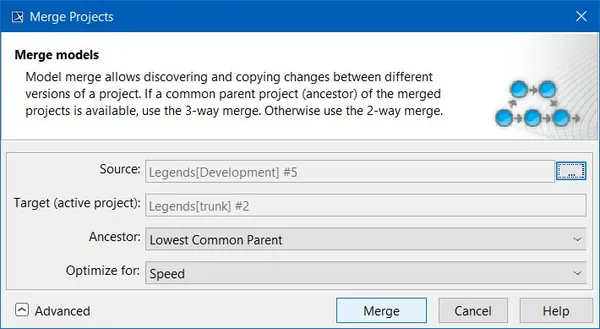
  1. To start merging select Project Merge from the Tools main menu. The Merge Projects dialog opens (see Figure 1).
  2. Choose source project (changes are going to be copied from source to the target project). Target is automatically selected as the opened project version. If merge is executed with Teamwork Cloud projects, ancestor project is automatically selected. If you are working with local projects, please select the ancestor to initialize 3-way merge.
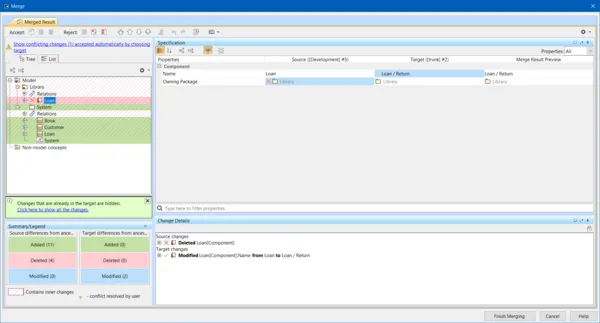
  3. The Merge window appears which allows analyzing changes made in source. Target changes are automatically hidden unless they are conflicting with changes from source. You are allowed to resolve conflicts before the merge is finished (e.g. when the same class is edited in both contributors) (see Figure 2).
  4. After accepting and rejecting changes and resolving conflicts, the user is asked to confirm changes and they are merged to the target.

Join the conversation in the CATIA MBSE Cyber System User Community!

Cameo Collaborator Native Format

Hi,Is there a published format of a Cameo Collaborator Document? For example, is it possible to access the links with a collaborator document? How is the collaborator document stored? Thank you, Maria DAgostino

CATIA MBSE CYBER SYSTEMS

SysML v2 Geometry Viewer - Spatial Requirements From System Model to CAD

SysML v2 gives shapes, coordinate frames and units a meaning that tools can reason over. Lets overview SysML v2 geometry capabilities from a ten-line car envelope to requirements that are rechecked in CATIA / 3DEXPERIENCE.Full demo:https://youtu.be/4SHATeLi2o8 Note: All figures are renders and screenshots from running models.An orbital station of about 150 parts. Every shape and every position i

CATIA MBSE CYBER SYSTEMS

Run CATIA Simulation within TWC without opening the app: a Docker starter kit (Cameo Containerization)

Hello,I recently created a post that shows how model simulations can be automated by containerization. I have made some improvements and updated the container, its more stable and secure now. If you've ever wanted to run a simulation configuration without opening Cameo (a nightly regression, a CI pipeline, or simply one repeatable command), I've put together a starter kit that does it in a Docker

CATIA MBSE CYBER SYSTEMS

NOTE: Existing users of No Magic products can access to the user portal at https://magicdraw.com/main.php, as well as Cameo Collaborator for Teamwork Cloud samples at https://ccexamples.nomagic.com.

Learn What CATIA Can Do for You

Speak with a CATIA expert to learn how our solutions enable seamless collaboration and sustainable innovation at organizations of every size.

Get Started

Courses and classes are available for students, academia, professionals and companies. Find the right CATIA training for you. 

Get Help

Find information on software & hardware certification, software downloads, user documentation, support contact and services offering