
Export Capabilities & Interfacing with Other Software
Dymola Supports FMI (Functional Mockup Interface), Code & Model Exports to other Platforms, and offers interfaces to other software.
Integration and Model Export Capabilities in Dymola
Dymola offers excellent capabilities to interface to other software tools and simulation environments. Along with this Dymola supports model export options such as Real time simulation, Binary model export, Source Code Generation.
FMI: Industry Standard for Simulation Code Exchange
Functional Mockup Interface (FMI) is a vendor-independent standard, developed by the Modelica Association, for combining simulation code modules (FMUs) from various tools. FMI offers two exchange formats: model exchange with a central solver for consistency, and co-simulation allowing embedded solvers for application-specific flexibility. It fosters a versatile simulation infrastructure.
- The Advantage of FMI
- FMI Support in Dymola
FA non-proprietary standard for exchange of simulation code
The Functional Mockup Interface (FMI) is an industry standard for combining simulation code modules (FMUs) from multiple tools and vendors. Developed under the auspices of the Modelica Association, the specification provides a well-defined and vendor-independent exchange format for code (binary or source) as well as associated data and documentation.
FMI is supported by many authoring tools, including tools which are not Modelica based, making it the ideal foundation for a vendor independent simulation infrastructure.
Choice of exchange formats
The FMI specification defines two exchange formats. FMI for model exchange defines the interface for simulation code modules that must be combined with a common, central, solver. This ensures a uniform numeric solution and reliable centralized simulation error control.
FMI for co-simulation defines the interface for code modules with embedded numeric solvers, as used by the generating tool. This approach gives the opportunity to embed dedicated solvers for the modeled application, and facilitates compatibility with simulation in the authoring tool.
Comprehensive FMI 1.0 and 2.0 support
FMI 2.0 (released on July 25, 2014) has been supported in Dymola since the Dymola 2015 FD01 release on both Windows and Linux. Dymola has supported the FMI 1.0 specifications for Model Exchange and Co-Simulation since they were released in 2010. Dymola passes the FMI 1.0 CrossCheck for both Model Exchange (export and import) and Co-Simulation (slave and master). Please consult the Dymola Release Notes and User's Manual for details on support of optional FMI features.
FMI 3.0
Dymola supports FMI 3.0 with certain restrictions. The complete FMI 2 functionality has been implemented, as well as the new array functionality of FMI 3.0. Support for event mode (hybrid) co-simulation, and terminals+icons, are available as beta-test features.
FMI tools for Simulink - FMI Kit
Dassault Systèmes provides tools with full support for FMU export and import with Simulink. The toolkit can be used for free without any license key.
FMI Kit for Simulink version 2.6 has been released in June 2019. Note that there may be updates between the official Dymola releases. Please download FMI Kit for Simulink from the project page on GitHub.
General features and compatibility information:
Full FMI support for export and import.
FMI versions 1.0, 2.0 and 3.0 - Model Exchange and Co-Simulation.
MATLAB/Simulink R2016a to R2022a.
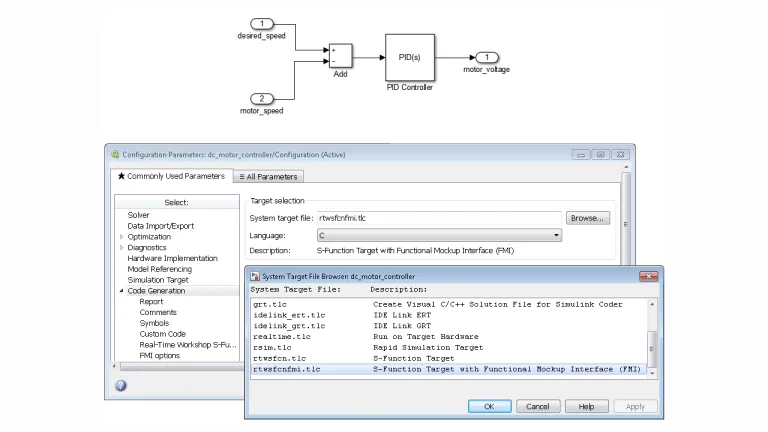
Simulink FMU block for importing and embedding FMUs into Simulink models. FMUs exported with FMI Kit are self-contained to not require any coupling to Simulink to run in the target environment.
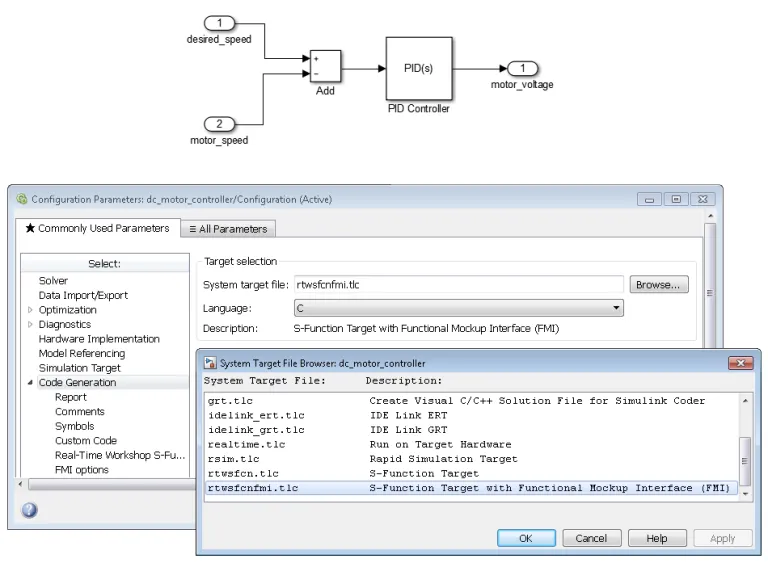
Simulink Coder Target for export of FMUs from Simulink.
Export Capabilities
Dymola has support for exporting models and model source code. Three export alternatives with different functionality are provided.
- Real-time simulation
- Binary model export
- Source code generation
Real-time Simulation enables the model to be used in environments not supporting the Microsoft C compilers. It is specifically designed for real-time platforms, such as the dSPACE and xPC platforms that are supported by Dymola for Hardware-In-the-Loop (HIL) simulation. Real-time simulation is part of the standard Dymola product. The following restrictions apply
Real-time Simulation only allows export of models that use inline integration, i.e., that have embedded fixed-step integrators. The run-time routines exported using Real-time Simulation does not include the most advanced library routines.
The Binary Model Export option allows the model to be exported to other computers without requiring a Dymola license at the target system. The simulation functionality of the exported model is the same as on a computer having a Dymola license. The benefits are:
Easy deployment of simulation code to other computers without the cost and overhead of managing runtime licenses. Full simulation capabilities available in the exported code, no restrictions due to copy-protected runtime libraries. Hence supports large-scale deployment outside the realm of Modelica experts.
Source Code Generation exports code that can be used on any platform without the need of a Dymola license at the target system. A number of flags are available that can be used to modify the contents of the generated model code.
Source Code Generation allows export of readable and well-documented code facilitating inspection, debugging, profiling, etc. This makes this export option suitable for advanced model-based applications, such as rapid prototyping.
The Source Code Generation option includes the functionality provided by Real-time Simulation (without the inline integration restriction) and Binary Model Export when models are translated in Dymola or Simulink.
The Binary Model Export and Source Code Generation options both allow export of symbol table information, e.g., model structure, variable names, types, and units as an XML file.
Interfacing Other Software
DYMOLA can be easily integrated with other software.
- Functional Mockup Interface
- System Structure and Parameterization
- FMI tools for Simulink
- Hardware in the Loop
- Python, Java and JavaScript
- Interfacing Dymola and SIMULIA software
FMI enables seamless integration of dynamic system models from various tools in Dymola. Importing FMUs allows easy inclusion of controllers or sub-systems, enhancing Modelica models with advanced capabilities.
Dymola support import and export of system descriptions according to the SSP 1.0 specification, including support for parameter value and mapping files, and the proposed SRMD meta-data format.
Dassault Systèmes provides tools with full support for FMU export and import with Simulink. The toolkit can be used for free without any license key; support and maintenance is offered to Dymola customers.
Full FMI support for both export and import.
FMI versions 1.0, 2.0 and 3.0, Model Exchange and Co-Simulation.
Simulink Coder Target for export of FMUs from Simulink.
Simulink FMU block for importing and embedding FMUs into Simulink models.
Dymola can generate efficient code for HILS platforms, for example dSPACE and Concurrent. Additionally, source code generation allows the user to set up a tool chain for any environment that can compile C code models. Dymola also support the new eFMI specification, generating optimized algorithm code from Modelica models.
Dymola can easily interface to common scripting environments such as Python and Java, permitting flexible scripting of common tasks. Parameters can be set, and simulation results read with provided utility libraries. Data can be exported in various formats, including CSV for Excel and HDF5.
It is possible to interface Dymola and the SIMULIA tools Abaqus, iSight and Process Composer.
Start Your Journey
The world of Systems Engineering is changing. Discover how to stay a step ahead with Dymola.

Free Trial Version of DYMOLA for Windows
The Trial Version has the functionality of DYMOLA standard, but with limited capacity.
Free Trials

Join the conversation in the CATIA MBSE Cyber System User Community!
Web Based UI for Non-Modeler for Business Data Capture and Automatic UAF Model Generation
This is amazing new integration sample of flexible web based UI. Based on highly configurable ALM web based solution - Tuleap. Solution is for non-modeler to capture business data and automatically transition it to world wide recognized standard of the model in OMG UAF. Solution is covering UAF strategy, operational, resources model generation including elements, relations and diagrams. OverviewT
CATIA MBSE CYBER SYSTEMS
SysML v2 Geometry Viewer - Spatial Requirements From System Model to CAD
SysML v2 gives shapes, coordinate frames and units a meaning that tools can reason over. Lets overview SysML v2 geometry capabilities from a ten-line car envelope to requirements that are rechecked in CATIA / 3DEXPERIENCE.Full demo:https://youtu.be/4SHATeLi2o8 Note: All figures are renders and screenshots from running models.An orbital station of about 150 parts. Every shape and every position i
CATIA MBSE CYBER SYSTEMS
Cameo Collaborator Native Format
Hi,Is there a published format of a Cameo Collaborator Document? For example, is it possible to access the links with a collaborator document? How is the collaborator document stored? Thank you, Maria DAgostino
CATIA MBSE CYBER SYSTEMS
Run CATIA Simulation within TWC without opening the app: a Docker starter kit (Cameo Containerization)
Hello,I recently created a post that shows how model simulations can be automated by containerization. I have made some improvements and updated the container, its more stable and secure now. If you've ever wanted to run a simulation configuration without opening Cameo (a nightly regression, a CI pipeline, or simply one repeatable command), I've put together a starter kit that does it in a Docker
CATIA MBSE CYBER SYSTEMS
FAQ About Functional Mockup Interface/Unit
Also Discover
Model Design Tools
Supporting Parameter Sweeps, Model Calibration, Design Optimization & Advanced Model Management

Dymola
Multi-Engineering Modeling and Simulation based on Modelica and FMI

Dymola Industry Solutions
Model and simulate complex systems that can span multiple engineering disciplines with Modelica specialized libraries and the 3DEXPERIENCE platform

Systems Engineering
End-to-End Model-Based Solutions for Mechatronics & Software-Driven Experiences
Learn What CATIA Can Do for You
Speak with a CATIA expert to learn how our solutions enable seamless collaboration and sustainable innovation at organizations of every size.
Get Started
Courses and classes are available for students, academia, professionals and companies. Find the right CATIA training for you.
Get Help
Find information on software & hardware certification, software downloads, user documentation, support contact and services offering