
Supporting Enterprise Architecture Modeling

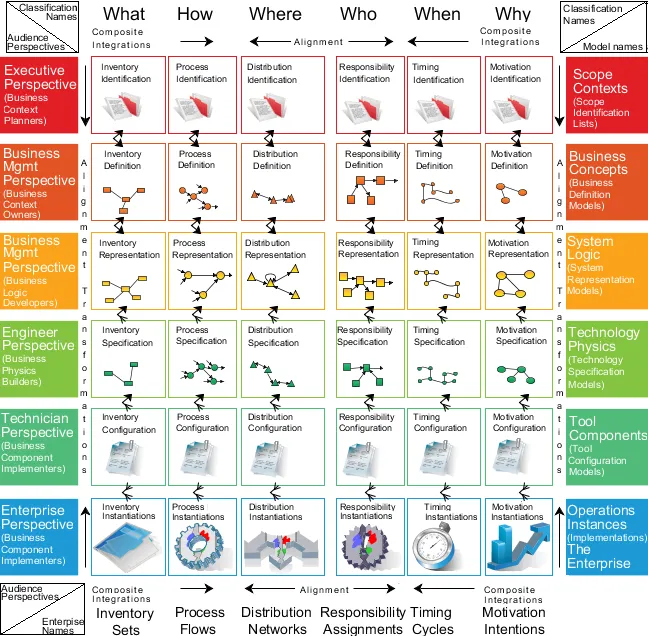
The Zachman Framework is a formal and highly structured way of viewing and defining an enterprise from different perspectives. It is represented as a classification schema for artifacts that is used for enterprise architecture modeling. In order to meet this vision, No Magic has developed and introduces for MagicDraw users a new free Zachman Framework plugin which provides:

  • Zachman Framework schema with a clickable interface
  • Zachman Framework project template
  • Zachman Framework perspective
  • Sample project

The Zachman Framework

The framework represents the interaction between aspects and perspectives. Six rows represent six perspectives and six columns represent six different aspects.

In the figure, you can see the Zachman Framework two-dimensional schema as it is represented in the Zachman Framework plugin for MagicDraw.

Perspectives

Business Context Planners

This perspective is a planning level. Business context planners describes what, how, where, who, when, and how should be done.

During this phase, six scope identification lists should be prepared, each for the six different aspects.

Scope contexts describe a scope of models, architectures, and descriptions for the organization.

This perspective also describes what planners should consider when thinking about the organization and how it interacts with the world.

Join the conversation in the CATIA MBSE Cyber System User Community!

FlexNet Plugin Licenses in Batch Mode

My team is trying to run Cameo in “batch mode”, and I have a question regarding the FlexNet license server configuration that is not answered in any of the documentation that I was able to find. In the Cameo documentation, I see Java arguments for specifying a FlexNet server and port (FL_SERVER_ADDRESS / FL_SERVER_PORT), and I also see that I can specify a tool edition (FL_EDITION). However, in th

CATIA MBSE CYBER SYSTEMS

Derivation Tables in SysML V2

Requirement derivation tables are easily one of the top requested topics from users across the industry. In my latest video, I walk through how to define a reusable view def and map it directly to your requirement structures.Watch the Video here: [Link to YouTube Video] Download / Copy the Source CodeGrab the SysML v2 code used in the video below to test and adapt for your own models:How are you

CATIA MBSE CYBER SYSTEMS

2026x Server side simulation

Hello,I was able to create a server side simulation using an instance table. There is one part of the simulation that is not working. I have a script that executes as part of a rollup pattern that performs a simple table lookup that fails.The rollup pattern uses a constraint block that has a Groovy script that performs the lookup. The simulation works just fine when executed within Cameo.Here is a

CATIA MBSE CYBER SYSTEMS

Custom Table Column to show indirect references

I have a table that shows the concerns in a specific part. In that table I want to add a column that shows the requirement(s) that satisfy each concern. The satisfy relations that provide this are contained within the associated requirements and target the specific concerns. The issue I am having is that I am unsure how to pull that information.SysML v2 SysMLv2

CATIA MBSE CYBER SYSTEMS

NOTE: Existing users of No Magic products can access to the user portal at https://magicdraw.com/main.php, as well as Cameo Collaborator for Teamwork Cloud samples at https://ccexamples.nomagic.com.

Learn What CATIA Can Do for You

Speak with a CATIA expert to learn how our solutions enable seamless collaboration and sustainable innovation at organizations of every size.

Get Started

Courses and classes are available for students, academia, professionals and companies. Find the right CATIA training for you. 

Get Help

Find information on software & hardware certification, software downloads, user documentation, support contact and services offering