
SysML v2 Book sample - read only
Can the sample model ("SysML v2 book sample") be opened in CATIA MAGIC Community edition in read-write mode? (is read-only by default) so that I can access the text version of the models...
CATIA MBSE CYBER SYSTEMS
Makes SysML Models Come Alive with No Magic
By executing constraint relationships in SysML parametric diagrams, systems engineers can run simulations and trade studies for complex systems from concept through final test. Mathematica® and PlayerPro® (Wolfram Research), OpenModelica®, and MATLAB® Symbolic Math Toolbox™ (MathWorks) can be used as math solvers. Links between SysML and Excel® make it easy to import and export data, generate SysML instances, and create reports and generate graphs and charts. Existing models in tools like MATLAB®, Simulink®, and Mathematica® can be easily wrapped as SysML constraint blocks and incorporated in the simulation.
Engineers and analysts used to working on individual spreadsheets now have a collaborative tool to synchronize their efforts using the best model-based systems engineering practices. In both traditional and non-traditional domains of system engineering, users can explore system performance, verify requirements, estimate cost, allocate resources, and keep diverse models in sync. Developers leveraging MagicDraw's UPDM and business modeling capabilities can add parametric simulation using SysML sub-models for defense planning, business process analysis and computational finance.
NEW: Starting with ParaMagic® 18.0, users can get Wolfram Player Pro math solver bundled with ParaMagic® plugin at a very low incremental price. Alternatively, users who need the full power of Mathematica front end can get Mathematica bundled with ParaMagic® plugin at a discounted incremental price.
ParaMagic® is developed by and is a registered trademark of our partner InterCAX LLC.
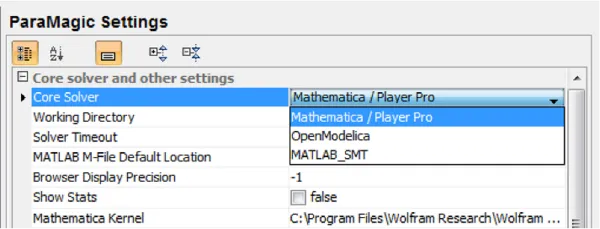
With ParaMagic® 18.0, Wolfram Player Pro is available bundled with ParaMagic® at a very low incremental price for new and existing users. All of ParaMagic's advanced parametric solving capabilities are currently (and will be in future) available with Player Pro. The option to select Player Pro is now available in the ParaMagic Settings category under MagicDraw Environment Option (Options > Environment), as shown below. We highly recommend all our users who were not using Mathematica as their core solver with ParaMagic® to upgrade to ParaMagic® + PlayerPro bundle to explore the full power of ParaMagic®. Alternatively, they can also upgrade to ParaMagic® + Mathematica bundle (see below) to get the full power of Mathematica front end.
While Player Pro serves as an advanced math solver for ParaMagic®, users may still need the full power of Mathematica front end, such as the ability to work with Mathematica notebooks, advanced user interface for authoring custom Mathematica functions and scripts, access to Mathematica library and documentation, and the ability to test and debug Mathematica functions before using them in SysML parametric models. Users can also purchase Mathematica bundled with ParaMagic® at a discounted incremental price.
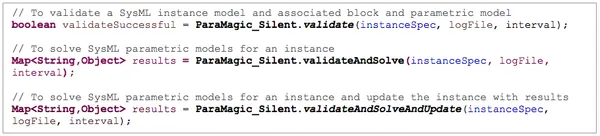
ParaMagic® 18.0 comes with the ParaMagic® Silent feature which provides two main capabilities for automation: (1) ParaMagic® Silent provides Java API methods to validate and solve parametric models, and update SysML instance models with results. Users who have installed the ParaMagic® plugin can now invoke these API methods from their own plugins and scripts; (2) ParaMagic® Silent also enables users to solve parametric models and update SysML instance models without launching the ParaMagic® browser interface.
ParaMagic® 18.0 comes with a strong integration with Player Pro and Mathematica, communicating directly with the math kernel versus the file-based communication earlier. This offers significant improvements in solving speeds, especially for parametric trade studies executing 1000s of scenarios, and significant reduction in the communication overhead with Mathematica and PlayerPro solver engines.
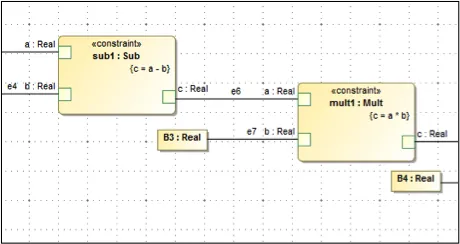
ParaMagic® 18.0 now supports binding connectors between two constraint parameters, as shown below. This works for all types of constraint blocks, those with regular math equations as well as those wrapping externally defined MATLAB functions/scripts and Mathematica functions, as shown below.
ParaMagic® 18.0 comes with major improvements in handling errors and description of end user messages when validating parametric models.
ParaMagic® 18.0 also provides major improvements in error handling and end user messages for the MATLAB/Simulink connection (section 8.3).
In addition to the new and improved capabilities listed above, ParaMagic® 18.0 also resolves several issues, such as those related to: (1) reading/writing nested instance structure from/to Excel spreadsheets and (2) naming binding connectors and properties owned by blocks in read-only mode.
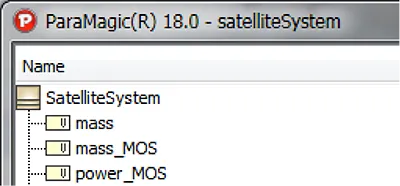
ParaMagic® has a new icon. The new icon will show up in the ParaMagic® toolbar, browser, settings, and dialogs.
ParaMagic® comes in two editions—ParaMagic® Lite and ParaMagic®. The table below compares the features of these editions. All features (both editions) are described in this Users Guide.
|
# |
Feature |
ParaMagic Lite |
ParaMagic |
|
1 |
Execute parametric models with math functions |
Yes |
Yes |
|
2 |
Availability of Constraint Block Library with math functions |
Yes |
Yes |
|
3 |
Use Mathematica / PlayerPro / OpenModelica (free) / MATLAB Symbolic Math Toolbox as solvers |
Yes |
Yes |
|
4 |
Acausal solving – Swap inputs and outputs at runtime without modifying equations |
Yes |
Yes |
|
5 |
Complex Aggregates – Solve parametric models with equations that involve collections of parts |
No |
Yes |
|
6 |
Recursion – Solve parametric models with equations that apply recursively through the model structure |
Yes |
Yes |
|
7 |
Redefinition – Solve parametric models where properties (value/part/reference/shared and constraint) are redefined |
Yes |
Yes |
|
8 |
Validation of math syntax before solving |
Yes |
Yes |
|
9 |
ParaMagic® Silent – Java API methods to call ParaMagic® in silent mode from your plugins and scripts |
No |
Yes |
|
10 |
Excel Connection – Read & write SysML instance values from/to Excel spreadsheets |
Yes |
Yes |
|
11 |
Excel Connection – Generate & update SysML instance model from Excel spreadsheets |
No |
Yes |
|
12 |
Trade Studies – Execute parametric model to perform trade studies |
Yes |
Yes |
|
13 |
MATLAB/Simulink Connection – Wrap MATLAB functions/scripts as constraint blocks and use in parametric models |
No |
Yes |
|
14 |
Mathematica Connection - Wrap custom Mathematica functions as constraint blocks and use in parametric models |
No |
Yes |
Can the sample model ("SysML v2 book sample") be opened in CATIA MAGIC Community edition in read-write mode? (is read-only by default) so that I can access the text version of the models...
CATIA MBSE CYBER SYSTEMS
I'm looking to add a table of contents based on the ordering of the views; by paragraph # as laid out in the Inner Elements ordering. It would be awesome if there were page numbers on the ToC when published and exported to pdfThe "Collaborator WebApp" can insert a ToC to the very first page of my document, but that gets listed before my customers official markings and cover pages. I would prefer
CATIA MBSE CYBER SYSTEMS
Hi, is there a way to get a trial version of Cameo Systems Modeler or MagicDraw for my postgraduate MBSE course? Also, I am writing a research paper for Zero Trust and would like to use the software to publish my model. Or can it be included in a Student Package, Although I only need the MBSE capability and no other software? I don't think University of New South Wales in Australia offer an academ
CATIA MBSE CYBER SYSTEMS
Tired of digging through menus because your most-used SysML v2 elements aren't in the creation dialog? I just dropped a new video showing how to easily patch your CATIA Magic UI to add elements like Views and Viewpoint Definitions right into your palette. We're keeping it strictly focused on native, out-of-the-box configurations rather than writing complex code.Grab the downloadable source file
CATIA MBSE CYBER SYSTEMS
NOTE: Existing users of No Magic products can access to the user portal at https://magicdraw.com/main.php, as well as Cameo Collaborator for Teamwork Cloud samples at https://ccexamples.nomagic.com.
Speak with a CATIA expert to learn how our solutions enable seamless collaboration and sustainable innovation at organizations of every size.
Courses and classes are available for students, academia, professionals and companies. Find the right CATIA training for you.
Find information on software & hardware certification, software downloads, user documentation, support contact and services offering