
Supporting Different Levels of Classification or Sensitivity

The Data Markings and Classification Plugin is designed for system and software engineers, enterprise architects, business analysts, and others who work with classified or sensitive data. It provides compatibility with the DoD Manual 5200.01 Volume 2 specification. Using the Data Markings and Classification Plugin, you can specifically mark your model elements to indicate different levels of classification or sensitivity.

Key Features:

  • Use predefined DoD data markings and/or create custom ones.
  • Access data markings via diagram (also symbol, table row, etc.) and element shortcut menus, as well as their specification windows.
  • Add data markings to various elements (relationships, blocks, packages, ports, operations, properties, comments, etc.) of your project.

Data Markings in the Model

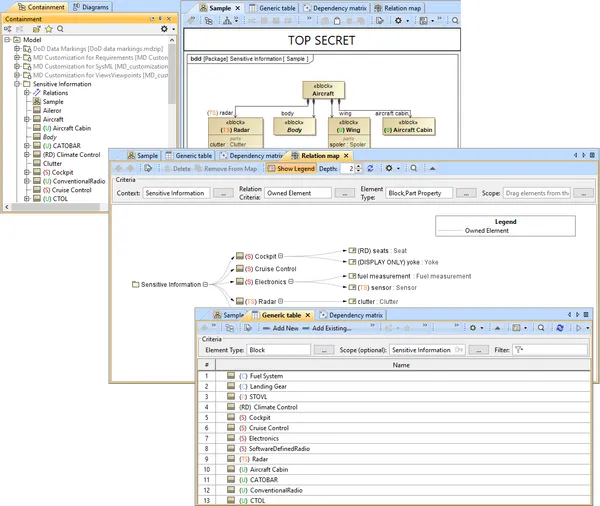
The image illustrates the following:

  • Diagram banner displaying the data markings added to the element symbols of the diagram.

  • Data markings displayed as prefixes to the element names in the Containment tree, symbolic diagram, matrix, table, or map.

Join the conversation in the CATIA MBSE Cyber System User Community!

2026x HF2 Unable to Apply ForceDesignation to Operational Performer

mission engineering UAF When I attempt to create a value for the OpposableElement tag I am not able to get a pull-down. Instead I just get a link to the enumeration. The tag definition in the stereotype uses the type DesignationKind for the tag, not ForceDesignation. DesignationKind is the base stereotype for ForceDesignation. This appears to be an issue in the UAF v1.3 profile.

CATIA MBSE CYBER SYSTEMS

[SAMPLE MODEL] EE&S Artifact Positioning on the Automotive SPICE Grid

What this isA practice model showing where EE&S plugin artifact types naturally land on the ASPICE process grid, using a Collision Avoidance System (ADAS) as the reference system. The point isn't the system — it's demonstrating that the tool's native constructs map directly to ASPICE work products, and that the chain doesn't stop at architecture.ASPICE Process → EE&S Artifact MappingSYS.1 — Requir

CATIA MBSE CYBER SYSTEMS

FlexNet Plugin Licenses in Batch Mode

My team is trying to run Cameo in “batch mode”, and I have a question regarding the FlexNet license server configuration that is not answered in any of the documentation that I was able to find. In the Cameo documentation, I see Java arguments for specifying a FlexNet server and port (FL_SERVER_ADDRESS / FL_SERVER_PORT), and I also see that I can specify a tool edition (FL_EDITION). However, in th

CATIA MBSE CYBER SYSTEMS

Derivation Tables in SysML V2

Requirement derivation tables are easily one of the top requested topics from users across the industry. In my latest video, I walk through how to define a reusable view def and map it directly to your requirement structures.Watch the Video here: [Link to YouTube Video] Download / Copy the Source CodeGrab the SysML v2 code used in the video below to test and adapt for your own models:How are you

CATIA MBSE CYBER SYSTEMS

NOTE: Existing users of No Magic products can access to the user portal at https://magicdraw.com/main.php, as well as Cameo Collaborator for Teamwork Cloud samples at https://ccexamples.nomagic.com.

Learn What CATIA Can Do for You

Speak with a CATIA expert to learn how our solutions enable seamless collaboration and sustainable innovation at organizations of every size.

Get Started

Courses and classes are available for students, academia, professionals and companies. Find the right CATIA training for you. 

Get Help

Find information on software & hardware certification, software downloads, user documentation, support contact and services offering