
Managing Requirements across Disparate Systems and Locations

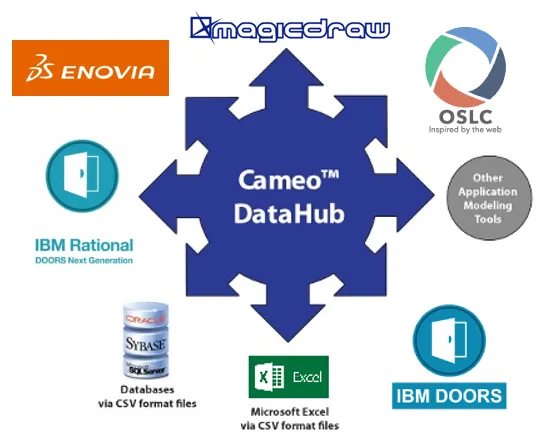
Global enterprise stakeholders and development teams in disparate geographical locations face the challenge of maintaining requirements integrity. Requirements data vital to their businesses may be stored in separate repositories and in different formats. The requirements management industry has gone through a series of mergers and acquisitions that could leave company executives questioning whether their data is usable or even accessible into the future. Much of this information could be lost or isolated in custom tools that have reached their end-of-life. Until now, the business world Cameo™ DataHub Circle of Interoperability did not have a single-source solution to lower risks by solving this critical and costly data interoperability challenge.

True Interoperability

Cameo DataHub is an integral part of No Magic's Cameo Suite providing true interoperability to the business and IT market by solving data interoperability issues between different vendors. Many of our competitors advocate interoperability of various vendor tools through a brokered published interface. Rather than forcing reliance on a myriad of vendors to support such an interfacing strategy, No Magic has taken all of the complexity and finger-pointing out of the integration puzzle: No Magic does it all by being your single-source guarantor against multi-source and multi-vendor incompatibility headaches. Technologies from No Magic maintain constant awareness of competitor's proprietary formats and assure continual compatibility between products.

A Powerful Data Bridge Solution

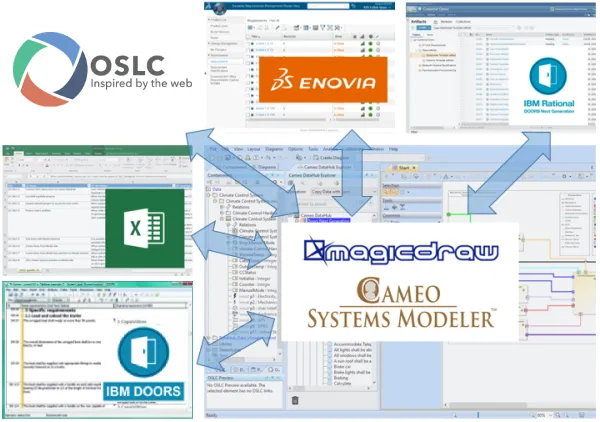
Cameo DataHub is a powerful data bridge solution that enables the import/export, automatic synchronization and creation of references between MagicDraw®, SysML Plugin, UPDM Plugin, Rational® DOORS®, Enovia™ TRM, and CSV files. Support for other tools/formats/repositories to be forthcoming.

This easy to use tool allows customers to:

  • Unify and relate requirements to the system architecture and design
  • Handle the relationship/dependency and information when change occur
  • Transform data from requirements-to-model or model-to-requirements
  • Associate and synchronize data (both automatic and manual)
  • Monitor data when associated data changes

Business Benefits Overview

  • Lowers the business risks to near zero for both current and future projects by ensuring your data will always be accessible
  • Easier understanding and editing of artifact dependencies via a visual schema mapper
  • Automatic monitoring of ongoing changes that may affect artifacts from either requirements or design
  • Associates and synchronizes tool data - may initiate synchronization either manually or automatically as configured on a per-tool basis
  • Reduces the cost of maintaining consistency
  • Data synchronization for multiple vendor requirements management tools without requiring their being resident in memory or even running on the same platform

Join the conversation in the CATIA MBSE Cyber System User Community!

[Blog Article] Verifying Nuclear Reactor Safety with CATIA Magic and Dymola

How can simulation help verify nuclear reactor safety earlier?For complex systems like advanced nuclear reactors, verification can’t wait until the end of development. It needs to happen throughout the engineering process.In this new blog, Assystem shares how combining CATIA Magic and Dymola on the 3DEXPERIENCE platform helps connect system architecture, requirements and multi-physics simulation.?

CATIA MBSE CYBER SYSTEMS

2026x HF2 Unable to Apply ForceDesignation to Operational Performer

mission engineering UAF When I attempt to create a value for the OpposableElement tag I am not able to get a pull-down. Instead I just get a link to the enumeration. The tag definition in the stereotype uses the type DesignationKind for the tag, not ForceDesignation. DesignationKind is the base stereotype for ForceDesignation. This appears to be an issue in the UAF v1.3 profile.

CATIA MBSE CYBER SYSTEMS

[SAMPLE MODEL] EE&S Artifact Positioning on the Automotive SPICE Grid

What this isA practice model showing where EE&S plugin artifact types naturally land on the ASPICE process grid, using a Collision Avoidance System (ADAS) as the reference system. The point isn't the system — it's demonstrating that the tool's native constructs map directly to ASPICE work products, and that the chain doesn't stop at architecture.ASPICE Process → EE&S Artifact MappingSYS.1 — Requir

CATIA MBSE CYBER SYSTEMS

FlexNet Plugin Licenses in Batch Mode

My team is trying to run Cameo in “batch mode”, and I have a question regarding the FlexNet license server configuration that is not answered in any of the documentation that I was able to find. In the Cameo documentation, I see Java arguments for specifying a FlexNet server and port (FL_SERVER_ADDRESS / FL_SERVER_PORT), and I also see that I can specify a tool edition (FL_EDITION). However, in th

CATIA MBSE CYBER SYSTEMS

NOTE: Existing users of No Magic products can access to the user portal at https://magicdraw.com/main.php, as well as Cameo Collaborator for Teamwork Cloud samples at https://ccexamples.nomagic.com.

Learn What CATIA Can Do for You

Speak with a CATIA expert to learn how our solutions enable seamless collaboration and sustainable innovation at organizations of every size.

Get Started

Courses and classes are available for students, academia, professionals and companies. Find the right CATIA training for you. 

Get Help

Find information on software & hardware certification, software downloads, user documentation, support contact and services offering