Cable Harness Simulation | Dassault Systèmes
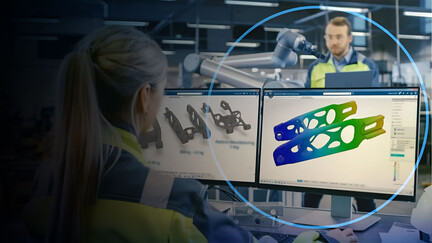
In this talk, we demonstrate the specialized cable simulation tools in CST Studio Suite that can analyze very complex cable harness structures efficiently.
E-seminar

On demand
UX/UI testing brings many advantages to software product development improving build quality into the product
In this talk, we demonstrate the specialized cable simulation tools in CST Studio Suite that can analyze very complex cable harness structures efficiently.
E-seminar
Press Release
April 23, 2020
We will discuss the ways Matt has leveraged evolving digital transformation and the tools afforded by the IIoT to help Develop thrive.
SOLIDWORKS LIVE
Discover why integrating a MODSIM approach in your Structural simulation curricula is key to stay ahead of the curve and make your students future-ready.
E-seminar
Dassault Systèmes and Capgemini deliver advanced capabilities based on software transformation and engineering services.
E-seminar
DriveWorks Solo is the ideal solution to transform how you design, configure and sell custom products. Using DriveWorks Solo, design engineers can automate repetitive SOLIDWORKS tasks, so they have more time to work on new product design.It is widely used by manufacturers in many industries, from HVAC and architectural components to transport and materials handling.Get started with a 30-day free trial of DriveWorks Solo.
Partner Product
An Introduction to SOLIDWORKS Flow Simulation 2018 takes the reader through the steps of creating the SOLIDWORKS part for the simulation followed by the setup and calculation of the SOLIDWORKS Flow Simulation project. The results from calculations are visualized and compared with theoretical solutions and empirical data. Each chapter starts with the objectives and a description of the specific problems that are studied. End of chapter exercises are included for reinforcement and practice of what has been learned. The fourteen chapters of this book are directed towards first-time to intermediate level users of SOLIDWORKS Flow Simulation. It is intended to be a supplement to undergraduate Fluid Mechanics, Heat Transfer and Finite Element Methods related courses. This book can also be used to show students the capabilities of fluid flow and heat transfer simulations in freshman and sophomore courses such as Introduction to Engineering. Both internal and external flow problems are covered and compared with experimental results and analytical solutions. Covered topics include airfoil flow, boundary layers, flow meters, heat exchanger, natural and forced convection, pipe flow, rotating flow, tube bank flow and valve flow.
Partner Product
Learn step by step with many examples for developing parts, assemblies, and detail in SOLIDWORKS. The course teaches complex operations such as simulations movement mechanisms. Learn to share and present your project with views exploded, eDrawings, and Render. See how to develop parts and assemblies such as a skateboard, a mechanical claw, and a hair dryer through practical examples that facilitate learning.This is one among the twenty SOLIDWORKS courses offered by Render. All courses are based on video training and tutorials that we offer in Portuguese. We are currently translating our website to offer these courses in English and Spanish.
Partner Product
The SharePoint connector automates the publishing of drawings and documents plus their associated meta-data to a SharePoint (Server or 365). More and more organizations are implementing the Microsoft SharePoint for the collaboration and content management features it provides. However, the need for Work In Progress document management does not diminish. 2D and 3D CAD files in particular require a more CAD-centric approach to file management with the final completed drawing being published to organization portals such as SharePoint. The d2m3 SharePoint connector bridges the gap between the Work In Progress document management as provided by SOLIDWORKS PDM Professional and the collaboration facilities provided by SharePoint by automating the upload information to a SharePoint Document Library from a SOLIDWORKS PDM Professional Vault.
Partner Product
Consultancy, customization, system integration, software development and global sourcing for CAD, CAM, PDM, FEM, ERP and product configuration.
Partner Product
induDrive is a powerful software tool for SOLIDWORKS Motion for synthesis, analysis, and optimizing complex motion sequences.With induDrive, shock- and jerk-free drives can be designed and edited easily according to VDI 2143. The usage of the program is intuitive. Motion datas and results are transferred into and from SOLIDWORKS Motion directly via API. The program can be used in all cases where complex mechanical or electronic motions have to be optimized.
Partner Product
DriveWorks Solo is the ideal solution to transform how you design, configure and sell custom products. Using DriveWorks Solo, design engineers can automate repetitive SOLIDWORKS tasks, so they have more time to work on new product design.It is widely used by manufacturers in many industries, from HVAC and architectural components to transport and materials handling.Get started with a 30-day free trial of DriveWorks Solo.
Partner Product
An Introduction to SOLIDWORKS Flow Simulation 2018 takes the reader through the steps of creating the SOLIDWORKS part for the simulation followed by the setup and calculation of the SOLIDWORKS Flow Simulation project. The results from calculations are visualized and compared with theoretical solutions and empirical data. Each chapter starts with the objectives and a description of the specific problems that are studied. End of chapter exercises are included for reinforcement and practice of what has been learned. The fourteen chapters of this book are directed towards first-time to intermediate level users of SOLIDWORKS Flow Simulation. It is intended to be a supplement to undergraduate Fluid Mechanics, Heat Transfer and Finite Element Methods related courses. This book can also be used to show students the capabilities of fluid flow and heat transfer simulations in freshman and sophomore courses such as Introduction to Engineering. Both internal and external flow problems are covered and compared with experimental results and analytical solutions. Covered topics include airfoil flow, boundary layers, flow meters, heat exchanger, natural and forced convection, pipe flow, rotating flow, tube bank flow and valve flow.
Partner Product
Learn step by step with many examples for developing parts, assemblies, and detail in SOLIDWORKS. The course teaches complex operations such as simulations movement mechanisms. Learn to share and present your project with views exploded, eDrawings, and Render. See how to develop parts and assemblies such as a skateboard, a mechanical claw, and a hair dryer through practical examples that facilitate learning.This is one among the twenty SOLIDWORKS courses offered by Render. All courses are based on video training and tutorials that we offer in Portuguese. We are currently translating our website to offer these courses in English and Spanish.
Partner Product
The SharePoint connector automates the publishing of drawings and documents plus their associated meta-data to a SharePoint (Server or 365). More and more organizations are implementing the Microsoft SharePoint for the collaboration and content management features it provides. However, the need for Work In Progress document management does not diminish. 2D and 3D CAD files in particular require a more CAD-centric approach to file management with the final completed drawing being published to organization portals such as SharePoint. The d2m3 SharePoint connector bridges the gap between the Work In Progress document management as provided by SOLIDWORKS PDM Professional and the collaboration facilities provided by SharePoint by automating the upload information to a SharePoint Document Library from a SOLIDWORKS PDM Professional Vault.
Partner Product
Consultancy, customization, system integration, software development and global sourcing for CAD, CAM, PDM, FEM, ERP and product configuration.
Partner Product
induDrive is a powerful software tool for SOLIDWORKS Motion for synthesis, analysis, and optimizing complex motion sequences.With induDrive, shock- and jerk-free drives can be designed and edited easily according to VDI 2143. The usage of the program is intuitive. Motion datas and results are transferred into and from SOLIDWORKS Motion directly via API. The program can be used in all cases where complex mechanical or electronic motions have to be optimized.
Partner Product
DriveWorks Solo is the ideal solution to transform how you design, configure and sell custom products. Using DriveWorks Solo, design engineers can automate repetitive SOLIDWORKS tasks, so they have more time to work on new product design.It is widely used by manufacturers in many industries, from HVAC and architectural components to transport and materials handling.Get started with a 30-day free trial of DriveWorks Solo.
Partner Product
An Introduction to SOLIDWORKS Flow Simulation 2018 takes the reader through the steps of creating the SOLIDWORKS part for the simulation followed by the setup and calculation of the SOLIDWORKS Flow Simulation project. The results from calculations are visualized and compared with theoretical solutions and empirical data. Each chapter starts with the objectives and a description of the specific problems that are studied. End of chapter exercises are included for reinforcement and practice of what has been learned. The fourteen chapters of this book are directed towards first-time to intermediate level users of SOLIDWORKS Flow Simulation. It is intended to be a supplement to undergraduate Fluid Mechanics, Heat Transfer and Finite Element Methods related courses. This book can also be used to show students the capabilities of fluid flow and heat transfer simulations in freshman and sophomore courses such as Introduction to Engineering. Both internal and external flow problems are covered and compared with experimental results and analytical solutions. Covered topics include airfoil flow, boundary layers, flow meters, heat exchanger, natural and forced convection, pipe flow, rotating flow, tube bank flow and valve flow.
Partner Product
Learn step by step with many examples for developing parts, assemblies, and detail in SOLIDWORKS. The course teaches complex operations such as simulations movement mechanisms. Learn to share and present your project with views exploded, eDrawings, and Render. See how to develop parts and assemblies such as a skateboard, a mechanical claw, and a hair dryer through practical examples that facilitate learning.This is one among the twenty SOLIDWORKS courses offered by Render. All courses are based on video training and tutorials that we offer in Portuguese. We are currently translating our website to offer these courses in English and Spanish.
Partner Product
The SharePoint connector automates the publishing of drawings and documents plus their associated meta-data to a SharePoint (Server or 365). More and more organizations are implementing the Microsoft SharePoint for the collaboration and content management features it provides. However, the need for Work In Progress document management does not diminish. 2D and 3D CAD files in particular require a more CAD-centric approach to file management with the final completed drawing being published to organization portals such as SharePoint. The d2m3 SharePoint connector bridges the gap between the Work In Progress document management as provided by SOLIDWORKS PDM Professional and the collaboration facilities provided by SharePoint by automating the upload information to a SharePoint Document Library from a SOLIDWORKS PDM Professional Vault.
Partner Product
Consultancy, customization, system integration, software development and global sourcing for CAD, CAM, PDM, FEM, ERP and product configuration.
Partner Product
induDrive is a powerful software tool for SOLIDWORKS Motion for synthesis, analysis, and optimizing complex motion sequences.With induDrive, shock- and jerk-free drives can be designed and edited easily according to VDI 2143. The usage of the program is intuitive. Motion datas and results are transferred into and from SOLIDWORKS Motion directly via API. The program can be used in all cases where complex mechanical or electronic motions have to be optimized.
Partner Product
DriveWorks Solo is the ideal solution to transform how you design, configure and sell custom products. Using DriveWorks Solo, design engineers can automate repetitive SOLIDWORKS tasks, so they have more time to work on new product design.It is widely used by manufacturers in many industries, from HVAC and architectural components to transport and materials handling.Get started with a 30-day free trial of DriveWorks Solo.
Partner Product
An Introduction to SOLIDWORKS Flow Simulation 2018 takes the reader through the steps of creating the SOLIDWORKS part for the simulation followed by the setup and calculation of the SOLIDWORKS Flow Simulation project. The results from calculations are visualized and compared with theoretical solutions and empirical data. Each chapter starts with the objectives and a description of the specific problems that are studied. End of chapter exercises are included for reinforcement and practice of what has been learned. The fourteen chapters of this book are directed towards first-time to intermediate level users of SOLIDWORKS Flow Simulation. It is intended to be a supplement to undergraduate Fluid Mechanics, Heat Transfer and Finite Element Methods related courses. This book can also be used to show students the capabilities of fluid flow and heat transfer simulations in freshman and sophomore courses such as Introduction to Engineering. Both internal and external flow problems are covered and compared with experimental results and analytical solutions. Covered topics include airfoil flow, boundary layers, flow meters, heat exchanger, natural and forced convection, pipe flow, rotating flow, tube bank flow and valve flow.
Partner Product
Learn step by step with many examples for developing parts, assemblies, and detail in SOLIDWORKS. The course teaches complex operations such as simulations movement mechanisms. Learn to share and present your project with views exploded, eDrawings, and Render. See how to develop parts and assemblies such as a skateboard, a mechanical claw, and a hair dryer through practical examples that facilitate learning.This is one among the twenty SOLIDWORKS courses offered by Render. All courses are based on video training and tutorials that we offer in Portuguese. We are currently translating our website to offer these courses in English and Spanish.
Partner Product
The SharePoint connector automates the publishing of drawings and documents plus their associated meta-data to a SharePoint (Server or 365). More and more organizations are implementing the Microsoft SharePoint for the collaboration and content management features it provides. However, the need for Work In Progress document management does not diminish. 2D and 3D CAD files in particular require a more CAD-centric approach to file management with the final completed drawing being published to organization portals such as SharePoint. The d2m3 SharePoint connector bridges the gap between the Work In Progress document management as provided by SOLIDWORKS PDM Professional and the collaboration facilities provided by SharePoint by automating the upload information to a SharePoint Document Library from a SOLIDWORKS PDM Professional Vault.
Partner Product
Consultancy, customization, system integration, software development and global sourcing for CAD, CAM, PDM, FEM, ERP and product configuration.
Partner Product
induDrive is a powerful software tool for SOLIDWORKS Motion for synthesis, analysis, and optimizing complex motion sequences.With induDrive, shock- and jerk-free drives can be designed and edited easily according to VDI 2143. The usage of the program is intuitive. Motion datas and results are transferred into and from SOLIDWORKS Motion directly via API. The program can be used in all cases where complex mechanical or electronic motions have to be optimized.
Partner Product
DriveWorks Solo is the ideal solution to transform how you design, configure and sell custom products. Using DriveWorks Solo, design engineers can automate repetitive SOLIDWORKS tasks, so they have more time to work on new product design.It is widely used by manufacturers in many industries, from HVAC and architectural components to transport and materials handling.Get started with a 30-day free trial of DriveWorks Solo.
Partner Product
An Introduction to SOLIDWORKS Flow Simulation 2018 takes the reader through the steps of creating the SOLIDWORKS part for the simulation followed by the setup and calculation of the SOLIDWORKS Flow Simulation project. The results from calculations are visualized and compared with theoretical solutions and empirical data. Each chapter starts with the objectives and a description of the specific problems that are studied. End of chapter exercises are included for reinforcement and practice of what has been learned. The fourteen chapters of this book are directed towards first-time to intermediate level users of SOLIDWORKS Flow Simulation. It is intended to be a supplement to undergraduate Fluid Mechanics, Heat Transfer and Finite Element Methods related courses. This book can also be used to show students the capabilities of fluid flow and heat transfer simulations in freshman and sophomore courses such as Introduction to Engineering. Both internal and external flow problems are covered and compared with experimental results and analytical solutions. Covered topics include airfoil flow, boundary layers, flow meters, heat exchanger, natural and forced convection, pipe flow, rotating flow, tube bank flow and valve flow.
Partner Product
Learn step by step with many examples for developing parts, assemblies, and detail in SOLIDWORKS. The course teaches complex operations such as simulations movement mechanisms. Learn to share and present your project with views exploded, eDrawings, and Render. See how to develop parts and assemblies such as a skateboard, a mechanical claw, and a hair dryer through practical examples that facilitate learning.This is one among the twenty SOLIDWORKS courses offered by Render. All courses are based on video training and tutorials that we offer in Portuguese. We are currently translating our website to offer these courses in English and Spanish.
Partner Product
The SharePoint connector automates the publishing of drawings and documents plus their associated meta-data to a SharePoint (Server or 365). More and more organizations are implementing the Microsoft SharePoint for the collaboration and content management features it provides. However, the need for Work In Progress document management does not diminish. 2D and 3D CAD files in particular require a more CAD-centric approach to file management with the final completed drawing being published to organization portals such as SharePoint. The d2m3 SharePoint connector bridges the gap between the Work In Progress document management as provided by SOLIDWORKS PDM Professional and the collaboration facilities provided by SharePoint by automating the upload information to a SharePoint Document Library from a SOLIDWORKS PDM Professional Vault.
Partner Product
Consultancy, customization, system integration, software development and global sourcing for CAD, CAM, PDM, FEM, ERP and product configuration.
Partner Product
induDrive is a powerful software tool for SOLIDWORKS Motion for synthesis, analysis, and optimizing complex motion sequences.With induDrive, shock- and jerk-free drives can be designed and edited easily according to VDI 2143. The usage of the program is intuitive. Motion datas and results are transferred into and from SOLIDWORKS Motion directly via API. The program can be used in all cases where complex mechanical or electronic motions have to be optimized.
Partner Product
DriveWorks Solo is the ideal solution to transform how you design, configure and sell custom products. Using DriveWorks Solo, design engineers can automate repetitive SOLIDWORKS tasks, so they have more time to work on new product design.It is widely used by manufacturers in many industries, from HVAC and architectural components to transport and materials handling.Get started with a 30-day free trial of DriveWorks Solo.
Partner Product
An Introduction to SOLIDWORKS Flow Simulation 2018 takes the reader through the steps of creating the SOLIDWORKS part for the simulation followed by the setup and calculation of the SOLIDWORKS Flow Simulation project. The results from calculations are visualized and compared with theoretical solutions and empirical data. Each chapter starts with the objectives and a description of the specific problems that are studied. End of chapter exercises are included for reinforcement and practice of what has been learned. The fourteen chapters of this book are directed towards first-time to intermediate level users of SOLIDWORKS Flow Simulation. It is intended to be a supplement to undergraduate Fluid Mechanics, Heat Transfer and Finite Element Methods related courses. This book can also be used to show students the capabilities of fluid flow and heat transfer simulations in freshman and sophomore courses such as Introduction to Engineering. Both internal and external flow problems are covered and compared with experimental results and analytical solutions. Covered topics include airfoil flow, boundary layers, flow meters, heat exchanger, natural and forced convection, pipe flow, rotating flow, tube bank flow and valve flow.
Partner Product
Learn step by step with many examples for developing parts, assemblies, and detail in SOLIDWORKS. The course teaches complex operations such as simulations movement mechanisms. Learn to share and present your project with views exploded, eDrawings, and Render. See how to develop parts and assemblies such as a skateboard, a mechanical claw, and a hair dryer through practical examples that facilitate learning.This is one among the twenty SOLIDWORKS courses offered by Render. All courses are based on video training and tutorials that we offer in Portuguese. We are currently translating our website to offer these courses in English and Spanish.
Partner Product
The SharePoint connector automates the publishing of drawings and documents plus their associated meta-data to a SharePoint (Server or 365). More and more organizations are implementing the Microsoft SharePoint for the collaboration and content management features it provides. However, the need for Work In Progress document management does not diminish. 2D and 3D CAD files in particular require a more CAD-centric approach to file management with the final completed drawing being published to organization portals such as SharePoint. The d2m3 SharePoint connector bridges the gap between the Work In Progress document management as provided by SOLIDWORKS PDM Professional and the collaboration facilities provided by SharePoint by automating the upload information to a SharePoint Document Library from a SOLIDWORKS PDM Professional Vault.
Partner Product
Consultancy, customization, system integration, software development and global sourcing for CAD, CAM, PDM, FEM, ERP and product configuration.
Partner Product
induDrive is a powerful software tool for SOLIDWORKS Motion for synthesis, analysis, and optimizing complex motion sequences.With induDrive, shock- and jerk-free drives can be designed and edited easily according to VDI 2143. The usage of the program is intuitive. Motion datas and results are transferred into and from SOLIDWORKS Motion directly via API. The program can be used in all cases where complex mechanical or electronic motions have to be optimized.
Partner Product
Rethink, Reshape and Resilience are the command words for businesses to navigate the “new normal”. At Dassault Systèmes, we want to help you rethink your path to business success. Having the right digital tools for your whole organization can make all the difference: improving productivity, reducing costs and time to market, and increasing profits.
Our 3DEXPERIENCE platform on the cloud allows you to reshape your entire business by connecting your ecosystem on a single environment. From best in class 3D design, simulation and engineering apps to collaborative ideation communities, lean project management and business analytics solutions and marketing cloud rendering apps, we’ve got you covered!
Become more resilient by fostering collaboration within and between different teams, to respond faster and better to any future changes. Be prepared to seize the new possibilities of the new normal.
Discover how Deutsche Aircraft uses Dassault Systèmes’ virtual twin to advance regional flight with faster certification and smarter design.
Customer Story