What's New in GEOVIA Whittle 2027
Bringing a new, modern 3D visualization experience, with surface import to compare surfaces and designs against the block model.
Brochures
Explore the latest enhancements across Surpac, Whittle and MineSched to support geology, mine planning and scheduling workflows.
Every mining operation depends on sound geological understanding, robust and effective mine planning and scheduling.
With GEOVIA 2027, discover the latest enhancements across Surpac, Whittle, and MineSched, supporting your work from geological modelling and deposit evaluation to strategic and tactical mine planning. Explore what’s new in each product and see how these updates can support your day-to-day work and planning decisions.
GEOVIA Surpac 2027 is Raising the Grade. A higher standard for the everyday experience. Unlock new levels of efficiency with advances in implicit modeling, data editing, intelligent UI, interactive charting and reporting, all backed by enhanced stability and performance.
Surpac 2027 introduces a new ribbon-based interface, enabled by a new software development platform, that replaces the previous menu structure with more intuitive access to functions. Modern new icons better reflect what each function does, so finding the right tool takes less effort.
The new Data Manager combines the former Layer Manager, Block models and Databases panels into a single integrated panel, giving you a comprehensive view of all the data open in the Graphics pane. New embedded controls even let you set the opacity directly for each layer. The Navigator has also been updated to allow entry of a custom filter to find files based on your own search criteria, in addition to the default filters. And when you set a directory as your work directory, it is now placed against the left side of the Navigator, so there is far less scrolling down and right to reach your files.
Panel management is simpler too. The default docked panels are now organised into two groups, Navigator + Planes + Legend, and Data Manager + Properties + Tool (properties). When stacked vertically, they can be expanded and contracted with a single click using the new Expand/Restore option, located next to the Float option. It gives you quicker access to information than dragging to resize, which is still available if you prefer it.
Finding and recalling commands is now much easier. The enhanced Function Chooser suggests functions using fuzzy search, so you no longer need to know the exact function name to find the one you want. Each function in the list has its own options menu to run it, show where it is located in the ribbon or open its Help. A new Search box in the top-right corner of the screen does the same for items in the ribbon, so you can find and run them from one place.
Surpac also adapts to the way you work. The new Adaptive toolbar, available below Graphics, uses your Recent Commands list to progressively add your most frequently used functions, with no need to build a custom toolbar. A new Next Commands list, available from the Graphics right-click context menu, uses historical usage patterns to highlight the commands you are most likely to need, based on the last command you ran. It is also available through a new optional Predictive toolbar.
And if you like to build your own setup, you can create customised ribbons and pin frequently used functions, or entire sub-menus, to the Quick Access Toolbar at the top-left of the interface. The Quick Access Toolbar is also available at the top of the Graphics right-click context menu.
The new Data Editor lets you view, edit and manage data (.str and .sdm files) in a spreadsheet-style interface. You get access to coordinates and description (D-field) values in bulk, instead of editing each point individually in Graphics.
Sort, filter and group your data, with a Filter Editor for complex selections and the option to invert a selection. In Edit mode, you can change point coordinates (X, Y, Z) and D-field attributes (string, segment and point columns are read-only), rename D-field labels and add new description fields to strings, up to 300 D-fields. Save your changes to .str or .sdm files, or apply them directly to an open layer.
It also works hand in hand with your spreadsheets. Copy (or cut) data from the grid for use in external spreadsheets such as Excel (Copy is available in View mode), or paste tab-delimited data back in, including block paste into a multi-cell selection, where the values tile to fill the selected area. New D-field columns are added automatically when you paste into columns that do not exist yet. Copy, cut, paste and clear are available from the shortcut menu, or with Ctrl+C, Ctrl+X, Ctrl+V and Delete. Clear and cut apply to D-field cells only: X, Y and Z can be edited directly but not cleared with these commands.
Made a mistake? Use the toolbar icons or Ctrl+Z and Ctrl+Y to undo and redo. Each completed cell edit is one undo step, and undo and redo also cover renaming D-field labels, adding D-field columns and clearing cells. The undo history is cleared once you save a file or apply changes to a layer.
You can open the Data Editor in four ways: by selecting File > Open > Data Editor; by right-clicking a .str or .sdm file in the Navigator and selecting Open in Data Editor; by right-clicking a layer in the Data Manager and selecting Open in Data Editor; or by selecting data in Graphics, right-clicking and selecting Edit in Data Editor.
Turn your analysis into a report as you go. The new report builder, available via Tools > Create/Open Report, lets you interactively build reports by appending tables, Basic Statistics graphs and the contents of Graphics to a Markdown (.md) report, using a new right-click option.
An Edit Report option is available, along with a preview from which the report can be printed. Everything you capture, images and tables, is centralised and displayed in one place (it is stored in a 'resources' folder in your working directory when the report is saved), which makes compiling technical reports much easier.
The individual outputs are now report quality, “What You See Is What You Get” (WYSIWYG), so they can also be embedded directly in other reports.
Shape your solids with precision. The graphics-based TRISOLATION STRING INSIDE and TRISOLATION STRING OUTSIDE functions can now be used to clip a watertight solid into multiple separate solid objects, using one or more closed segments in a string.
All valid resulting objects are retained as separate watertight solids, and invalid or self-intersecting segments are addressed accordingly. The corresponding file-based equivalents are TRISOLATION FILE STRING INSIDE and TRISOLATION FILE STRING OUTSIDE.
Go from drillhole data to geological solids faster. The new Implicit Modeling function uses a radial basis function (RBF) algorithm to rapidly generate geological solids from categorical interval data. With the Implicit Model panel, you can generate closed 3D solid meshes around unconformable geological units such as dykes, sills, veins, batholiths, perched water tables and categorical grade intervals, directly from classified borehole interval data.
There is no longer any need to manually build surfaces on sections. The RBF interpolator uses your classified borehole dataset to construct a smooth geological solid that honours every measured contact.
Your work is easy to pick up again, too. An Implicit Model project file (*.impx) stores all the Implicit Model panel settings: data source, unit selections, kernel, anisotropy, resolution and output options. You can restore a modelling session by dragging the .impx file into the view, or by opening it from the panel.
Exploratory data analysis becomes truly interactive with the full integration of the Basic Statistics window with Graphics. Select points in an active layer in Graphics, and graphs of the selected data can be displayed in the Basic Statistics window through the right-click 'Show in Basic Statistics' option.
The link works both ways. Select an element of a graph, such as a single histogram bin, and the associated data is highlighted in Graphics and in the Basic Statistics Data table. You can then filter the table to display only the selected points and save the resulting dataset. Selections can be inverted to define two distinct datasets, and additional filter options are available to further refine the data used for the graphs.
Spot relationships in your data at a glance. A new Correlation Matrix chart is available in Basic Statistics to display the pairwise correlation coefficients, using Pearson or Spearman, between multiple variables, such as geochemical elements or physical property measurements within a dataset.
It includes correlation heatmaps and the ability to filter the heatmaps at varying levels of statistical significance. You can start scatterplots directly from individual heatmap cells, and add the Correlation Matrix to a report.
GEOVIA Whittle 2027 gives you a new way to see your block model, compare your designs against it and fine-tune how exclusion zones behave in optimization. Explore the three highlights below.
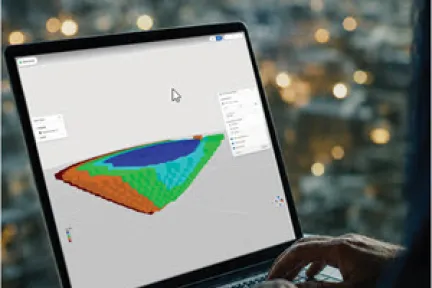
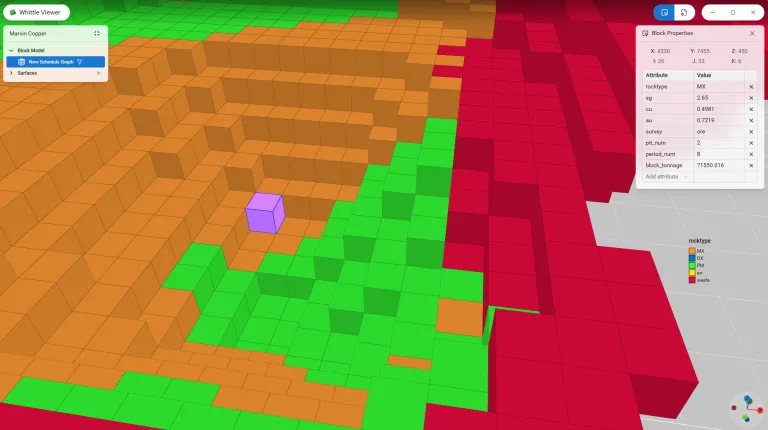
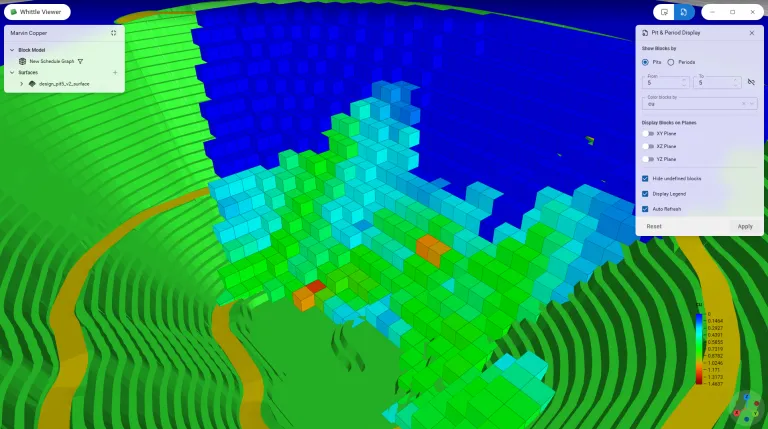
Large block models deserve a viewer that keeps up with you. Whittle 2027 introduces a rebuilt 3D viewer, powered by a modern WebGPU engine, that renders large models smoothly.
Filter by pit and period, cut through your model with section and plan views to focus on exactly the coordinates you want to study, and click any block to inspect all of its attributes. A colour legend keeps grades and attributes easy to read at a glance, so you spend less time hunting for answers and more time acting on them.
This is a first look at the changes coming to Whittle in upcoming releases. And if you prefer, the classic Java 3D viewer is still there: you can switch between the two at any time in the Preferences form.
Bring your surfaces straight into the viewer to verify topography, evaluate pit shells and compare pushback and period designs against the block model. SDM is the preferred and fastest format, and DXF and OMF are supported too.
Instead of relying on tables of numbers, you can see exactly where each design sits in your orebody. It makes strategic decisions easier to validate, and much easier to explain to your team and stakeholders.
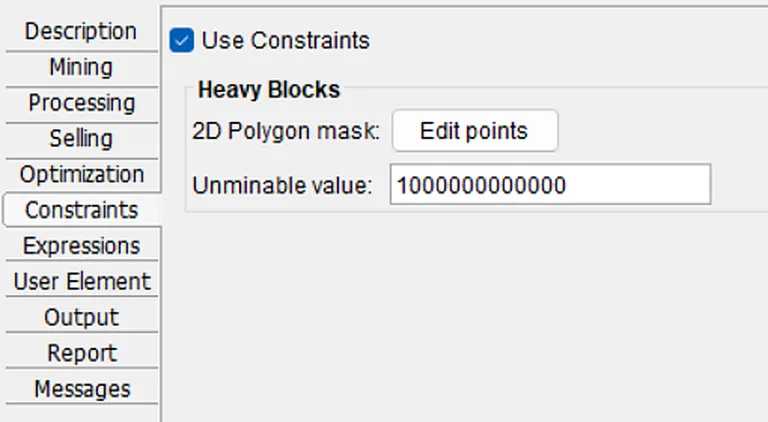
When polygons are used as exclusion zones in optimization, you can now decide how they behave. A new Unminable value lets you define the threshold cost that has to be paid to mine through a polygon.
The result: more stable FastFlow results when heavy blocks are involved, and the freedom to tune exclusion-zone cost to match your plan. You will find it in the Constraints tab, in the Unminable value field.
Watch the GEOVIA CONNECT 26X replays on demand, featuring technical presentations on Surpac, MineSched, and Whittle, with insights and expertise from the GEOVIA team.
MineSched makes it easier to set up and communicate your tactical mine plan. Discover how geolocated imagery and a richer Gantt chart help you validate your sequence and share it with confidence.
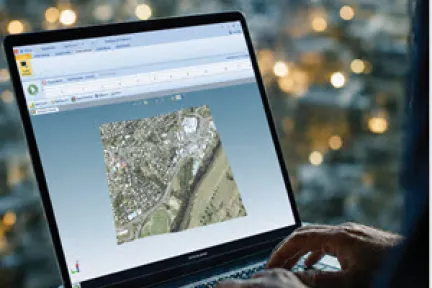
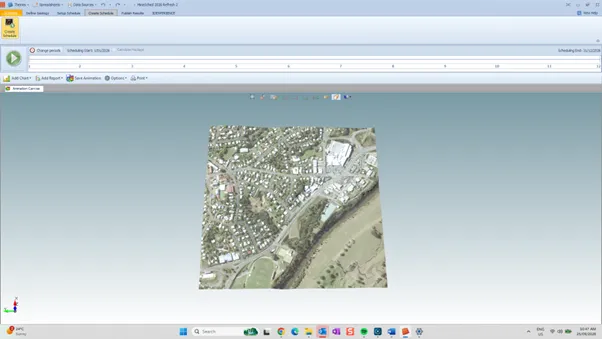
A mine plan is easier to understand when you can see it in context. MineSched could always display 2D and 3D shapes, but not geolocated images. You can now bring geolocated 2D and 3D images, such as aerial imagery, straight onto the 3D and Animation canvas.
Use GeoTIFF (with or without DEM), JPEG and PNG for 2D images, and OBJ and Surpac RGF files for 3D images. Animations have also been enriched: you can now display strings alongside 3D shapes.
Whether you are setting up the plan or presenting it, everyone can see what is happening, where and when, which makes your tactical plan easier to communicate.
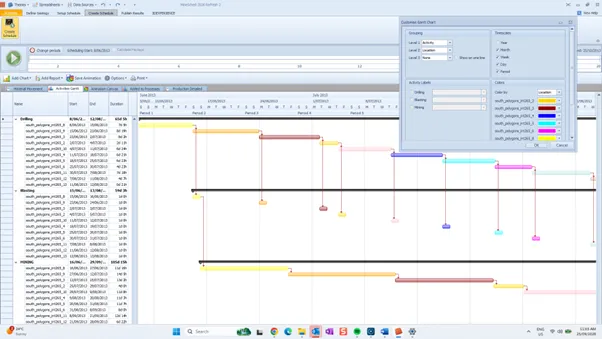
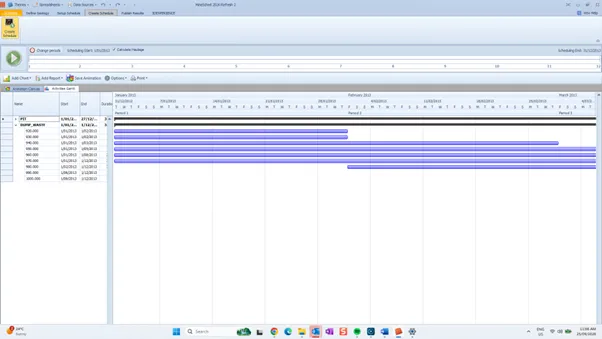
The Gantt chart is where you validate your mining activity sequence, so it should be easy to read. Until now, colours could only be applied to mining activities. You can now colour any level of the Gantt chart.
Default colours are drawn from the locations and resources you have already set up, so you get a meaningful view straight away, and you stay free to change them. Colour by location, for example, to see at a glance how your sequence moves across the site.
Fill locations could not be displayed on the Gantt chart before. They now can, and progress can be tracked directly in the chart.
Seeing your fills next to your mining activities helps you validate the whole plan in a single view and keep an eye on progress as the schedule unfolds.
The world of complex industrial scenarios + Natural interaction is changing. Discover how to stay a step ahead with 3DEXPERIENCE.
Bringing a new, modern 3D visualization experience, with surface import to compare surfaces and designs against the block model.
Brochures
Improving the ability to set up and communicate the tactical mine plan.
Brochures
Join us for GEOVIA CONNECT 26X, a global webinar series featuring technical presentations on Surpac, MineSched, and Whittle, with GEOVIA experts available live for Q&A.
E-seminar
Comprehensive Mine Planning and Geological Modelling Software
Advanced Strategic Mine Planning
Advanced Tactical Mine Planning & Scheduling
Speak with a GEOVIA expert to learn how our solutions enable seamless collaboration and sustainable innovation at organizations of every size.
Courses and classes are available for students, academia, professionals and companies. Find the right GEOVIA training for you.
Find information on software & hardware certification, software downloads, user documentation, support contact and services offering