3DEXPERIENCE CATIA for Conceptual Design of Train Carbody | Dassault Systèmes
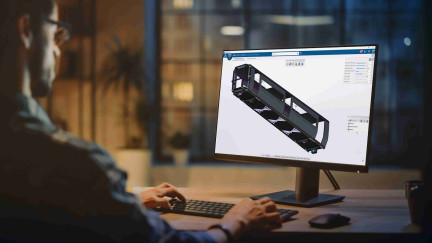
Watch the replay to discover how CATIA accelerates train carbody design.
E-seminar
On demand
UX/UI testing brings many advantages to software product development improving build quality into the product
Watch the replay to discover how CATIA accelerates train carbody design.
E-seminar
Discover how the 3DEXPERIENCE platform seamlessly integrates engineering and manufacturing to enhance efficiency and collaboration.
E-seminar
Press Release
March 23, 2021
Press Release
March 12, 2024
Press Release
March 29, 2016
Press Release
October 30, 2024
Pinnacle Series by Eagle Point Software is a comprehensive Learning Management System (LMS) and eLearning solution designed to enhance workforce productivity and skill development across entire organizations. Created for AEC and manufacturing industries, it offers skills assessments to identify knowledge gaps, personalized learning paths to address them, on-demand resources, and integrated workflows to streamline training. With trusted, expert-developed content and powerful reporting tools, Pinnacle Series enables organizations to track progress, reduce training costs, and boost productivity. It also empowers teams to capture and share organizational knowledge, creating a centralized hub of expertise accessible to all employees. Organizations can customize content to fit company standards, upload internal documentation and training videos, control the look and feel of the Pinnacle Series interface, give assignments and monitor employee progress, create private groups and invite external users, and more.
Partner Product
This book is written to help you learn the core concepts and steps to conduct virtual machining using CAMWorks. CAMWorks is a virtual machining tool designed to increase your productivity and efficiency by simulating machining operations on a computer before creating a physical product. CAMWorks is embedded in SOLIDWORKS as a fully integrated module. CAMWorks provides excellent capabilities for machining simulations in a virtual environment. Capabilities in CAMWorks allow you to select CNC machines and tools, extract or create machinable features, define machining operations, and simulate and visualize machining toolpaths. In addition, the machining time estimated in CAMWorks provides important information for estimating product manufacturing costs without physically manufacturing the product.
Partner Product
QUICKSURFACE add-in is a natively integrated, powerful reverse engineering add-in for SOLIDWORKS that lets you convert 3D scan meshes into CAD models. It provides efficient tools to generate surfaces and curves for creating professional CAD models. Created with years of experience in the field of 3D scanning, delivering fast and efficient algorithms, including automatic free form surfacing, Mesh2Surface reduces drastically the time for anyone who is working to design using 3D scan data.
Partner Product
BOSS is an integrated add-in to the SolidWorks software, utilizing SolidWorks' API, BOSS allows you to automate many actions a 3D drawer must do every day. It will greatly improve standardization between different components and documents as well as save your drawing team tons of time. The software is available in English and French versions.
Partner Product
With FRAMEpro, Bosch Rexroth brings proven basic mechanic elements to the CAD program SOLIDWORKS via a plug-in.
Partner Product
Versa Note is the only SOLIDWORKS add-in to manage configurable shared notes in drawings and models. With centralized administration, CAD managers or engineering leads can easily define standard notes and finally put an end to drawing note errors, inconsistencies and omissions. Versa Note's highly customizable notes can include configurable elements like drop-down lists and user input fields; ensuring consistency, while offering designers the flexibility to communicate unique design requirements. It also offers advanced features such as linked flag notes or linked annotations, linked custom properties or BOM table cell values, multi-column note tables, indented note numbering, dynamic QR codes as well as numerous other options and advanced settings to control how notes are added and updated. Versa Note supports notes in model annotation views and includes built-in functionality to allow users to transfer drawing notes to models. Whether you've made the switch to Model Based Definition (MBD), or are considering it in the future, you can rest assured that Versa Note will enable the seamless transition from drawings to models. Furthermore, the Versa Note suite of tools includes Versa Magic: a simple, easy tool to find & replace text in any note, add & remove notes in any/all files, and export notes from ALL of your drawings in seconds; and Versa Note Desktop: enabling users, even those without SOLIDWORKS, to configure & add notes or modify & update existing notes in SOLIDWORKS drawings & models. To start your free trial, download Versa Note today at cadinnovations.ca
Partner Product
Pinnacle Series by Eagle Point Software is a comprehensive Learning Management System (LMS) and eLearning solution designed to enhance workforce productivity and skill development across entire organizations. Created for AEC and manufacturing industries, it offers skills assessments to identify knowledge gaps, personalized learning paths to address them, on-demand resources, and integrated workflows to streamline training. With trusted, expert-developed content and powerful reporting tools, Pinnacle Series enables organizations to track progress, reduce training costs, and boost productivity. It also empowers teams to capture and share organizational knowledge, creating a centralized hub of expertise accessible to all employees. Organizations can customize content to fit company standards, upload internal documentation and training videos, control the look and feel of the Pinnacle Series interface, give assignments and monitor employee progress, create private groups and invite external users, and more.
Partner Product
This book is written to help you learn the core concepts and steps to conduct virtual machining using CAMWorks. CAMWorks is a virtual machining tool designed to increase your productivity and efficiency by simulating machining operations on a computer before creating a physical product. CAMWorks is embedded in SOLIDWORKS as a fully integrated module. CAMWorks provides excellent capabilities for machining simulations in a virtual environment. Capabilities in CAMWorks allow you to select CNC machines and tools, extract or create machinable features, define machining operations, and simulate and visualize machining toolpaths. In addition, the machining time estimated in CAMWorks provides important information for estimating product manufacturing costs without physically manufacturing the product.
Partner Product
QUICKSURFACE add-in is a natively integrated, powerful reverse engineering add-in for SOLIDWORKS that lets you convert 3D scan meshes into CAD models. It provides efficient tools to generate surfaces and curves for creating professional CAD models. Created with years of experience in the field of 3D scanning, delivering fast and efficient algorithms, including automatic free form surfacing, Mesh2Surface reduces drastically the time for anyone who is working to design using 3D scan data.
Partner Product
BOSS is an integrated add-in to the SolidWorks software, utilizing SolidWorks' API, BOSS allows you to automate many actions a 3D drawer must do every day. It will greatly improve standardization between different components and documents as well as save your drawing team tons of time. The software is available in English and French versions.
Partner Product
With FRAMEpro, Bosch Rexroth brings proven basic mechanic elements to the CAD program SOLIDWORKS via a plug-in.
Partner Product
Versa Note is the only SOLIDWORKS add-in to manage configurable shared notes in drawings and models. With centralized administration, CAD managers or engineering leads can easily define standard notes and finally put an end to drawing note errors, inconsistencies and omissions. Versa Note's highly customizable notes can include configurable elements like drop-down lists and user input fields; ensuring consistency, while offering designers the flexibility to communicate unique design requirements. It also offers advanced features such as linked flag notes or linked annotations, linked custom properties or BOM table cell values, multi-column note tables, indented note numbering, dynamic QR codes as well as numerous other options and advanced settings to control how notes are added and updated. Versa Note supports notes in model annotation views and includes built-in functionality to allow users to transfer drawing notes to models. Whether you've made the switch to Model Based Definition (MBD), or are considering it in the future, you can rest assured that Versa Note will enable the seamless transition from drawings to models. Furthermore, the Versa Note suite of tools includes Versa Magic: a simple, easy tool to find & replace text in any note, add & remove notes in any/all files, and export notes from ALL of your drawings in seconds; and Versa Note Desktop: enabling users, even those without SOLIDWORKS, to configure & add notes or modify & update existing notes in SOLIDWORKS drawings & models. To start your free trial, download Versa Note today at cadinnovations.ca
Partner Product
Inside The GD&T Premium Reference Center, you will find over 275 GD&T Tips with PDFs, 88 with videos. There are an additional 160 educational videos, electronic versions of our GD&T Hierarchy Pocket Guides (1994, 2009, 2018), all ASME Y14.5 symbols, an easy-to-use search function, Y14.5 Standard references, case studies, Brown Bag sessions, and the SOLIDWORKS add-on. This robust reference center will help to answer questions related to GD&T and help users to refresh their knowledge of symbols not often used. With the SOLIDWORKS add-on, the reference center is available at your fingertips in a convenient drop-down menu within SOLIDWORKS. Our customers find the reference center (AKA GD&T help files) to be a valued resource both before and after GD&T training with Tec-Ease.
Partner Product
The DSTV Assistant is integrated into SOLIDWORKS and can be used by any user with basic SOLIDWORKS knowledge. During development, special emphasis was placed on implementing as many functions as possible in the familiar SOLIDWORKS environment and in uniform Property Manager Pages (PMP).If NC data is to be generated from a 3D solid body, the DSTV Assistant analyzes the component and determines the profile type or sheet orientation as well as all processing such as holes, cutouts, chamfers and many more. Thanks to the intelligent functions, the NC data in DSTV format can be generated very quickly and automatically. However, if, for example, the profile type is not known or the sheet metal alignment is not clear, manual entries by the user may be necessary. Here, too, the DSTV Assistant provides you with the best possible support with clearly structured queries for the missing information.In summary, the DSTV Assistant is the perfect addition for all users who work with structural steel components in SOLIDWORKS and offers automatic functions for exporting NC data in DSTV directly from SOLIDWORKS. The source of the data is almost irrelevant as long as SOLIDWORKS can import the data and the volumes are clearly defined.
Partner Product
We believe that fostering and strengthening authentic personal relationships with our customers is the most important part of our business. Above all, we want to help you get exactly what you need to be successful. When you need more than a mass-market pre-built system, trust our technical expertise and dedication to personal service to design and build your bespoke PC.
Partner Product
AddItIn is a SolidWorks addin to easily create, modify and deploy your own SolidWork addin.Create your own customized SolidWorks addin, hosting your companies' macros within one single file, without the need of API knowledge.AddItIn allows you to have control which macros are available to users and the way they are implemented within SolidWorks. Some of the implementations are:- Availability depending on the document type- Taskpane: create your own tab in the SolidWorks taskpane containing a Visual Studio usercontrol.- Hidden: macros are ran on certain SolidWorks events e.g. when a file is saved or when the active document changes.- RMB: you can create your own RMB menus depending on the selection a user made.- File open/save: you can add your own extensions to the SolidWorks open and save menu.You can use your own logos and images to make the UI even more in line with your companies demands.Using AddItIn will give you improved performance, a professional UI, ease of deployment and insight in the intensity a macro is used.
Partner Product
Turn hours of file admin into minutes! #TASK takes care of automating tasks, batch processing, and saves you hours of file admin in SOLIDWORKS. Trusted by more than 15,000 users in over 100 countries, #TASK has revolutionized file admin automation. Whether you're a solo designer or managing a national team of users, #TASK is purpose-built to support batch processing at any size.
Partner Product
Pinnacle Series by Eagle Point Software is a comprehensive Learning Management System (LMS) and eLearning solution designed to enhance workforce productivity and skill development across entire organizations. Created for AEC and manufacturing industries, it offers skills assessments to identify knowledge gaps, personalized learning paths to address them, on-demand resources, and integrated workflows to streamline training. With trusted, expert-developed content and powerful reporting tools, Pinnacle Series enables organizations to track progress, reduce training costs, and boost productivity. It also empowers teams to capture and share organizational knowledge, creating a centralized hub of expertise accessible to all employees. Organizations can customize content to fit company standards, upload internal documentation and training videos, control the look and feel of the Pinnacle Series interface, give assignments and monitor employee progress, create private groups and invite external users, and more.
Partner Product
Inside The GD&T Premium Reference Center, you will find over 275 GD&T Tips with PDFs, 88 with videos. There are an additional 160 educational videos, electronic versions of our GD&T Hierarchy Pocket Guides (1994, 2009, 2018), all ASME Y14.5 symbols, an easy-to-use search function, Y14.5 Standard references, case studies, Brown Bag sessions, and the SOLIDWORKS add-on. This robust reference center will help to answer questions related to GD&T and help users to refresh their knowledge of symbols not often used. With the SOLIDWORKS add-on, the reference center is available at your fingertips in a convenient drop-down menu within SOLIDWORKS. Our customers find the reference center (AKA GD&T help files) to be a valued resource both before and after GD&T training with Tec-Ease.
Partner Product
The DSTV Assistant is integrated into SOLIDWORKS and can be used by any user with basic SOLIDWORKS knowledge. During development, special emphasis was placed on implementing as many functions as possible in the familiar SOLIDWORKS environment and in uniform Property Manager Pages (PMP).If NC data is to be generated from a 3D solid body, the DSTV Assistant analyzes the component and determines the profile type or sheet orientation as well as all processing such as holes, cutouts, chamfers and many more. Thanks to the intelligent functions, the NC data in DSTV format can be generated very quickly and automatically. However, if, for example, the profile type is not known or the sheet metal alignment is not clear, manual entries by the user may be necessary. Here, too, the DSTV Assistant provides you with the best possible support with clearly structured queries for the missing information.In summary, the DSTV Assistant is the perfect addition for all users who work with structural steel components in SOLIDWORKS and offers automatic functions for exporting NC data in DSTV directly from SOLIDWORKS. The source of the data is almost irrelevant as long as SOLIDWORKS can import the data and the volumes are clearly defined.
Partner Product
We believe that fostering and strengthening authentic personal relationships with our customers is the most important part of our business. Above all, we want to help you get exactly what you need to be successful. When you need more than a mass-market pre-built system, trust our technical expertise and dedication to personal service to design and build your bespoke PC.
Partner Product
AddItIn is a SolidWorks addin to easily create, modify and deploy your own SolidWork addin.Create your own customized SolidWorks addin, hosting your companies' macros within one single file, without the need of API knowledge.AddItIn allows you to have control which macros are available to users and the way they are implemented within SolidWorks. Some of the implementations are:- Availability depending on the document type- Taskpane: create your own tab in the SolidWorks taskpane containing a Visual Studio usercontrol.- Hidden: macros are ran on certain SolidWorks events e.g. when a file is saved or when the active document changes.- RMB: you can create your own RMB menus depending on the selection a user made.- File open/save: you can add your own extensions to the SolidWorks open and save menu.You can use your own logos and images to make the UI even more in line with your companies demands.Using AddItIn will give you improved performance, a professional UI, ease of deployment and insight in the intensity a macro is used.
Partner Product
Turn hours of file admin into minutes! #TASK takes care of automating tasks, batch processing, and saves you hours of file admin in SOLIDWORKS. Trusted by more than 15,000 users in over 100 countries, #TASK has revolutionized file admin automation. Whether you're a solo designer or managing a national team of users, #TASK is purpose-built to support batch processing at any size.
Partner Product
Pinnacle Series by Eagle Point Software is a comprehensive Learning Management System (LMS) and eLearning solution designed to enhance workforce productivity and skill development across entire organizations. Created for AEC and manufacturing industries, it offers skills assessments to identify knowledge gaps, personalized learning paths to address them, on-demand resources, and integrated workflows to streamline training. With trusted, expert-developed content and powerful reporting tools, Pinnacle Series enables organizations to track progress, reduce training costs, and boost productivity. It also empowers teams to capture and share organizational knowledge, creating a centralized hub of expertise accessible to all employees. Organizations can customize content to fit company standards, upload internal documentation and training videos, control the look and feel of the Pinnacle Series interface, give assignments and monitor employee progress, create private groups and invite external users, and more.
Partner Product
Inside The GD&T Premium Reference Center, you will find over 275 GD&T Tips with PDFs, 88 with videos. There are an additional 160 educational videos, electronic versions of our GD&T Hierarchy Pocket Guides (1994, 2009, 2018), all ASME Y14.5 symbols, an easy-to-use search function, Y14.5 Standard references, case studies, Brown Bag sessions, and the SOLIDWORKS add-on. This robust reference center will help to answer questions related to GD&T and help users to refresh their knowledge of symbols not often used. With the SOLIDWORKS add-on, the reference center is available at your fingertips in a convenient drop-down menu within SOLIDWORKS. Our customers find the reference center (AKA GD&T help files) to be a valued resource both before and after GD&T training with Tec-Ease.
Partner Product
The DSTV Assistant is integrated into SOLIDWORKS and can be used by any user with basic SOLIDWORKS knowledge. During development, special emphasis was placed on implementing as many functions as possible in the familiar SOLIDWORKS environment and in uniform Property Manager Pages (PMP).If NC data is to be generated from a 3D solid body, the DSTV Assistant analyzes the component and determines the profile type or sheet orientation as well as all processing such as holes, cutouts, chamfers and many more. Thanks to the intelligent functions, the NC data in DSTV format can be generated very quickly and automatically. However, if, for example, the profile type is not known or the sheet metal alignment is not clear, manual entries by the user may be necessary. Here, too, the DSTV Assistant provides you with the best possible support with clearly structured queries for the missing information.In summary, the DSTV Assistant is the perfect addition for all users who work with structural steel components in SOLIDWORKS and offers automatic functions for exporting NC data in DSTV directly from SOLIDWORKS. The source of the data is almost irrelevant as long as SOLIDWORKS can import the data and the volumes are clearly defined.
Partner Product
We believe that fostering and strengthening authentic personal relationships with our customers is the most important part of our business. Above all, we want to help you get exactly what you need to be successful. When you need more than a mass-market pre-built system, trust our technical expertise and dedication to personal service to design and build your bespoke PC.
Partner Product
AddItIn is a SolidWorks addin to easily create, modify and deploy your own SolidWork addin.Create your own customized SolidWorks addin, hosting your companies' macros within one single file, without the need of API knowledge.AddItIn allows you to have control which macros are available to users and the way they are implemented within SolidWorks. Some of the implementations are:- Availability depending on the document type- Taskpane: create your own tab in the SolidWorks taskpane containing a Visual Studio usercontrol.- Hidden: macros are ran on certain SolidWorks events e.g. when a file is saved or when the active document changes.- RMB: you can create your own RMB menus depending on the selection a user made.- File open/save: you can add your own extensions to the SolidWorks open and save menu.You can use your own logos and images to make the UI even more in line with your companies demands.Using AddItIn will give you improved performance, a professional UI, ease of deployment and insight in the intensity a macro is used.
Partner Product
Turn hours of file admin into minutes! #TASK takes care of automating tasks, batch processing, and saves you hours of file admin in SOLIDWORKS. Trusted by more than 15,000 users in over 100 countries, #TASK has revolutionized file admin automation. Whether you're a solo designer or managing a national team of users, #TASK is purpose-built to support batch processing at any size.
Partner Product
Pinnacle Series by Eagle Point Software is a comprehensive Learning Management System (LMS) and eLearning solution designed to enhance workforce productivity and skill development across entire organizations. Created for AEC and manufacturing industries, it offers skills assessments to identify knowledge gaps, personalized learning paths to address them, on-demand resources, and integrated workflows to streamline training. With trusted, expert-developed content and powerful reporting tools, Pinnacle Series enables organizations to track progress, reduce training costs, and boost productivity. It also empowers teams to capture and share organizational knowledge, creating a centralized hub of expertise accessible to all employees. Organizations can customize content to fit company standards, upload internal documentation and training videos, control the look and feel of the Pinnacle Series interface, give assignments and monitor employee progress, create private groups and invite external users, and more.
Partner Product
Inside The GD&T Premium Reference Center, you will find over 275 GD&T Tips with PDFs, 88 with videos. There are an additional 160 educational videos, electronic versions of our GD&T Hierarchy Pocket Guides (1994, 2009, 2018), all ASME Y14.5 symbols, an easy-to-use search function, Y14.5 Standard references, case studies, Brown Bag sessions, and the SOLIDWORKS add-on. This robust reference center will help to answer questions related to GD&T and help users to refresh their knowledge of symbols not often used. With the SOLIDWORKS add-on, the reference center is available at your fingertips in a convenient drop-down menu within SOLIDWORKS. Our customers find the reference center (AKA GD&T help files) to be a valued resource both before and after GD&T training with Tec-Ease.
Partner Product
The DSTV Assistant is integrated into SOLIDWORKS and can be used by any user with basic SOLIDWORKS knowledge. During development, special emphasis was placed on implementing as many functions as possible in the familiar SOLIDWORKS environment and in uniform Property Manager Pages (PMP).If NC data is to be generated from a 3D solid body, the DSTV Assistant analyzes the component and determines the profile type or sheet orientation as well as all processing such as holes, cutouts, chamfers and many more. Thanks to the intelligent functions, the NC data in DSTV format can be generated very quickly and automatically. However, if, for example, the profile type is not known or the sheet metal alignment is not clear, manual entries by the user may be necessary. Here, too, the DSTV Assistant provides you with the best possible support with clearly structured queries for the missing information.In summary, the DSTV Assistant is the perfect addition for all users who work with structural steel components in SOLIDWORKS and offers automatic functions for exporting NC data in DSTV directly from SOLIDWORKS. The source of the data is almost irrelevant as long as SOLIDWORKS can import the data and the volumes are clearly defined.
Partner Product
We believe that fostering and strengthening authentic personal relationships with our customers is the most important part of our business. Above all, we want to help you get exactly what you need to be successful. When you need more than a mass-market pre-built system, trust our technical expertise and dedication to personal service to design and build your bespoke PC.
Partner Product
AddItIn is a SolidWorks addin to easily create, modify and deploy your own SolidWork addin.Create your own customized SolidWorks addin, hosting your companies' macros within one single file, without the need of API knowledge.AddItIn allows you to have control which macros are available to users and the way they are implemented within SolidWorks. Some of the implementations are:- Availability depending on the document type- Taskpane: create your own tab in the SolidWorks taskpane containing a Visual Studio usercontrol.- Hidden: macros are ran on certain SolidWorks events e.g. when a file is saved or when the active document changes.- RMB: you can create your own RMB menus depending on the selection a user made.- File open/save: you can add your own extensions to the SolidWorks open and save menu.You can use your own logos and images to make the UI even more in line with your companies demands.Using AddItIn will give you improved performance, a professional UI, ease of deployment and insight in the intensity a macro is used.
Partner Product
Turn hours of file admin into minutes! #TASK takes care of automating tasks, batch processing, and saves you hours of file admin in SOLIDWORKS. Trusted by more than 15,000 users in over 100 countries, #TASK has revolutionized file admin automation. Whether you're a solo designer or managing a national team of users, #TASK is purpose-built to support batch processing at any size.
Partner Product
Pinnacle Series by Eagle Point Software is a comprehensive Learning Management System (LMS) and eLearning solution designed to enhance workforce productivity and skill development across entire organizations. Created for AEC and manufacturing industries, it offers skills assessments to identify knowledge gaps, personalized learning paths to address them, on-demand resources, and integrated workflows to streamline training. With trusted, expert-developed content and powerful reporting tools, Pinnacle Series enables organizations to track progress, reduce training costs, and boost productivity. It also empowers teams to capture and share organizational knowledge, creating a centralized hub of expertise accessible to all employees. Organizations can customize content to fit company standards, upload internal documentation and training videos, control the look and feel of the Pinnacle Series interface, give assignments and monitor employee progress, create private groups and invite external users, and more.
Partner Product
Rethink, Reshape and Resilience are the command words for businesses to navigate the “new normal”. At Dassault Systèmes, we want to help you rethink your path to business success. Having the right digital tools for your whole organization can make all the difference: improving productivity, reducing costs and time to market, and increasing profits.
Our 3DEXPERIENCE platform on the cloud allows you to reshape your entire business by connecting your ecosystem on a single environment. From best in class 3D design, simulation and engineering apps to collaborative ideation communities, lean project management and business analytics solutions and marketing cloud rendering apps, we’ve got you covered!
Become more resilient by fostering collaboration within and between different teams, to respond faster and better to any future changes. Be prepared to seize the new possibilities of the new normal.
Discover how IGeTECH designed the fully autonomous Hummingbird eVTOL air taxi using the cloud-based 3DEXPERIENCE platform for rapid, compliant innovation.
Customer Story