
What's New in 3DEXPERIENCE for Education?
The 3DEXPERIENCE for Education public cloud platform is regularly updated with enhancements, fixes, and new features. There are 2 release rhythms you should know:
▪ GA (General Availability): the major annual release. It brings significant innovations, new apps, and an enhanced user experience.
▪ FD (Functional Delivery): 4 times per year. These boost the platform with functional improvements, performance upgrades, and customer-requested features.
September 2026
R2026x FD04 | Pedagogical Highlights for Academic Institutions
 Here's a recap of the key new functionalities that will be delivered in the FD04 upgrade (available on September 14th), more details:
Optimized for educational institutions, the FD04 update focuses on facilitating your teaching experience on the platform and introducing a new role for DELMIA "Robotics Virtual Commissioning Analyst" as part of Production Engineering.
Teacher Experience
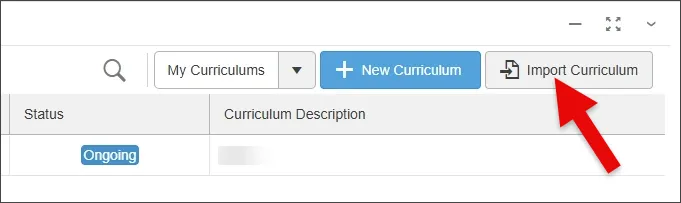
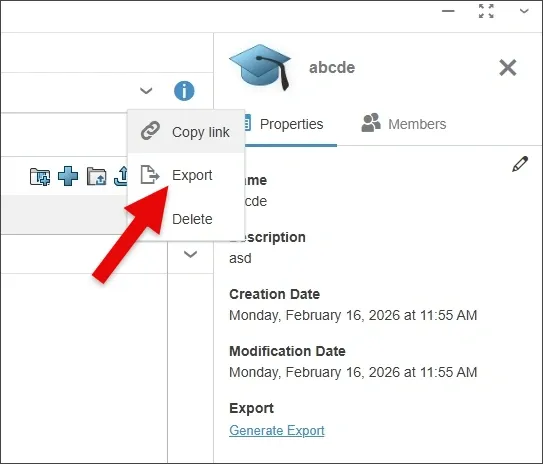
- Teachers can now Export and Import Curriculums to manage them efficiently between various academic cycles and subjects.
- Teachers can now Export and Import Curriculums to manage them efficiently between various academic cycles and subjects.
CATIA
- Flow Driven Generative Design: automatically synchronize concept shapes immediately after flow optimization calculations to save design time.
- Smoothing of Results Improvements: generate smoother, more regular concept shapes with seamless cross-section transitions from flow optimization results.
DELMIA
- New Role available: Robotics Virtual Commissioning analyst (RVN) added to Production Engineer (U2M)
With this new role, you can execute virtual commissioning scenarios on a Manufacturing virtual twin with accurate simulations of Robots, equipment and sensors connected to a PLC program.
Key activities and values:- Create sensors, generate and transform parts for multicycle scenario on any Robotics role
- Enable virtual validation and correction of the PLC Program to accelerate the start of production
- Reduce costly downtime by leveraging the virtual twin to train operators and maintenance workers
- Forecast workcell cycle time by connecting the virtual robot to the RRS II Standard or any proprietary Virtual Robot Controller server
- New learning module available: Additive Manufacturing for Education.
- New Role available: Robotics Virtual Commissioning analyst (RVN) added to Production Engineer (U2M)
ENOVIA
- Project Planner: maximize project success by using effort-driven resource optimization to schedule parallel tasks and balance workload across team members.
When using the "Time & Resource" planning option and Task Efforts are defined, the schedule is optimized by allowing Task Assignees to work on multiple tasks in parallel.
- Project Planner: maximize project success by using effort-driven resource optimization to schedule parallel tasks and balance workload across team members.
SIMULIA Fluid Dynamics/ Physics Results Explorer
- Intuitively create stunning visuals, with enhanced Rendering settings now available for more plot types, like slices and isosurfaces, as well as a new culling option to easily visualize inside a geometry.
Inside FD04: Top Picks
1. Teacher Experience: managing curriculums
Easily export and import curriculums to streamline lesson planning across academic cycles and subjects.
Teachers can now share customizable curriculums with colleagues or adapt existing frameworks for different classes to fit their exact teaching needs.
- Export a Curriculum: quickly download your curriculum as a 1 GB max .zip file (containing .json details and .3dxml content) to archive or transfer it across academic cycles.
- Import a Curriculum: upload a saved .zip file to generate a new curriculum complete with its original contents, roles, assignment templates, and duplicated bookmark structure.
2. Structural Simulation: Easily Customize Rendering Settings
Intuitively create stunning visuals, with enhanced Rendering settings now available for more plot types, like slices and isosurfaces, as well as a new culling option to easily visualize inside a geometry.
July 2026
R2026x FD03 | Pedagogical Highlights for Academic Institutions
Here's a recap of the key new functionalities that will be delivered in the FD03 upgrade (available on July 11th), more details:
Optimized for educational institutions, the FD03 update enhances digital continuity, introduces immersive VR classroom collaboration, and packs robust new cloud simulation capabilities to supercharge student engineering and design projects.
This release also marks a major milestone for core design tracks with the launch of the all-new SOLIDWORKS Design Premium for Education role, bringing advanced, next-generation engineering tools directly to the classroom.
SOLIDWORKS and xDesign
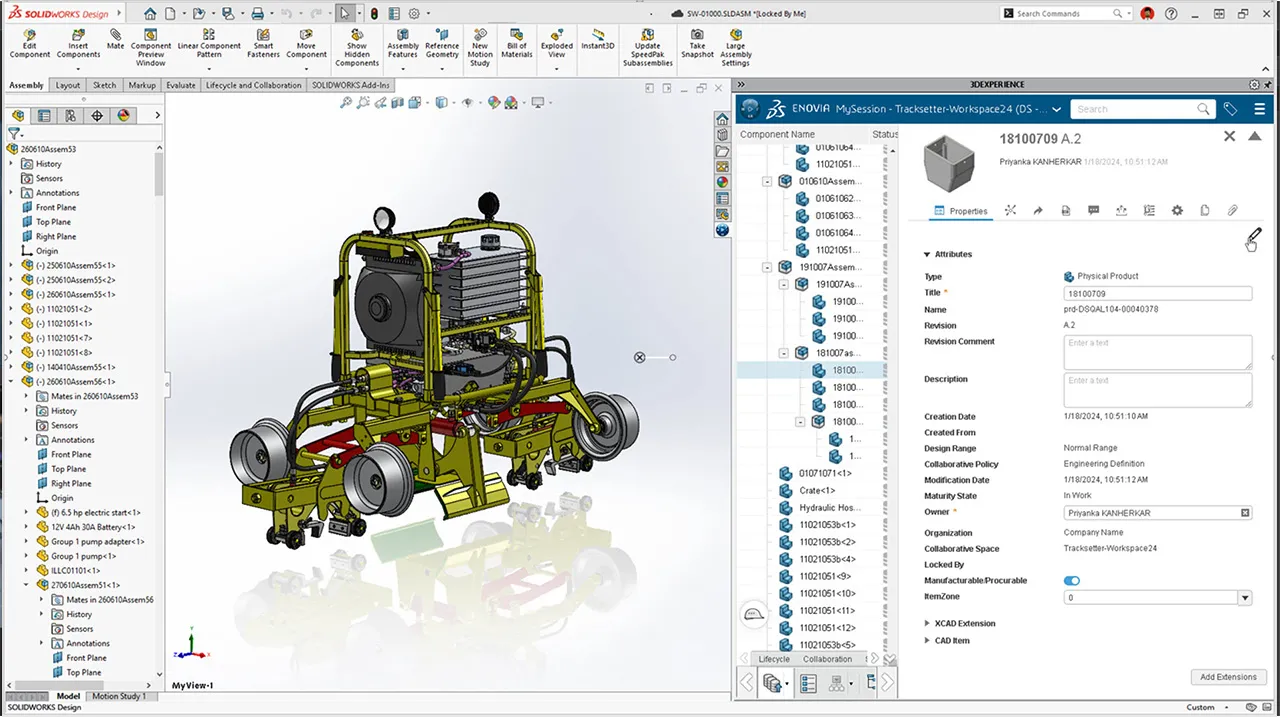
- [NEW ROLE] SOLIDWORKS Design Premium for Education: replacing the legacy role, the new SOLIDWORKS Design Premium for Education role delivers a complete, cloud-connected design-to-manufacturing workflow featuring newly integrated structural simulation, motion analysis, and automated NC code generation.
- Cloud Modeling with automated Part Families in xDesign for design efficiency: students can eliminate redundant modeling by using a single generic template and a Design table to generate multiple component variations.
Collaboration and Platform Features
- 3DSWYM Knowledge Base: standardized learning templates bring consistency to student communities, allowing educators to enforce unified formats across posts, ideas, and wikis for sharper collaborative project tracking.
- 3DEXPERIENCE Dashboard: Frictionless app switching improves workflow agility by logging the six most recently used web apps for immediate access and allowing users to drag-and-drop active apps directly onto any dashboard tab layout [feature to be activated in your dashboard].
- ENOVIA simplified Project Management: simplified project tracking introduces clean hierarchical breadcrumbs in the identity card and native task-level milestone management to give student teams sharp, intuitive visibility over complex assignment deadlines.
CATIA and Immersive Design
- CATIA Motion Design: Automated Design Reviews : automated clash reporting speeds up digital mockup reviews by allowing students to instantly generate presentation slides directly from a Motion Interference Report to eliminate manual checks.
- Creative Design - Box Deformer: advanced box deforming empowers students to execute complex parametric sculpting, morphological studies, and aerodynamic shape morphing with precision, even within a VR setup.
- Enhanced Sense Computing - Immersive Collaboration (ICE Role): Immersive multi-user VR classrooms enable remote students to explore the same 3D workspace together in real time via the Unified XR Command, complete with custom avatar tags, leader crown icons, and automated personal space boundaries.
SIMULIA and Cloud Simulation
- Simulation Data Management (SDM): advanced multi-product simulation branching streamlines data control by leveraging broad, automated renaming functionalities on simulation objects within the Collaborative Lifecycle application.
- Structural Simulation: Physics Results Explorer: hotspot detection via local min/max analytics allows students to quickly flag local stress peaks or valleys in the Physics Results Explorer and add instant annotations to justify structural design improvements.
- Fluid Scenario Setup (CFD): streamlined scenario setups drastically reduce onboarding time through smart domain spatial defaults, accelerated post-processing history metrics, and transient multiphase flow seeding from coarse initialization states to slash simulation runtimes.
3DEXCITE Virtual Experiences
- Creative Experience: Quick-Start Templates: ready-to-use sandbox templates provide pre-loaded sample experiences in the Welcome Panel to give new students an instant interactive starting point and offer educators a fast setup for live classroom demos.
Inside FD03: Top Picks
1. NEW ROLE: SOLIDWORKS Design Premium for Education
Empower your students with industry-leading 3D design tools used by engineers worldwide. From concept to simulation and manufacturing, SOLIDWORKS Design Premium on the 3DEXPERIENCE platform gives students a complete, real-world design and engineering workflow - all in one environment. Key features:
- Core Engineering Skills: Master 3D mechanical part and assembly modeling, detailed 2D manufacturing drawings, and integrated routing (piping, tubing, electrical wiring).
- Mechatronics Integration: Seamlessly import and sync PCB board geometry with mechanical designs.
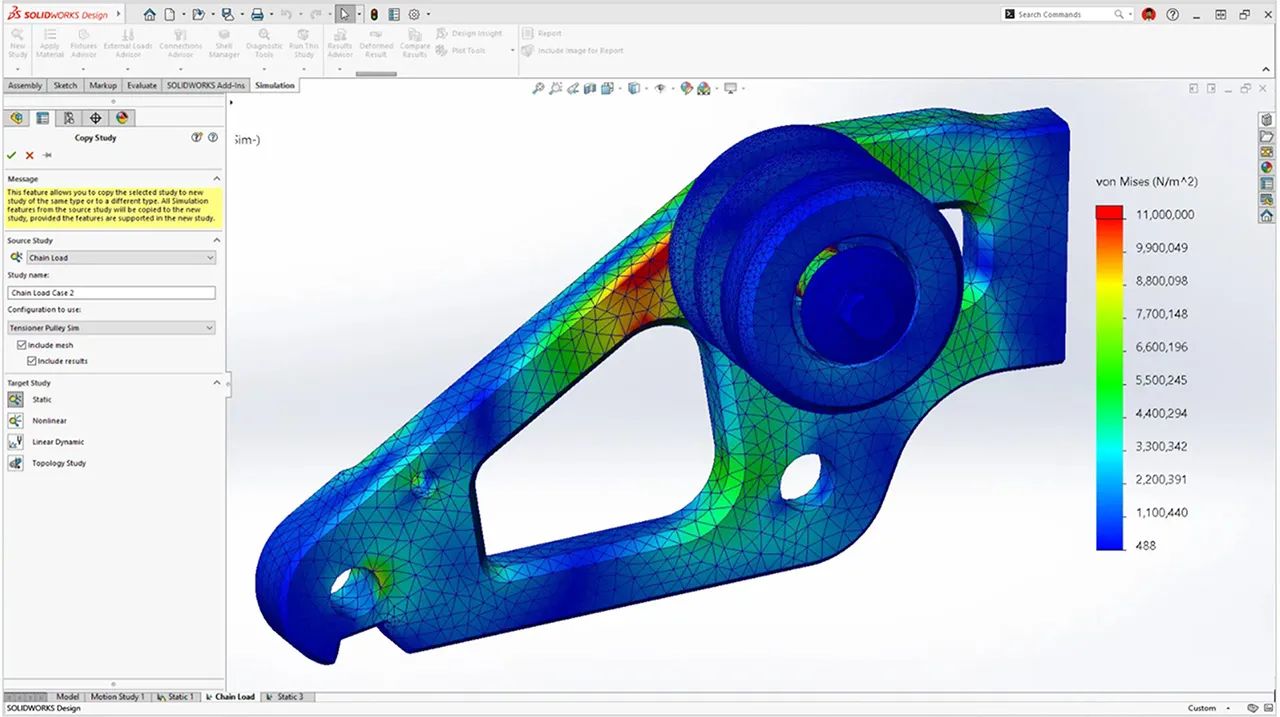
- 🆕 Built-In Structural Simulation: Students can validate structural designs using linear static simulations, analyzing stresses, deflections, and Factor of Safety (FOS).
- 🆕 Kinematic Motion: Simulate true-to-life mechanism motion factoring in forces, springs, dampers, and friction.
- 🆕 Design to Manufacturing: Close the production loop with automated NC code generation for CNC machining.
2. Creative Design Experience: Box Deformer
Advanced Ergonomics & Box Deformer Sculpting: the new Box Deformer constraint allows rapid parametric sculpting and complex shape morphing—fully compatible with VR hardware and ideal for fluid aerodynamic modifications or industrial design styling.
3. Structural Simulation: Physics Results Explorer
Hotspot Identification: easily detect localized stress and strain concentrations with new Local Min/Max capability in the Physics Results Explorer.
This feature highlights local peak and valley data values, enabling students to conduct more robust analyses of their structural simulations. With these insights, they can propose more effective design improvements.
April 2026
R2026x FD02 | Pedagogical Highlights for Academic Institutions
Here's a recap of the key new functionalities delivered in the FD02 upgrade (available on Apr.27th), more details below:
The FD02 release brings a wave of enhancements to the 3DEXPERIENCE platform, focusing on admin control for educators, advanced design flexibility, and streamlined simulation workflows.
Teacher Experience
- Teacher Experience Admin mode: teachers can now directly manage student access, including removing students from classes and archiving/deleting their content (available for pending or unlicensed users).
- Assignment Flexibility: easily add new students to existing, ongoing assignments in one click.
- Improved User Experience: to view share status on assignment deliveries.
CATIA Modeling Apps evolutions
- Motion Design enhanced Design Validation: increase setup flexibility and efficiency by defining contact and clearance probes directly on products while storing occurrence assessments for streamlined violation reporting.
- Assembly Design productivity: create Symmetry for multiple parts simultaneously.
+ Generate complex patterns directly from Sketches.
+ Precise Movement: engineering connections now respect existing assembly constraints to prevent update errors. - Lattice Design: unleash complex geometry with Custom TPMS Lattice using user-defined equations and Asymmetric Offset for high-performance heat exchanger design.
- Multi-Body Sheet Metal: increase teaching flexibility by assigning independent parameters to individual bodies within a single part, simplifying the creation of complex, multi-material designs.
- Visual Scripting: Reworked I/O panels and new JSON/Web Request nodes to automate CAD workflows using live online data.
SOLIDWORKS
- Material Data mapping: automate SOLIDWORKS to 3DEXPERIENCE material mapping to ensure simulation accuracy, data integrity, and full traceability across the platform.
- Visualize Volume Rendering: create immersive, high-impact visuals by adding atmospheric effects like fog, dust, and light rays to your scenes.
- Visual Excellence: support for DSPBR appearances in GLB/GLTF exports for a better visual consistency.
- xDesign Enhancements: streamline data management with direct Content Explorer integration for centralized file organization, and elevate design detail by importing custom fonts (.ttf or .otf) for specialized sketch text and markings.
SIMULIA enhancements
- Structural Model Creation: automated Meshing with new default fillet rules and splitting options significantly improve mesh flow in complex geometries like Body-in-White (BIW).
+ Modeling Efficiency: faster setup via persistent settings/templates for connections and a new rotate-around-hole tool for manual 2D mesh edits.
+ Mechanical Fidelity: More accurate simulations with analytical threaded bolt definitions in contact controls. - Fluid Scenario: easily optimize thermal performance with streamlined electronics cooling (e-cooling) workflows for modeling PCBs, fans, and heat pipes with simplified thermal resistance definitions..
- Results Explorer & Learning: Enhanced visualization through angular transformations (cylindrical/spherical) and new industrial tutorials for E-Cooling and Ship Propeller Cavitation.
- Structural Model Creation: automated Meshing with new default fillet rules and splitting options significantly improve mesh flow in complex geometries like Body-in-White (BIW).
DELMIA enhancement
- Boost realism by applying a Manufacturing Ambience, bringing your robots to life in their natural industrial habitat.
- Boost realism by applying a Manufacturing Ambience, bringing your robots to life in their natural industrial habitat.
3DEXPERIENCE platform Governance & Immersive Collaboration
- Platform Governance: admins can now enforce global notification settings to ensure students stay updated on deadlines through precise command over essential communications for the notification center and email notifications of an app.
- Safety Net for students: a new "Reset Preferences" option allows users (or teachers helping students) to instantly restore default settings.
- Visualization Synchronization: in co-review sessions, observers now automatically sync to the leader’s ambience, camera, and view mode for a truly shared "Virtual Twin" experience, allowing a better common understanding of a model for students & teachers.
- XR Updates: redesigned laser pointer and UI for a more intuitive Extended Reality navigation.
Inside FD02: Top Picks
1. CATIA MOTION DESIGN IMPROVEMENTS
Design with Precision: define 3D contacts, interferences, and distance probes directly on your products for ultimate model flexibility.
Work Smarter: boost efficiency by instantly creating and storing assessments for clearance and interference violation reports.
2. ASSEMBLY DESIGN PRODUCTIVITY
Assembly Symmetry: accelerate complex modeling during lessons by mirroring multiple components in a single step, maximizing instructional time for design analysis.
3. SIMULIA STRUCTURAL MODEL CREATION
Save time and ensure consistency with connection settings that now persist across sessions. By automatically retaining your last-used templates and parameters, this update eliminates repetitive manual configuration and accelerates your overall meshing workflow.
4. COLLABORATING USING VISUALIZATION SYNCHRONIZATION
In the 3DEXPERIENCE Platform Desktop interface, upon joining a co-review session, the observer’s interface automatically loads not only the leader’s model but also the same predefined ambience, view modes, and set of cameras as the leader.
This sync allows a better classroom synergy with a unified Virtual Twin view and a better common understanding.
February 2026
R2026x FD01 | Pedagogical Highlights for Academic Institutions
Here's a recap of the key new functionalities delivered in the FD01 upgrade (available on Feb.9th), more details below:
This update delivers powerful enhancements that make teaching and learning faster, smarter, and more engaging. From streamlined classroom management to intelligent modeling in CATIA, enhanced DELMIA and SIMULIA capabilities, and greater flexibility in SOLIDWORKS, every improvement is designed to save time and elevate the student learning experience.
3DEXPERIENCE platform related enhancements
- Welcome Page & What's New related to your Academic roles on the 3DEXPERIENCE desktop client.
A new interface that provides you with quick access to recent work, content creation, bookmarks, updates, and useful resources. - Teacher Experience UI improvement: Assignment Templates and Roles tabs are now available in the curriculums section, ready to teach right away. Creating a class from a curriculum automatically includes the defined roles and generates all related assignments for that class.
- Welcome Page & What's New related to your Academic roles on the 3DEXPERIENCE desktop client.
CATIA Modeling Apps evolutions
- NEW APPS powered with AI: Part Design Plus and Generative Shape Design Plus
- Visualizing Clashes and Clearance Situations Using Interference Probes.
- Data Migration Enhancement: migrate additional excitations and probes from Mechanical Systems Experience into motion design simulations.
- New Enterprise Knowledge Language (EKL) Editor that features performances improvement & intelligent code completion, which provides context-aware suggestions.
CATIA Systems Engineering (MBSE)
- New role: "Collaborative Designer for CATIA Magic"
- 3DPlay available for Systems Traceability Analyst for a quick synchronized view of physical components.
- Mechatronics Systems Designer: use rules to display different graphical representations of ports and pins across sheets, improving clarity in electrical system designs.
- New CATIA Magic certification "Model Execution with Magic Model Analyst - CATIA Associate" available.
DELMIA enhancements
- Multi-Axis Machining: improve 5-axis roughing with better feed rate control and more efficient material removal on complex shapes.
- Robot Simulation: automatically find the best robot configurations to reduce setup time and manual adjustments.
- Factory Flow Simulation: manage uni- or bi-directional conveyors by time or part flow to optimize space and throughput.
- Ergonomic Workplace Design: use region-specific manikins to design workstations adapted to local populations.
SIMULIA enhancements
- Physics Results Explorer using Scenes to capture results: create, view, switch, rename, and manage your scenes directly from the Scenes panel, with clear visual indicators of what’s currently displayed.
- Optimization Process Composer: new Simulation Adapter for Structural, Fluid, Electromagnetics and Plastics to increase efficiency + Train machine learning models on all output variables to predict the impact of design changes faster and with less computational effort.
 Key Highlight for Students
- SOLIDWORKS xDesign update: your homepage just got smarter.
The interface has been improved again! You can now see your courses and assignments instantly from your homepage. Track what’s to do, in progress, or overdue, check due dates at a glance, and open assignments quickly without breaking your flow.
Inside FD01: Top Picks
1. NEW CATIA "PLUS" APPS, POWERED WITH AI
 Part Design Plus
Part Design Plus is designed to create precise 3D mechanical shapes with an intuitive and flexible user interface, from sketching in an assembly context to iterative detailed design.
Feature-based design with the flexibility of Boolean modeling, enabling a highly productive and intuitive workflow.
 Generative Shape Design Plus
Generative Shape Design Plus is an enhanced version of Generative Shape Design allowing you to quickly model both simple and complex shapes using wireframe and surface features. It provides a large set of tools for creating and editing shape designs.
Included with new commands: "Generative Shape Develop" & "Generative Shape Morphing".
COMMON AI Augmented features 
- MODULES FEATURE: access to the modular technology
Design smarter with modular units that let you explore ideas faster, adapt instantly, and build robust, future-ready models from concept to creation.
- Boosted with COMMAND INTELLIGENCE
Design faster and smarter as AI-powered Command Intelligence suggests the best tools for every step of your model.
- Included New NAVIGATION BAR
Navigate and explore your 3D models effortlessly with instant access to all viewing and navigation tools in one intuitive bar, dynamically adapting to the apps you’re using.
2. VISUALIZING CLASHES AND CLEARANCE SITUATIONS USING INTERFERENCE PROBES
When using interference probes, you can visualize in the 3D area the volume mesh during clashes, and the minimal distances for clearance situations.
Benefits: You can see exactly where the clash and clearance situations occur, and which areas of the bodies and model are impacted.
3. NEW ROLE: COLLABORATIVE DESIGNER FOR CATIA MAGIC
Equip your students with the new CATIA Magic role (reach out to your education partner for details and pricing) and connect CATIA Magic with the 3DEXPERIENCE platform to:
- Save UML, SysML and UAF models in the 3DEXPERIENCE Platform.
- Provide 3DEXPERIENCE Platform Services to these models (change management, collaborative modeling management, secured data access and control).
- Support digital thread from mission to physical by enabling collaboration between systems architects and discipline design to accelerate product delivery).
4. CATIA MAGIC MODEL ANALYST - ASSOCIATE CERTIFICATION
Discover the brand new Catia magic certification: "Model Execution with Magic Model Analyst - CATIA Associate"
A new opportunity to let your students pass certification thanks to the certification credits included natively in your subscription. At any time, students can take exams using 3D Learn.
5. PHYSICS RESULTS EXPLORER - SCENES
Physics Results Explorer using Scenes to capture results.
Create, view, switch, rename, and manage your scenes directly from the Scenes panel. The panel reports the synchronization state of what displays in the viewer. It uses clear visual indicators to differentiate which scenes are currently shown in the viewer and which are not.
November 2025
R2026x GA | Pedagogical Highlights for Academic Institutions
Here's a recap of the key new functionalities delivered in the upgrade, more details below.
Education-related enhancements
- A new “3D Learn” application has been added, allowing users to learn directly within the platform.
Working and learning in the same environment has never been easier, giving students seamless access to the right learning content. - Certification now included natively in your subscription: boost your students employability by certifying them with the right Associate exams, without the extra hassle.
At any time, students can take exams using 3D Learn (4 credits are delivered per user, enabling up to 2 certifications). - Teacher Experience UI enhancements: a revamped interface for clearer insights and faster interactions with your curriculum and classrooms.
- A new “3D Learn” application has been added, allowing users to learn directly within the platform.
CATIA-related Apps and evolutions
- Command Intelligence to accelerate students’ learning curve with AI support.
- 3D Tolerancing & Annotation: automates 2D drawings from the 3D virtual twin with AI support.
- Enhanced human centric user experience with the motion designer improvements that includes a better motion simulation.
SOLIDWORKS xDesign-related enhancements
- Generative Picture to Mechanism: AI converts sketches to mechanisms
- Create Design configurations with Part Tables: students can explore real engineering scenarios, compare variations, and manage parameters, all in a single web-based environment.
3DEXCITE enhancements
- Build interactive labels to design seamless learning scenarios in digital twins.
- Easily publish simulation results into immersive experiences, ready for your students on Apple Vision Pro.
- New webinar for Educators on Thursday, November 20: discover the AI Capabilities for CATIA & DELMIA!
Webinar | AI-Powered CATIA and DELMIA for Educators
The future of engineering is powered by AI. Watch the webinar replay and equip your students with the skills and knowledge to thrive in the new era of digital design and manufacturing.
Inside R2026x GA: Top Picks
1. CATIA COMMAND INTELLIGENCE
Accelerate students’ learning curve with AI support.
AI prediction will guide them through complex operations by suggesting the most relevant commands with Command Prediction, streamlining design steps with Smart Command Completion, enabling intuitive choices with Smart Selection (either in 3D or in the tree), and much more!
2. 3D TOLERANCING & ANNOTATION
Teach dimensioning and tolerancing directly in 3D and help your students embrace the industry shift.
While many still teach 2D drafting, industry now defines and communicates tolerances directly in 3D. With AI-driven 3D Tolerancing, your models carry all the information with embed annotations automatically and the system generates 2D drawings instantly on the fly, helping your students learn the industry’s model-based approach.
3. HUMAN ANIMATION ENHANCEMENTS
Bring dynamics and realism to your lessons with a more intuitive, human-centric interface and improved motion simulation. The latest Motion Designer empowers students to visualize, test, and refine how mechanisms truly move, helping them connect theory with real-world engineering behavior.
A powerful way to teach kinematics, design validation, and system thinking.
4. SOLIDWORKS GENERATIVE PICTURE TO MECHANISM
Bring creativity to life in seconds. With AI-powered image-to-mechanism, SOLIDWORKS xDesign transforms a simple sketch or photo into a functional 3D mechanism automatically.
It’s the perfect way to teach design thinking, mechanical principles and AI-assisted innovation helping students grasp how ideas move, connect, and come alive through intelligent automation.
5. 3DEXCITE INTERACTIVE LABELS
3DEXCITE now integrates Interactive labels for creating seamless learning scenarios in digital twins, empowering educators to build intuitive lessons, streamline student guidance, and enhance skill mastery.
6. 3DEXCITE IMMERSIVE SIMULATION
Easily publish simulation results into immersive experiences your students can explore on Apple Vision Pro, bringing complex engineering concepts to life through hands-on learning.
DISCOVER OUR READY-TO-USE EDUCATION EXPERIENCES
Jump into the 3DEXPERIENCE with our brand new packages for Education