T64-2022 BIOVIA® Foundation Hub 2022 SP1
Task Action buttons takes time to load in Task Plan section
Program
BIOVIA® Foundation Hub
Operating Systems
Operating Systems supported by BIOVIA® Foundation Hub
See the System Requirements documents for details
Background
This technical note is to inform all BIOVIA Foundation Hub (v2022 SP1) customers regarding a known issue where task action buttons takes more time (10–15 seconds) to load under a task plan section.
This is affecting to all BIOVIA Foundation Hub customers with Oracle 19c Database release 7 or higher where the application SQL performance degrade due to a known Oracle bug#33649782 where database Optimizer feature impact query execution time when table access FULL FOR “OR” SQL queries.
Workaround
Oracle suggest changing the Optimizer feature as an workaround like
OPTIMIZER_FEATURES_ENABLE=''12.1.0.2''
or
“_OPTIMIZER_CBQT_OR_EXPANSION”=OFF
To implement this workaround please follow the steps below:
- Take a backup of app-config.groovy file (which can be found in Foundation Hub server install directory for example C:\Program Files\BIOVIA\Foundation\Hub\onf)
- Modify app-config.groovy file to add additional parameters to the datasource properties.
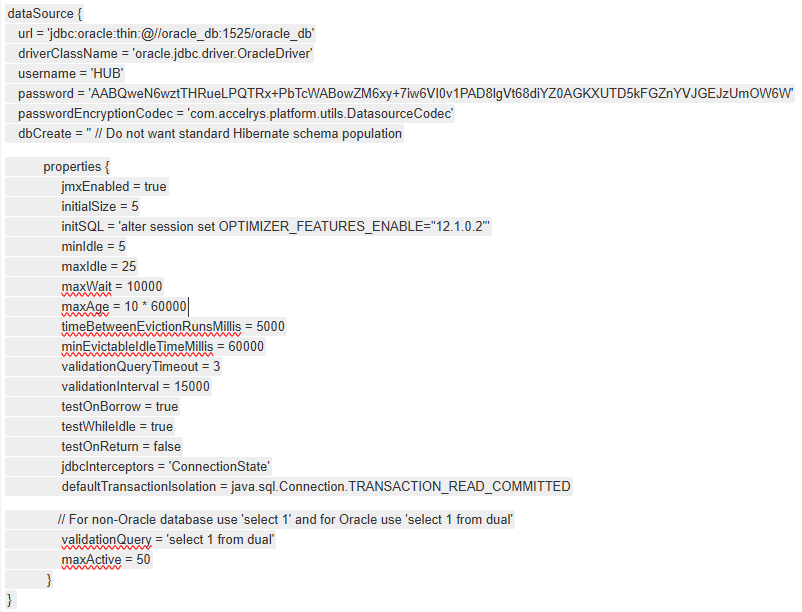
- Restart Foundation Hub Service after the config file change.
- If Foundation Hub is load balanced, please repeat the steps 1-3 each load balanced foundation Hub server.
Solution
BIOVIA R&D team is investigating this issue for a possible solution with DAT-23691.
How to contact BIOVIA Support
If you have any questions, please contact BIOVIA Support.
Need Assistance?
Our support team is here to help you make the most of our software. Whether you have a question, encounter an issue, or need guidance, we've got your back.