T01-2026 BIOVIA® Workbook Vault Application Server: Microsoft Message Queuing defect causes failure in the BIOVIA Workbook workflow stage assignment during experiment creation.
BIOVIA® Workbook Vault Application Server: Microsoft Message Queuing (MSMQ) defect causes failure in the BIOVIA Workbook workflow stage assignment during experiment creation.
Program
BIOVIA® Workbook
Operating Systems
Operating Systems supported by BIOVIA® Workbook Application Server versions 2012, 2012 R2, 2016 and 2019.
See the System Requirements documents for details.
Background
This technical note is intended to inform all BIOVIA Workbook Customers of a Known issue which prevents new experiments from having a Workflow Stage.
Microsoft's December 2025 security update disrupted Message Queuing functionality on Windows Server systems, causing enterprise applications and IIS sites to fail.
The December 2025 security update introduced MSMQ failures on multiple Windows platforms. The problem affected Windows Server 2019 with KB5071544, and Windows Server 2016 with KB5071543 as well as Windows Server 2012 and Windows Server 2012 R2.
While this issue does not impact the creation of workbook experiments, it prevents workflow stages from being assigned to those experiments.
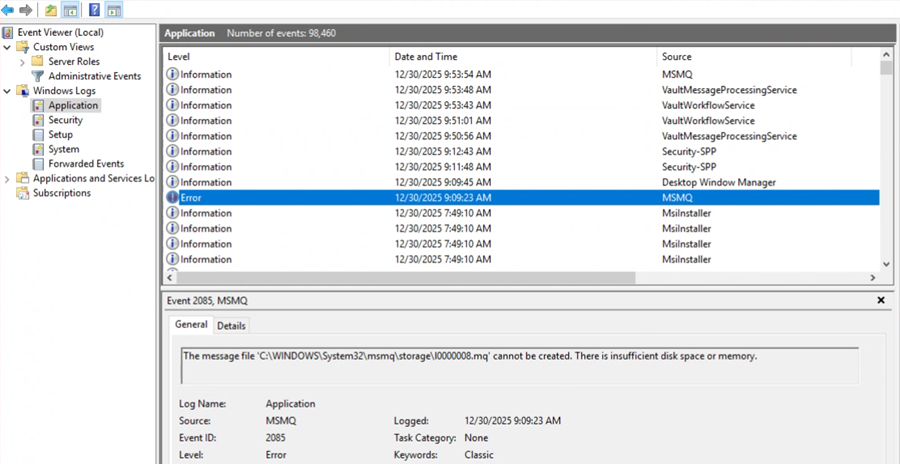
This issue can be confirmed by reviewing MSMQ error entries in the Application section of the Microsoft Event Viewer. For example, below:
“The message file 'C:\windows\System32\msmq\storage\l0000003.mq' cannot be created. There is insufficient disk space or memory.”
Solution
Microsoft released emergency out-of-band updates on December 18, 2025, to fix the MSMQ issues.
For Windows Server 2019 Microsoft released KB5074975 (OS Build 17763.8148). For Windows Server 2016 the company released KB5074974 (OS Build 14393.8692).
The out-of-band updates are only available from the Microsoft Update Catalog and do not appear in Windows Update. Administrators need to download and install updates from the catalog manually. The updates restore the correct NTFS permissions, so that the MSMQ service and application accounts regain the required write access to the storage folder.
Application Administrator needs to reset IIS and restart all vault services after the patch is deployed. Please refer BIOVIA Vault server administration guide to follow application services stop and start order.
Resources
How to contact BIOVIA Support
If you have any questions, please contact BIOVIA Support.
Need Assistance?
Our support team is here to help you make the most of our software. Whether you have a question, encounter an issue, or need guidance, we've got your back.