Search

Please use the search box below or the filters provided to fine-tune the results and discover more about our offers, products, customers, and stories.

There are 17579 results
Get Ready for the Latest Enhancements in the SOLIDWORKS Roles with the R2026x FD02 Release on April 25th!

SOLIDWORKSPortfolioUpdate R2026x FD02 The SOLIDWORKS team is excited to announce the upcoming release of the SOLIDWORKS roles. The R2026x FD02 release, scheduled for Saturday, April 25th, 2026, features significant enhancements that help customers simplify workflows and improve productivity. What's New in SOLIDWORKS - R2026x FD02 (April 25, 2026)To learn more about the enhancements in R2026x F

SOLIDWORKS NEWS & INFO
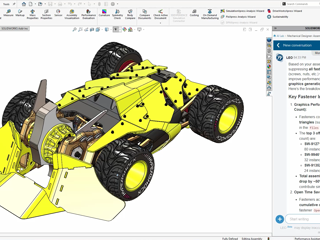
Proud to share that I’ve officially achieved the SOLIDWORKS Expert (CSWE) certification

Reaching this level wasn’t just about passing an exam... it was about the journey—late nights, failed attempts, problem-solving under pressure, and constantly pushing beyond my limits.Every challenge along the way helped me grow not only as a designer, but as an engineer who can think, analyze, and build with confidence.This achievement is not mine alone. Huge appreciation to Ahmed Abdelnaser , SW

3DEXPERIENCE EDU | STUDENTS

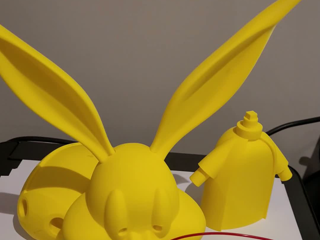
Bugs Bunny Design and 3D Printing

Hello everyone,I had previously created a Bugs Bunny design in xShape for Easter. I started printing this model using a 3D printer. Since the model is over 60 cm tall, I decided to break it down into parts and used SOLIDWORKS for this process. Using the 3D Sketch feature in SOLIDWORKS, I created split lines on the non-planar organic surfaces to divide the model into parts. I’m currently working on

MAKERS | MADE IN 3D

[Academia platform] - Prepare for the update of your 3DEXPERIENCE platform on April 25th, 2026

Dear 3DEXPERIENCE platform users,Please be aware that we will be updating the 3DEXPERIENCE platform to R2026x FD02 on April 25th, 2026 *.Platform ImpactedAcademia 3DEXPERIENCE platformHow it Affects YouDuring this maintenance period there will be downtime on all services following the execution schedule below.Be sure to save your documents on the platform before the beginning of maintenance.Region

3DEXPERIENCE PLATFORM USER'S COMMUNITY

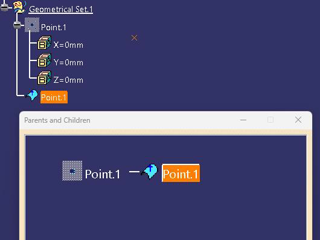
CATIA Trick..

HelloWhile reviewing old macros, I found one that allows me to do things like this... a little trick.

CATIA USER COMMUNITY

[Customers 3DEXPERIENCE platform] - Prepare for the update of your 3DEXPERIENCE platform on April 25th, 2026.

Dear 3DEXPERIENCE platform users,Please be aware that we will be updating the 3DEXPERIENCE platform to R2026x FD02 on April 25th, 2026*.Platform ImpactedPublic Cloud 3DEXPERIENCE platformHow it Affects YouDuring this maintenance period there will be downtime on all services following the execution schedule below.Be sure to save your documents on the platform before the beginning of maintenance.Reg

3DEXPERIENCE PLATFORM USER'S COMMUNITY

Explore the ENOVIA Project Planner Role: User Adoption Journey & Upcoming Webinar

Keep your team aligned and your projects on schedule.The ENOVIA Project Planner role is a cloud-based solution that empowers you to plan, execute, and monitor projects. From task tracking to risk mitigation, this role is your key to collaborative efficiency and data-driven decisions. Start Your Journey TodayDive into the Project Planner Adoption Page to explore:Introduction to the ENOVIA Projec

ENOVIA USER COMMUNITY

Viewing Models Without a license

Hello everyone,Would it be possible to share models with someone who does not have a license to view a model?Specifically, is it possible to download CATIA MCSE 2024x or 2026x, and open it in some sort of "viewer" mode with no license?Thanks for any help in advance

CATIA MBSE CYBER SYSTEMS

Sync'ing to Excel

I am attempting to synch model elements to an .xlsx file. When I specify and read the file into Cameo the mapping options are grayed out, and none of the table columns show up on either side of the mapping window. CSV works fine, but I cannot get the .xlsx file type to work. The excel table is simple text and integer values with the first row as the column header. I've tried this with 22x and 24x.

CATIA MBSE CYBER SYSTEMS

Tomorrow: An ELITE AE Unlocks Hidden SOLIDWORKS Knowledge!

"It's 2026, and you're still learning SOLIDWORKS the old way!"...That's a stance to take, for sure. ...But what about these scorching hot takes?Some of the best SOLIDWORKS knowledge is hiding in documents most users never read.Your next SOLIDWORKS mentor might be AI.You have the engineering wisdom of thousands of support cases, and you aren't using it! https://www.

SOLIDWORKS NEWS & INFO

CATIA at NXT BLD Conference in London, May 13-14, 2026

Dassault Systèmes is proud to announce that we are officially a Platinum Sponsor for NXT BLD, and we’re bringing the future of AEC with us!We’ll be at Booth #3 showcasing how firms can transcend traditional BIM by leveraging the power of the 3DEXPERIENCE platform to create true, integrated digital threads.In an era of rapid transformation, we’re not just talking about tools—we’re talking about AI

CATIA BUILDINGS & INFRASTRUCTURE

A practical G-code learning path (from beginner to industrial level)

Hey everyone,After years working with CNC machining and G-code (and seeing the same mistakes over and over again), I decided to put everything I’ve learned into something practical — not theory-heavy, but actually useful on the shop floor. So I created a complete 5-book path, covering everything from absolute beginner to professional-level programming. This is NOT academic stuff — it's built aroun

ENOVIA USER COMMUNITY

Looking for more?

Check out the links below

Want to join the Workforce of the Future?

Search, find and apply to job opportunities at Dassault Systèmes

Explore our Network of Partners

Our partners extend our solutions by offering complementary products, expertise, and services

Search the Knowledge Base

Dassault Systèmes customers' one stop to get help and support information