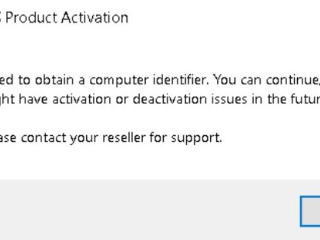
When I try to start the DraftSight stand-alone application, why do I see the error ‘Failed to obtain computer identifier...’?
This error can occur if the 'FlexNet Licensing Service' is not running on the system. See the attached image.For the DraftSight stand-alone license to work correctly, a few services must be running on computer. To resolve this issue, follow these steps: 1. Open the Windows ‘Services’ app.2. Locate the ‘FlexNet Licensing Service 64’ service. 3. Change the ‘Startup type’ to ‘Automatic’.4.
DRAFTSIGHT USER COMMUNITY