How to add the new license file to Pipeline Pilot?
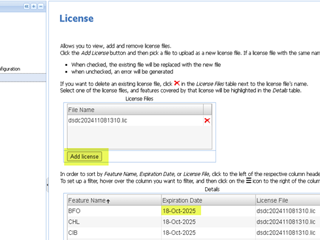
There are 2 ways to add new license file to the PLP. If the license has not expired and able to access the PLP Admin portal, then in the admin portal, navigate to ‘Maintenance’ section and then ‘License’ page.In the License page, click ‘Add License’ and then choose the new license file. Then check the ‘Expiration Date’ which will reflect the new expiration date. Additionally, you can also check
BIOVIA PIPELINE PILOT