[Do not delete] WOC issue

 UX/UI testing brings many advantages to software product development improving build quality into the product 

There are 49603 results
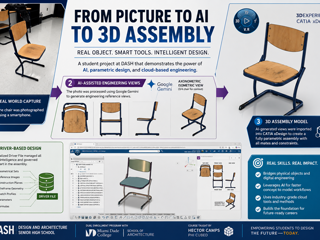
From Picture to AI to 3D Assembly

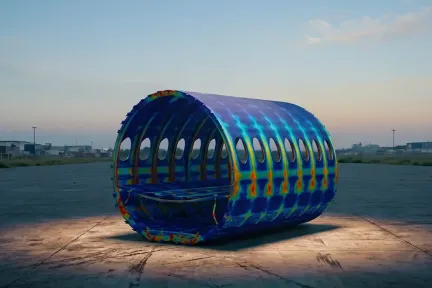
A simple classroom chair became an exercise in digital engineering, artificial intelligence, and parametric design.This project, developed at the Design and Architecture Senior High School (DASH), demonstrates a modern workflow that connects the physical and digital worlds.The Process Reality CaptureA classroom chair was photographed using a smartphone. AI-Assisted InterpretationThe photograph

CATIA USER COMMUNITY
ERP for SOLIDWORKS Users: Stop Chasing Your Quality Data

For many manufacturers, quality data is scattered across spreadsheets, CAD files, and disconnected ERP systems. When a non-conformance occurs, the hunt for the root cause often turns into a time-consuming manual audit. Watch now as we discuss how to eliminate these silos.We cover:The Basics: A fast-paced refresher on CAPA, CAR, and Med Device compliance.The Overlap: How to use your existing tools to drive quality from the model up.The Reality Check: Real-world examples of the integration pitfalls that exist in mixed PLM/ERP environments.The Solution: A look at how DELMIAWorks integrates these processes natively to save time and reduce scrap.Don't let your quality process be an afterthought. See how a unified digital thread can make your next audit a non-event.Watch Now!

Recorded Webinars

Getting Started Guide Update - AI Virtual Companions

We have updated the SOLIDWORKS + 3DEXPERIENCE Getting Started Guide with a new topic covering the new AI Virtual Companions. This new section covers everything you need to get start using AI in SOLIDWORKS Design, from installing the add-in, to accessing the companions in your SOLIDWORKS session. The section also includes several use case examples demonstrating how to utilise the companions to hel

SOLIDWORKS NEWS & INFO

Collision Detection and Risk Assessment for Overhead Crane Movements in DELMIA

Hi Community,I have created a plant layout using DELMIA Plant Layout Design application. Within this layout, There is an overhead crane used for material handling in the workshop. During operations, the crane moves materials from one workstation to another, which involves kinematic movements of the crane itself. In this scenario, is there any DELMIA application that would allow me to simulate the

DELMIA VIRTUAL FACTORY & ROBOTICS

Abaqus script: Graph Extractor Tool

Hi everyone.The last week I was a lot of time extracting the X, Y data from papers graphs. So, to avoid waste more time with this, I just developed this, in my opinion, quite useful plugin for Abaqus. This Plug-in extracts the X, Y data from an image, even if the image is distorted :). You can see a little bit about it in this video.https://youtu.be/OcPJOO1lVD0 If you are interested in the plug-in

SIMULIA COMMUNITY

3DEXPERIENCE CATIA Student: Unable to Save 3D Shape00000055

Hello everyone,I recently purchased the 3DEXPERIENCE CATIA Student Edition and I am facing an issue when trying to save my designs.Whenever I try to save a part, I receive the following error:"You cannot proceed with this operation because you do not have the necessary privileges."Object: 3D Shape00000055I am using:3DEXPERIENCE CATIA Student EditionWindows 11ASUS TUF Gaming A15I would like to know

3DEXPERIENCE EDU | STUDENTS