T08-2026 Notification regarding BIOVIA Foundation Hub
Capture fails to execute task if the Approved recipe with expression mapped to Parameter template with deleted Vocabulary entry.
Program
BIOVIA Foundation Hub
Operating System
This issue affects all operating systems supported by BIOVIA® Foundation Hub.
Please see the System Requirements documents for details.
Description
There is a known issue in BIOVIA Foundation Hub where references to a deleted vocabulary entry causes errors during Task execution. The error in the logs shows as “Cannot get property 'name' on null object”. If you see this error, look for the following the log entry: “CalculatorUtils$_getAvailableVocabularyEntries” .
This is fixed in BIOVIA Foundation Hub 2025 SP1.
Resolution
- In Postman or a similar tool, authenticate with Foundation Hub credentials.
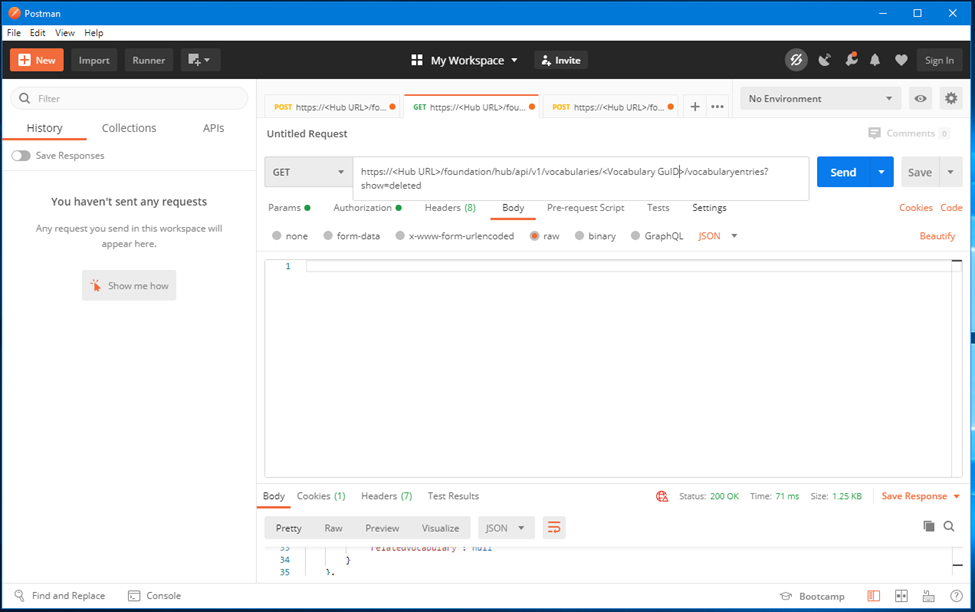
- Make a GET API call against “/foundation/hub/api/v1/vocabularies/<GUID> /vocabularyentries?show=deleted” where the GUID is the GUID for the vocabulary with the deleted vocabulary entry.
- Find the GUID for the deleted vocabulary entry from all the entries in the JSON response.
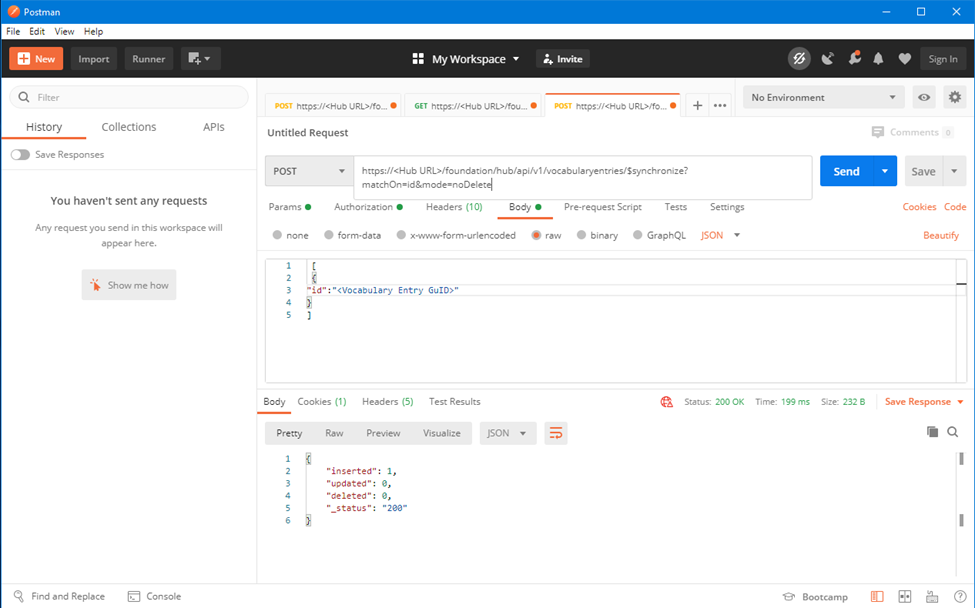
- Set the body of the API call to the deleted Vocabulary Entry GUID.
- Run a POST against “foundation/hub/api/v1/vocabularyentries/$synchronize?matchOn=id&mode=noDelete”.
- The Vocabulary Entry should be restored.
See below for example screenshots:
How to contact BIOVIA Support
If you have any questions, please contact Dassault Systèmes BIOVIA call centers .
Need Assistance?
Our support team is here to help you make the most of our software. Whether you have a question, encounter an issue, or need guidance, we've got your back.