[Do not delete] WOC issue
UX/UI testing brings many advantages to software product development improving build quality into the product
There are 49610 results
Maximizing Mission Readiness
Discover how a global provider of aerospace and defense solutions is supporting its military customers to keep aircraft ready to fly with the 3DEXPERIENCE platform.
Article

Top 10 Features in SOLIDWORKS xDesign in 2025
Top enhancements include a redesigned landing page, exploded views for technical documentation, and the extender reality (XR) visualization technology. ... Continued
Article
SOLIDWORKS® 2025 Quick Start | D&M Education
The book provides a step-by-step project-based learning approach.Desired outcomes and usage competencies are listed for each chapter. The book is divided into three sections with 7 chapters and a bonus eBook on SOLIDWORKS and the 3DEXPERIENCE platform.Chapter 1-5. Explore the SOLIDWORKS User Interface, CommandManager and Document and System properties. Create simple and complex parts and assemblies. Learn and apply proper design intent. Create part configurations, multi-view drawings and a Bill of Material (BOM) with Custom Properties. Develop a mini-Stirling Engine and investigate the proper design intent and constraints. Explore view orientation based on the Front, Top and Right planes. As you sketch, use tools such as the circle, line, centerline, slot and mirror. Modify sketches and sketch planes. Set document properties, identify sketch states and insert geometric relations and dimensions along with applying proper design technique. The CSWA chapter addresses the various categories in the CSWA exam: Drafting Competencies, Basic Part Creation and Modification, Intermediate Part Creation and Modification, Advanced Part Creation and Modification, Assembly Creation, and Modification. The Additive Manufacturing chapter covers a basic understanding between Additive vs. Subtractive manufacturing. Discuss Fused Filament Fabrication (FFF), STereoLithography (SLA) and Selective Laser Sintering (SLS) printer technology. Select suitable filament material. Comprehend 3D printer terminology. Knowledge of preparing, saving and printing a model on a Fused Filament Fabrication 3D printer. Information on the Associate - Additive Manufacturing (CSWA-AM) exam and general topic areas. An eBook for SOLIDWORKS and the 3DEXPERIENCE platform is included.Detailed information is provided to obtain a 3DEXPERIENCE ID (login credentials) to access the platform. Install the Design with SOLIDWORKS App. This provides the ability to upload, store, manage and share files. The platform enables you to collaborate with students and teams on and off campus through a browser. Think of the 3DEXPERIENCE platform simply as a SOLIDWORKS Add-In on your desktop. Experience a single modeling environment. Access the platform within the SOLIDWORKS Task Pane.Nine step-by-step tutorials and models are provided to practice and understand the tools and advantages of SOLIDWORKS and the platform.
Partner Product
AutoVue 3D Professional | Oracle America, Inc
- Make product and asset documents, including 3D / 2D CAD, Graphics, Office and PDF documents readily available to all enterprise users- Optimize decision making through improved global cross-team collaboration- Streamline design reviews and capture a reliable audit trail of all decisions, changes and approvals using built-in digital annotations- Foster innovation by enabling participation and contribution of extended team to the new product development and introduction process- Enhance capital projects and facility operations with 3D walkthrough- Share documents securely without jeopardizing intellectual property
Partner Product
INRETO | mbm Solution
Quality control by manufacturers becomes an important issue in a planned or already existing Quality Service (QS) certification. The creation of a first article report or a Production Part Approval Process (PPAP), or just the drawing of a prototype, can be a time-consuming task. With INRETO (Inspection-Report-Tool), you have the ability to create your drawing fully automated with verification symbols so you can generate a proof sheet with all the necessary information, including tolerance calculations. Within the SOLIDWORKS integrated menu, you can now automatically choose a verification symbol (function test or measurement test) and have the symbol placed in your chosen drawing. Of course, you can also choose to place verification symbols in specific measurements or surface signs, as well as plain marks in specific writings and text blocks. Should you need to erase or add verification symbols retroactively, INRETO xxxx will create new sequential numbering automatically, without duplicating any numbers-an advantage when working with large drawings. Because of the ability of turning verification symbols on or off in your drawing, you eliminate the need for a proof drawing, as you have the choice of turning your finished drawing into a proof drawing and vice versa automatically. The creation of a verification report happens with the push of a button. Measurements are considered with upper and lower tolerance and will be included in the report. The numerical integrity will be identical with the drawing. Reports can be obtained in Microsoft Word as well as Microsoft Excel and can be easily changed and reworked by the user. Quality control by manufacturers becomes an important issue in a planned or already existing QS certification.
Partner Product
myCADtools | VISIATIV
First, there are tools to help you with data recovery. Since data is crucial to the company, you can mass-harmonize property names across all your documents, standardize title blocks, and validate that you have unique part numbers to ensure smooth integration into a PDM or PLM system, for example.Once your data is harmonized, you can, when creating new SOLIDWORKS documents, fill in properties through a property input mask and automatically generate unique part numbers that will name your documents according to the project. This secures data entry and ensures that the data can be used throughout the manufacturing process.You can also duplicate assemblies while keeping your naming conventions and property management rules according to your business standards.The third pillar focuses on automatic drawing creation, using different templates depending on document types and properties. For example, you can generate different drawings depending on whether a part is to be purchased or manufactured, or if it is a welded structure and you want to include overall dimensions for each profile.Next, you'll find specific industry-oriented tools that are particularly useful for optimizing manufacturing if you design sheet metal or welded structures. You can generate cutting plans from an assembly and create sheet metal flat patterns by thickness and material, also allowing 3D export to laser cutting machines that support these formats.Finally, you can easily create a complete manufacturing folder, with BOMs filtered by defined properties, neutral-format 3D files, and PDF drawings. For instance, you can generate a folder for the purchasing department containing only the parts to be bought, and another for production with only the relevant manufacturing parts.From the moment a pillar meets your needs, you're already a winner!
Partner Product
NestingWorks | HCL America Inc.
NESTINGWorks automatically nests layouts of SOLIDWORKS parts and assemblies for production. This 3D nesting application is seamlessly integrated within SOLIDWORKS software, enabling automated nesting of flat or 3D part or assembly models made from sheet stock, including sheet metal, plates, plastics, composites, or wood.
Partner Product
Simulation & Rendering Workstation for SOLIDWORKS | Puget Systems
Simulation and rendering tasks in SOLIDWORKS, can see moderate to large performance gains with a higher core count CPU. We've taken the time to perform testing to determine what hardware runs SOLIDWORKS the best. Based on this testing, we have come up with our own list of recommended hardware for SOLIDWORKS.
Partner Product
Ryzen 9000 CAD Workstation | Top Flight Computers
We believe that fostering and strengthening authentic personal relationships with our customers is the most important part of our business. Above all, we want to help you get exactly what you need to be successful. When you need more than a mass-market pre-built system, trust our technical expertise and dedication to personal service to design and build your bespoke PC.
Partner Product
Curtain MonGuard – a handy tool to display Screen-watermark | Coworkshop Solutions Limited
It enables watermarks with user information showing on screen! It gets user's attention before they capture screen and share the information with other people!Curtain MonGuard screen watermark offers you and your company a convenient and effective way to strengthen your existing data security defences.Curtain MonGuard is shareware. You can download and use the software for free on a trial basis or commercial use. If you want to display [username] and [IP address] in screen watermark and some advanced features, you need to activate the software to paid version.
Partner Product
Project progress with a couple of videos
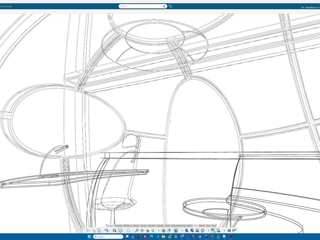
Dear community , Just wanted to share some videos generated onscreen of the ongoing EggPod projects I find using the space-mouse quite intuitive to a point you can orchestrate some basic choreography ( kind of ) I should be really engineering further but couldn`t help generate some self motivational material instead EggPodCATIA Champion
CATIA CREATIVE DESIGN & STYLING - USER COMMUNITY