[Do not delete] WOC issue

 UX/UI testing brings many advantages to software product development improving build quality into the product 

There are 49610 results
SOLIDWORKS Enterprise PDM | Servtronica Technologies Private Limited

Our Enterprise PDM Services offer comprehensive solutions designed to streamline and enhance the management of your product data. We provide end-to-end support throughout the lifecycle of your PDM system, including Project and Change Management, Implementation and Deployment, and Configuration and Administration. Our technical support ensures that your system runs smoothly, while our Development and Programming Services help tailor the platform to your specific needs. We also specialize in Customization, Automation, and Scripting to optimize workflows and improve efficiency. To ensure your team is fully equipped, we offer Training Services and guide you through Process Analysis, Methodologies, and Best Practices to help you maximize the potential of your PDM system.

Partner Product

Chemical Registration: Prevent direct registration or limit access to Read-only.

Chemical Registration Configuration guide says the following on these two topics:Preventing Direct RegistrationTo prevent direct registration by a specific user or group, ensure they are explicitly Denied the Chemical Registration > Register Entities permission.Limiting Access to Read-OnlyTo prevent a user or group from having any registration ability (so that they can only view the home panel of

BIOVIA LABORATORY INFORMATICS

Formulation Design: Limits on the number of recipes and the number of iterations

Formulation Design users might be interested in knowing if there is a limit to the number of recipes that can be added to the Multi-Formula Editor (MFE) and the number of iterations a recipe can have.Our Formulation Design Developer says: "Currently, there is no set limitation on the number of recipes that can be added to the MFE, nor on the number of clones or interactions a recipe can have. The

BIOVIA LABORATORY INFORMATICS

Insight for Excel: Application does not open ChemDraw 23

BIOVIA provided support for ChemDraw 23 only beginning version 2024 SP1 HF1 of Insight for Excel and it will not work with earlier versions. This particular hotfix is available on the download platform under BIOVIA 2024 > BIOVIA 2024 Refresh 1 > BIOVIA 2024 Refresh 1 HF3. Users should install/upgrade to this version before testing with ChemDraw 23.Users are requested to review the technical note "

BIOVIA LABORATORY INFORMATICS

LES: How to test the Instrument connectivity to LES?

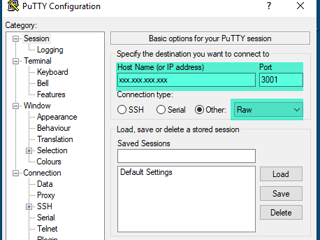
Testing the Instrument connectivity to LES application using Putty app:Pre-Requisites: Install Putty in LES application server.Launch the Putty App.In the Putty Configuration window, add the IP-address of the Instrument, port and select ‘Raw’ for the Connection type.Click Open.Type commands for the corresponding Instrument (eg Balance). Type ‘S’ to get stable weight value or ‘SU’ to get

BIOVIA LABORATORY INFORMATICS

Notebook: Support for ChemDraw 25

Notebook users trying to use ChemDraw 25 to draw chemical structures might find that it is not working as expected, especially when their Notebook version is 2025. Our Developer says that "the user must install ChemDraw_Applications_25.0.2.exe and not ChemDraw_25.0.2.exe in order to get both the 32-bit and 64-bit versions installed which is required for it to work with the Desktop Connector Client

BIOVIA LABORATORY INFORMATICS

Materials Management: Unable to select constituents when creating a material.

Scenario to reproduce this issue:1) Create some substances first.2) Try to create a material of type Experimental, Sourced or Unified3) Go to the Constituency section, click on + sign at the right to provide details for a constituent 4) Enter a substance name in the search box under Title to search for that substance Users might sometimes see a message "No results found" in the search box under T

BIOVIA LABORATORY INFORMATICS

Chemical Registration: Register Directly option is not available.

Chemical Registration users might find that the "Register Directly" option is no longer available and they might see this after an upgrade from a previous version. "RegisterDirectly" is a permission that is either assigned to a user's Chemical Registration group or removed from it; depending upon the need. This permission is still available in Chemical Registration versions 2024 and 2025.Chemical

BIOVIA LABORATORY INFORMATICS

Chemical Registration: My favorite search form is not available as the first item in Insight Search and Browse dropdown

Registration users might sometimes find that their favorite (default) search form is no longer available as the first item in the dropdown in Insight Search & Browse and they have to scroll down in the dropdown to select the desired form. This might see this change after the application upgrade or server migration. This issue can be resolved as follows: If the user is the owner of that search form

BIOVIA LABORATORY INFORMATICS