Product Innovation Customer Keynote - Science in the Age of Experience 2019 - Dassault Systèmes
Youtube
Duration 23min 43s
UX/UI testing brings many advantages to software product development improving build quality into the product
Youtube
Duration 23min 43s
Once upon a time, aftermarket was a sleepy business, a call to...
Article
For most businesses, a fleet keeps their business moving — even during the harsh winter months.
Article
My family gave me my boundless energy and motivation. My mother...passed her...
Article
Scripts can be used to automate certain tasks within DraftSight. It today’s blog, I’ll show you an example of a simple script that creates Layers and assigns Colours to those layers. So, what do you need to get started? Well … Continued
Article
It’s hard to believe during the depths of winter. But at the height of summer, seeking solace from the sun is a crucial part of being able to relax in the balmy weather. Who doesn’t enjoy a leisurely cool, refreshing ... Continued
Article
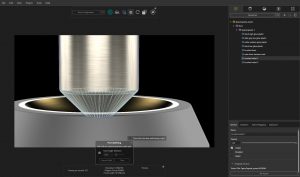
Learn how to use the Part Splitter to easily modify your geometry to assign materials or animate separately. ... Continued
Article
AutomateWorks is an extremely easy-to-use configurator tool, which does not require any programming skills when automating SOLIDWORKS assemblies. The user performs the configuration of any SOLIDWORKS model with the help of Excel.AutomateWorks removes the manual modifying routines and automates the customer-specific tailoring of the product and the output of the documentation. As the final result, there will be in updated state all the 3D models, 2D drawings, bills of materials (BOM)or whatever SOLIDWORKS supported output is asked for. AutomateWorks is a tool for every SOLIDWORKS user who wants to automate the customization of customer-specific products.Use these AutomateWorks features to automate your 3D design: Open and close any SOLIDWORKS document (PDMWorks vault fully supported) Modify model dimensions Change configurations of components Suppress and unsuppress components Suppress and unsuppress features Replace components Modify attribute information in custom properties Save documents to any SOLIDWORKS-supported file format like PDF, DWG, DXF, and eDrawings Run any system command, SOLIDWORKS macro, or external program
Partner Product
Scripts can be used to automate certain tasks within DraftSight. It today’s...
Article