[Do not delete] WOC issue

 UX/UI testing brings many advantages to software product development improving build quality into the product 

There are 49369 results
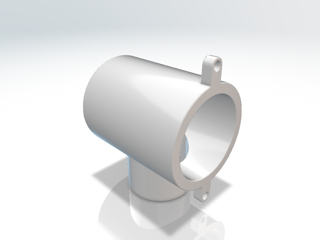
From Generative 3D to a Physical Part

Just wanted to share some great work from the Fablab! This part has a special meaning for our project, so we decided to 3D print it as a little souvenir with the help of the Fablab team.Really happy to see it become something physical — many thanks to @DC, @AA and @SR who helped make it happen!

MAKERS | MADE IN 3D

Logopress Flatten | Logopress

Logopress Flatten for SOLIDWORKS offers finite element analysis together with flattening capabilities, helping the designer and/or estimator quickly and easily determine the theoretical blank of a complex 3D formed part and get stress, strain, thinning and thickening information. Native models as well as imported models can be used. Logopress Flatten is not only for the tool & die industry. Experience has shown that users can quickly, easily, and accurately flatten parts from various applications such as: Automotive type, double-curved surfaces Complex 3D-shaped parts Cloth (car seats, textile industry) Plastics and adhesives Leather (shoes) Canvas and nylon (tents and bags) Inflatable objects Packing and packaging Orthopedic braces (medical industry) Curved plasterboard and swimming pool liners

Partner Product
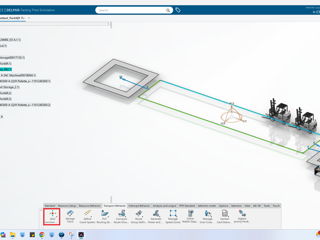
AGV Junction Management

Hi Community,What is the purpose of the AGV Junction Management command, and how is it used in a plant layout ?

DELMIA VIRTUAL FACTORY & ROBOTICS

Artworks Florida Classic Fresnel Lenses, llc

More efficiently and cost-effectively manage and complete a growing number of Fresnel lighthouse lens restoration and reproduction projects while streamlining communication and maintaining access to the company’s valuable legacy data for design reuse.

Customer Story

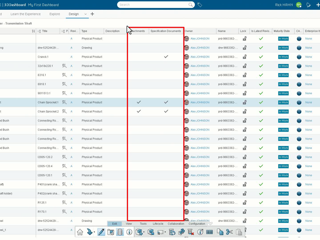
Useful Tip| Access Relations from the Product Tree

Did you know?You can access the Relations to a product directly from a column in the Product Structure Editor or Product Explorer tree? How?Add the Specification and Attachments to the columns of the tree list viewRefresh the screen and you will see the new columns and can now expose the relationships from the info panel by clicking any of the checkmarks that appear in the columns.

ENOVIA USER COMMUNITY