
Selection in ICEM Design Experience 2025X-FD03
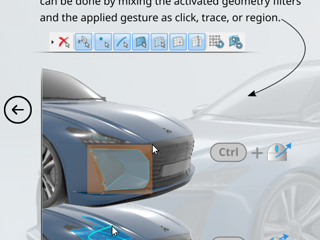
Hi, is it just me but in IDX 2025X-FD03 the selection using Ctrl key is reversed compared to the STEP 4 help. Ctrl + Left mouse button does window drag; Ctrl + Middle mouse button does trace select.Standard CATIA Rotation, Pan and Zoom are working so the buttons aren't reversed. All other menus such as Crown, Alt, Alt+Ctrl are fine too.
CATIA CREATIVE DESIGN & STYLING - USER COMMUNITY


![[WEBINAR Replay] Did you miss our webinar: Advanced usage of DELTAGEN Add Ons? Watch the replay here!](https://blog-assets.3ds.com/uploads/2022/03/catia-webinar-deltagen-advanced-usage-300x167.png)
![[WEBINAR Replay] What‘s new for Engineers on CATIA Core Engineering in R2019x?](https://blog-assets.3ds.com/uploads/2022/03/catia-webinar-catia-core-engineering-300x168.png)

![[Webinar Replay] Class A Surface Refinement with CATIA Icem? Watch it now!](https://blog-assets.3ds.com/uploads/2022/03/webinar-class-a-surface-refinement-with-catia-icem-300x168.png)
![[WEBINAR Replay] Master complexity with CATIA Electrical/Electronic Architecture solutions](https://blog-assets.3ds.com/uploads/2022/03/webinar-master-complexity-with-catia-electrical-electronic-architecture-solutions-300x168.png)
![[WEBINAR Replay] Master complexity with CATIA Electrical/Electronic Architecture solutions](https://blog-assets.3ds.com/uploads/2022/03/catia-webinar-electrical-engineering-systems-architecture-300x168.png)